



 Healthcare Software Development Services
 Healthcare App Development Services

 Real Estate Web Development Services
 Real Estate App Development Company

 E-Commerce App Development Services
 E-Commerce Web Development Services
 Blockchain E-commerce Development Company

 Fintech Software Development
 Fintech App Development Services
 E-Learning App Development Services

 Restaurant App Development Company

 Mobile Game Development Company

 Travel App Development Company

 Automotive Web Design
 AI Traffic Management System

 AI Inventory Management Software

 Logistics App Development Services
 Machine Learning Development
 ChatGPT integration services
 AI Development Company
 AI Integration Services
 Natural Language Processing Company
 Mobile App Development
 IOS App Development
 Android App Development
 Cross-Platform App Development
 Augmented Reality (AR) App Development
 Virtual Reality (VR) App Development
 Web App Development
 SaaS App Development
 Custom Software Development Services
 Flutter
 React Native
 Swift (IOS)
 Kotlin (Android)
 Mean Stack Development
 AngularJS Development
 MongoDB Development
 Nodejs Development
 Database Development
 Ruby on Rails Development
 Expressjs Development
 Full Stack Development
 Web Development Services
 Laravel Development
 LAMP Development
 Custom PHP Development
 .Net Development
 User Experience Design Services
 User Interface Design Services
 Automated Testing
 Manual Testing
 Digital Marketing Services

 Ride-Sharing And Taxi Services
 Food Delivery Services
 Grocery Delivery Services
 Transportation And Logistics
 Car Wash App
 Home Services App
 ERP Development Services
 CMS Development Services
 LMS Development
 CRM Development
 DevOps Development Services
 AI Business Solutions
 AI Cloud Solutions
 AI Chatbot Development
 API Development
 Blockchain Product Development
 Cryptocurrency Wallet Development
 About Talentelgia
 Our Team
 Our Culture

 Healthcare App Development Services
 Real Estate Web Development Services
 E-Commerce App Development Services
 E-Commerce Web Development Services
 Blockchain E-commerce
Development Company
 Fintech App Development Services
 Blockchain Fintech
Development Company
 E-Learning App Development Services
 Restaurant App Development Company
 Mobile Game Development Company
 Travel App Development Company
 AI Traffic Management System
 AI Inventory Management Software
 AI Development Company
 ChatGPT integration services
 AI Integration Services
 Machine Learning Development
 Machine learning consulting services
 Blockchain Development
 Blockchain Software Development
 Smart contract development company
 NFT marketplace development services
 Asset tokenization companies
 DeFi Wallet Development Company
 IOS App Development
 Android App Development
 Cross-Platform App Development
 Augmented Reality (AR) App
Development
 Virtual Reality (VR) App Development
 Web App Development
 Flutter
 React
Native
 Swift
(IOS)
 Kotlin (Android)
 MEAN Stack Development
 AngularJS Development
 MongoDB Development
 Nodejs Development
 Database development services
 Expressjs Development
 Full Stack Development
 Web Development Services
 Laravel Development
 LAMP
Development
 Custom PHP Development
 User Experience Design Services
 User Interface Design Services
 Automated Testing
 Manual
Testing
 About Talentelgia
 Our Team
 Our Culture

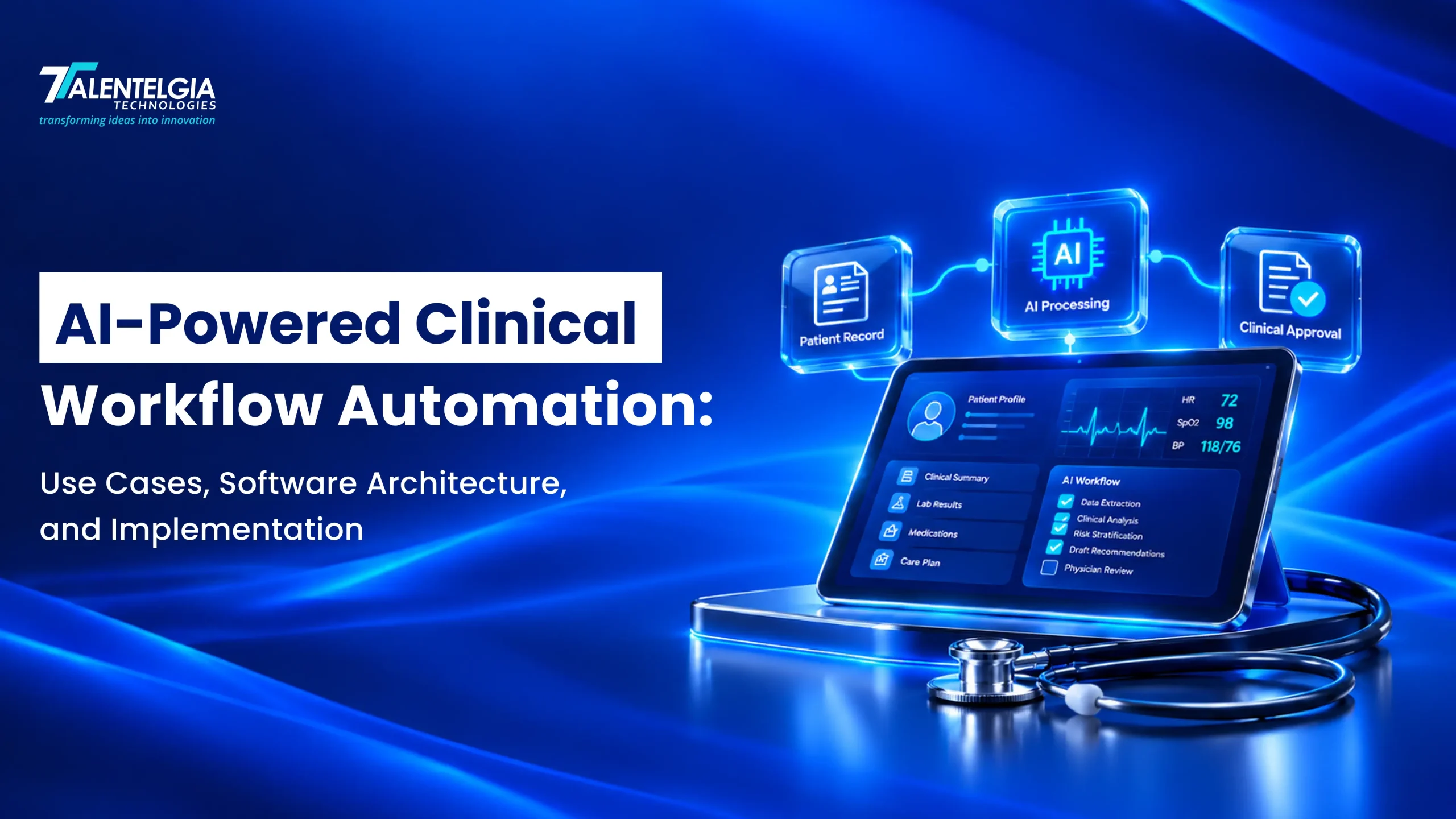
Healthcare teams spend much of their day on work that happens outside the exam room. Staff chase referrals, file documentation, wait on lab results, push through insurance approvals, and send discharge instructions, often across systems that don’t talk to each other. Manual data entry and scattered communication slow every one of those steps. Backlogs build up, and patients feel the delay.
Clinical workflow automation software connects these steps through integrations and applies fixed business rules to routine tasks, such as sending a lab result to the right queue. Where the data gets messy, AI steps in. It reads unstructured clinical notes and drafts recommendations, and a clinician or staff member approves them before anything moves forward.
This guide covers practical use cases, software architecture, and implementation decisions. It also explains the safeguards you need before AI-powered clinical workflows go live.
What Is Clinical Workflow Automation Software?
Clinical workflow automation software coordinates repeatable healthcare tasks, information exchange, approvals, and follow-up activities. It can support clinical operations, administration, revenue cycle management, and patient engagement.
Traditional automation vs. AI-powered automation
| Approach | How it works | Best suited for |
| Rule-based automation | Executes predefined conditions and actions | Appointment reminders, routing, eligibility checks |
| Machine learning | Detects patterns and generates predictions | Risk prioritization, workload forecasting |
| Natural language processing and LLMs | Extracts, classifies, or summarizes unstructured information | Clinical notes, referral letters, document review |
| Hybrid automation | Combines AI interpretation with rules, workflows, and human approval | EHR-connected clinical and administrative processes |
AI does not eliminate the need for deterministic controls. A model might summarize a referral, but a workflow engine should still verify the patient identity, check required fields, enforce permissions, and assign the referral to an authorized team.
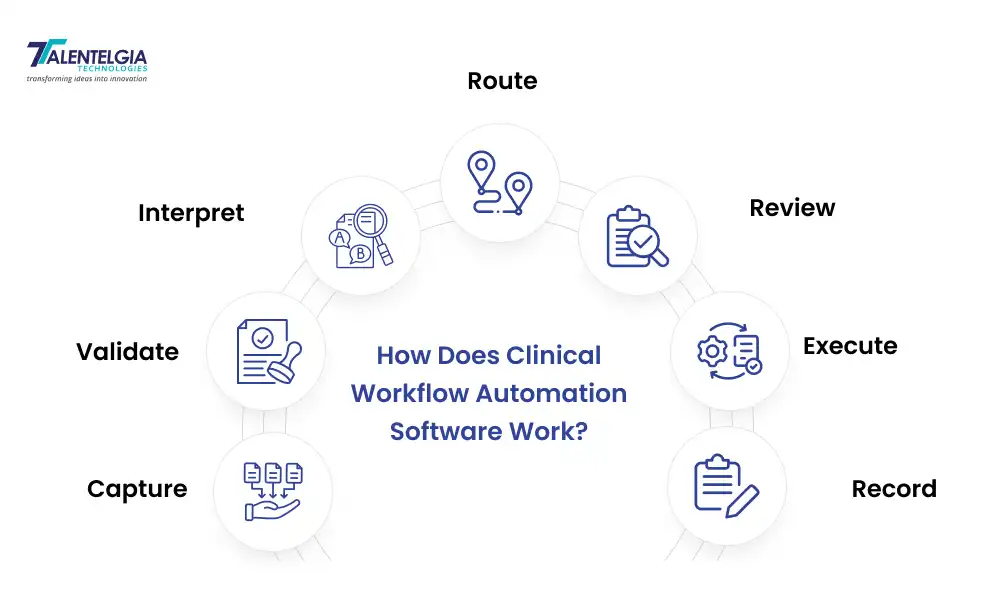
How does the software work?
A typical workflow follows this sequence:
- Capture: Receive information from an EHR, patient portal, document, API, or staff member.
- Validate: Confirm identity, required fields, permissions, and data quality.
- Interpret: Apply rules or AI to classify information, extract fields, or prepare a draft.
- Route: Assign the task to the appropriate team or approval queue.
- Review: Obtain human approval where clinical risk or organizational policy requires it.
- Execute: Perform authorized actions through an approved interface.
- Record: Log the outcome, source information, errors, and any required follow-up.
Key Use Cases of AI Healthcare Automation
The right use cases depend on workload, data availability, clinical risk, and integration readiness.
| Workflow | AI’s role | Essential control |
| Clinical documentation | Draft structured notes | Clinician review and sign-off |
| EHR summarization | Extract and summarize patient history | Verify patient identity and source records |
| Scheduling and referrals | Classify requests and route tasks | Confirm availability and referral requirements |
| Lab results and follow-up | Prioritize work queues and draft notifications | Clinically governed escalation rules |
| Coding and prior authorization | Suggest codes and prepare documentation | Qualified review and payer-specific validation |
| Discharge and population health | Draft instructions, identify care gaps, coordinate outreach | Clinical approval and accountable task ownership |
1. Clinical documentation and medical note generation
Ambient documentation tools process the conversation between clinician and patient and produce a draft note. Speech recognition and natural language processing handle the transcript, and generative AI sorts the content into a structured format: history, assessment, and plan.
The clinician reviews the draft, corrects errors, and signs off on the final record. The software also needs a plan for patient consent, unsupported languages, mid-visit interruptions, and information gaps.
At Stanford Health Care, 48 physicians ran an ambient scribe pilot for three months as part of a quality-improvement study. Their survey responses pointed to lighter task load, less burnout, and better usability. The study covered a single implementation, so the results may not carry over to other settings.
2. EHR data extraction and clinical summarization
AI can pull diagnoses, medications, procedures, lab findings, and key events out of authorized clinical records. Clinicians then walk into an encounter with a summary in hand and skip the manual hunt through multiple documents.
Every summary should keep its source references, dates, and any uncertainty intact. If two medication lists conflict or a result is missing, the system should flag it for a person to resolve. A model should never quietly pick one version and move on.
3. Scheduling, referrals, and care coordination
AI healthcare automation can collect appointment requests, classify referral documents, verify required information, and route tasks to the correct department. It can also send confirmations and reminders.
Rules should validate provider availability, referral criteria, and scheduling constraints. Requests that require clinical judgment or contain incomplete information should move to staff review instead of being processed blindly.
4. Laboratory results and clinical follow-up
Incoming results can be matched to the ordering clinician, placed in work queues, and prioritized using approved rules. The system can track whether a result has been acknowledged and whether required follow-up is complete.
High-priority findings need explicit escalation paths, backup ownership, and acknowledgment tracking. AI should not independently decide that a potentially serious result requires no action.
5. Prior authorization, medical coding, and billing
AI can extract information from clinical notes, suggest billing codes, prepare authorization documents, identify missing evidence, and classify denial reasons. Rule-based checks can validate required fields before submission.
Automating preparation is not the same as guaranteeing approval or eliminating denials. Coding accuracy, payer-specific requirements, documentation sufficiency, and appropriate human review remain important.
6. Discharge management and population health
Automation can assemble draft discharge instructions, assign outstanding discharge tasks, schedule follow-ups, and identify patients overdue for preventive care or recommended testing.
Clinical teams must approve patient-specific instructions and define how concerning follow-up responses reach an accountable professional. Track outreach completion separately from successful patient contact.
| Ready to identify automation opportunities in your clinical workflows? Explore how Talentelgia’s AI development services can help you design AI-powered solutions around your healthcare organization’s operational needs. |
Software Architecture of an AI-Powered Clinical Workflow Automation System
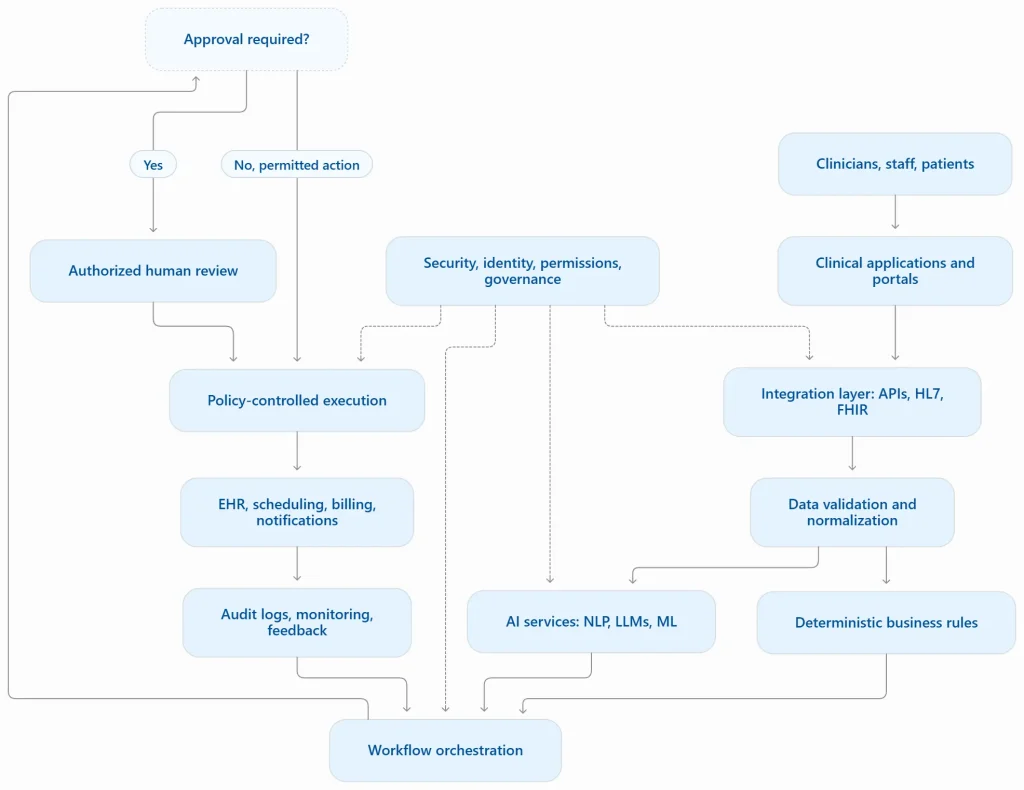
A production system needs more than an AI model connected to an EHR. It needs reliable integration, controlled execution, exception handling, and operational monitoring.
Core architectural components
Clinical application and user interface layer: Gives clinicians and administrative teams access to task queues, drafts, approvals, exceptions, and workflow status.
Healthcare integration layer: Connects EHRs, practice management systems, laboratory platforms, billing systems, and patient portals. Integration methods may include REST APIs, HL7 v2 messaging, FHIR resources, webhooks, and event streams.
FHIR provides standardized structures and interfaces for exchanging healthcare information, but it does not automatically resolve differences in terminology, data quality, permissions, or vendor implementation.
Data ingestion and normalization: Validates incoming records, timestamps, patient identifiers, terminology, and source provenance. Incomplete or conflicting data should remain visible to downstream processes.
AI and machine learning services: Handle speech recognition, document extraction, summarization, classification, and prediction. Retrieval-augmented generation can ground answers in approved clinical documents, but retrieved information and generated outputs still require appropriate validation.
Workflow orchestration and business rules: Manages task states, queues, approvals, timeouts, retries, and exceptions. Idempotency controls help prevent duplicate actions when messages are delivered more than once.
Security, observability, and governance: Enforces authentication, least-privilege authorization, encryption, audit logging, monitoring, incident response, and controlled model updates.
Also Read: HL7 vs FHIR: Which Healthcare Interoperability Standard Should You Choose?
End-to-end example: automated referral processing
Consider a referral arriving as a scanned document.
- The integration service receives the document and links it to a verified patient.
- OCR and AI extract the referring clinician, specialty, reason, and supporting information.
- Validation rules flag missing documents, ambiguous identities, or inconsistent dates.
- The workflow routes complete referrals to the correct queue and incomplete ones to staff.
- An authorized coordinator reviews exceptions and confirms the next action.
- The system records the outcome and tracks the referral until it reaches its defined completion state.
The acceptance criteria should include correct patient matching, extraction accuracy, routing accuracy, duplicate prevention, exception resolution, and complete audit records.
| Building a connected clinical automation system? From integrating existing healthcare platforms to developing custom AI workflows, Talentelgia’s AI integration services can help you plan an implementation that fits your technology ecosystem. |
How to Implement Clinical Process Automation: A Step-by-Step Roadmap
Step 1: Identify the workflow
Map each handoff, delay, manual action, and failure point. Establish baseline processing time, error rates, backlog, and ownership before selecting technology.
Step 2: Assess data and integration readiness
Inventory systems, APIs, data quality, identity matching, permissions, and dependencies. Acceptance criterion: the team can trace required data from its source to its intended destination.
Step 3: Select the appropriate approach
Use deterministic rules for stable processes, machine learning for validated prediction tasks, and LLMs for language-heavy work. Define permitted actions and approval thresholds before development.
Step 4: Develop and integrate
Implement orchestration, validation, access controls, audit trails, retries, and fallback procedures. Test duplicate events, partial failures, invalid data, and unavailable downstream systems.
Step 5: Validate and pilot
Test representative, difficult, and high-risk cases with clinical and operational users. Define acceptance thresholds for accuracy, safety, usability, exception handling, and workflow completion.
Step 6: Deploy, monitor, and optimize
Roll out in stages, monitor real-world performance, collect feedback, investigate incidents, and maintain rollback procedures. Revalidate material changes to models, integrations, or business rules.
Also read: Healthcare Workflow Automation: How AI Can Reduce Administrative Work
Challenges in Implementing AI-Powered Clinical Systems
- Fragmented systems: Legacy applications and inconsistent interfaces can block reliable data exchange. Map dependencies early and test integration using realistic records.
- Inaccurate AI outputs: Models can omit information or generate unsupported details. Use source-grounded outputs, field-level validation, and human review for consequential tasks.
- Privacy and cybersecurity: Excessive permissions, insecure integrations, and unclear vendor data practices increase risk. Apply least privilege, security testing, and documented data-handling controls.
- Workflow disruption: Poorly designed automation can create extra clicks or duplicate work. Involve end users in design and measure the complete workflow, not an isolated task.
- Unclear accountability: Staff need to know who owns exceptions and final decisions. Define responsibility for each task and escalation path.
- Maintenance and model drift: Changes in data, clinical practice, and software can reduce performance. Monitor errors and revalidate when meaningful changes occur.
Security, Compliance, and Patient Safety Considerations
When developing secure clinical applications, healthcare software development services must account for data protection, regulatory requirements, access controls, and patient safety throughout the software development lifecycle.
For U.S. organizations subject to HIPAA, safeguards include appropriate access controls, risk analysis, security management, and suitable business associate arrangements. Compliance is an ongoing organizational responsibility, not a property that can be guaranteed by selecting a particular cloud provider or AI model.
Core controls include:
- Authenticate users and services, restrict access to the minimum necessary, and review permissions regularly.
- Encrypt sensitive information in transit and at rest, protect secrets, and establish retention and deletion policies.
- Log the source of clinical information, AI-generated suggestions, human edits, approvals, and actions taken.
- Require appropriate clinical authorization before consequential actions.
- Validate performance across relevant patient populations and monitor for errors, bias, and drift.
- Assess applicable privacy, medical-device, and clinical software requirements based on intended use and jurisdiction.
The FDA maintains a list of AI-enabled medical devices authorized for marketing in the United States. Whether a particular system falls under medical-device requirements depends on its intended use and functionality.
How to Measure Success
Measure a healthcare automation solution’s outcomes against a baseline using a defined comparison period and consistent workflow definitions.
| Measurement area | Example metrics |
| Efficiency | Processing time, documentation time, backlog |
| Quality | Extraction accuracy, correction rate, record completeness |
| Safety | Missed escalations, severity of errors, unauthorized actions |
| Workflow | Completion rate, rework, exception volume |
| Adoption | Active use, user feedback, override rate |
| Financial | Cost per completed task, maintenance costs, realized savings |
Avoid treating speed as proof of success. A workflow that processes more referrals but increases incorrect routing may be faster without being better. Report both benefits and unintended effects.
How to Choose the Right Healthcare Workflow Software or Custom Solution
Evaluate options using a structured readiness checklist:
- Compatibility with existing EHR and practice management systems
- Documented API and integration capabilities
- Data portability and traceable information sources
- AI evaluation results relevant to the intended use
- Human approval, exception handling, and rollback capabilities
- Privacy safeguards, auditability, and appropriate contractual commitments
- Clear support arrangements, operating costs, and maintenance responsibilities
- A realistic implementation plan and measurable acceptance criteria
Buy existing healthcare workflow software when it already supports the workflow, required integrations, and governance controls.
Build a custom solution when workflows are specialized, multiple systems require orchestration, or existing products cannot meet necessary integration and control requirements.
Choose a hybrid approach when an established platform handles core capabilities but custom integration and workflow logic are needed.
When Should Healthcare Organizations Consider Custom AI Development?
Custom development can be appropriate when an organization needs to coordinate several legacy systems, automate specialized processes, maintain tighter control over data flows, or support workflows that existing AI-powered clinical systems cannot adequately address.
It also allows organizations to design explicit permissions, exception handling, audit trails, and model evaluation around their operational requirements.
However, custom development brings responsibility for integration maintenance, security updates, validation, monitoring, and ongoing support. A configurable existing product may be more economical when it already satisfies the requirements.
Also Read: How to Build a Remote Patient Monitoring Software That Connects Devices, EHRs & Clinicians
Build AI-Powered Clinical Workflow Automation with Talentelgia
Successful clinical automation starts with a clearly defined operational problem, not a decision to introduce AI for its own sake.
Talentelgia can be considered for technology initiatives involving AI-enabled applications, system integration, natural language processing, and custom workflow development. A practical engagement should begin with workflow discovery, integration assessment, risk analysis, and a measurable pilot plan.
| Planning your next clinical workflow automation project?Whether you need an AI documentation assistant, intelligent workflow orchestration, or integration with existing healthcare systems, connect with Talentelgia Technologies to explore custom healthcare software solutions aligned with your clinical and operational goals. |
Frequently Asked Questions
Whether you need an AI documentation assistant, intelligent workflow orchestration, or integration with existing healthcare systems, connect with Talentelgia Technologies to explore custom healthcare software solutions aligned with your clinical and operational goals.
AI interprets information such as clinical notes, referral letters, and patient messages. Workflow rules then validate outputs, route tasks, request approvals, and record authorized actions.
Common applications include clinical documentation, EHR summarization, patient scheduling, referral management, laboratory follow-up, prior authorization, medical coding, discharge coordination, and patient communication.
Integration can use FHIR APIs, HL7 v2 messaging, REST APIs, webhooks, and approved vendor interfaces. The implementation must also address identity matching, permissions, terminology, and data validation.
Typical technologies include cloud infrastructure, API integration, workflow engines, relational databases, NLP, large language models, machine learning, identity management, and observability tools. The appropriate combination depends on the use case.
There is no universal timeline. A standalone administrative workflow may be simpler than an AI system involving multiple EHRs, clinical validation, and complex approvals. Scope, interfaces, data quality, and risk determine the schedule.
Compare baseline and post-deployment processing time, rework, error rates, staffing effort, software costs, maintenance, and realized financial outcomes. Include safety and quality measures rather than relying on time savings alone.
It can be designed to meet applicable requirements, but security and compliance are not automatic. Organizations need appropriate safeguards, risk assessments, access controls, contractual arrangements, validation, and ongoing monitoring.
Buy when an existing product meets the workflow and integration requirements. Build when specialized processes or system constraints demand customization. A hybrid approach can combine established software with custom integrations and orchestration.











 Sales Enquiries:
 Business queries:
 HR:


