



 Healthcare Software Development Services
 Healthcare App Development Services
 Real Estate Web Development Services
 Real Estate App Development Company
 E-Commerce App Development Services
 E-Commerce Web Development Services
 Blockchain E-commerce Development Company
 Fintech Software Development
 Fintech App Development Services
 E-Learning App Development Services
 Restaurant App Development Company
 Mobile Game Development Company
 Travel App Development Company
 Automotive Web Design
 AI Traffic Management System
 AI Inventory Management Software
 Logistics App Development Services
 Machine Learning Development
 ChatGPT integration services
  AI Development Company
  AI Integration Services
  Natural Language Processing Company
 Mobile App Development
  IOS App Development
  Android App Development
  Cross-Platform App Development
  Augmented Reality (AR) App Development
  Virtual Reality (VR) App Development
  Web App Development
  SaaS App Development
 Custom Software Development Services
  Flutter
  React Native
  Swift (IOS)
  Kotlin (Android)
  Mean Stack Development
  AngularJS Development
  MongoDB Development
  Nodejs Development
  Database Development
 Ruby on Rails Development
 Expressjs Development
  Full Stack Development
  Web Development Services
  Laravel Development
  LAMP Development
  Custom PHP Development
  .Net Development
  User Experience Design Services
  User Interface Design Services
  Automated Testing
  Manual Testing
  Digital Marketing Services
 Ride-Sharing And Taxi Services
 Food Delivery Services
 Grocery Delivery Services
 Transportation And Logistics
 Car Wash App
 Home Services App
 ERP Development Services
 CMS Development Services
 LMS Development
 CRM Development
 DevOps Development Services
 AI Business Solutions
 AI Cloud Solutions
 AI Chatbot Development
 API Development
 Blockchain Product Development
 Cryptocurrency Wallet Development
 About Talentelgia
  Our Team
  Our Culture
 Healthcare App Development Services
 Real Estate Web Development Services
 E-Commerce App Development Services
 E-Commerce Web Development Services
 Blockchain E-commerce
Development Company
Blockchain E-commerce
Development Company Fintech App Development Services
 Blockchain Fintech
Development Company
Blockchain Fintech
Development Company E-Learning App Development Services
 Restaurant App Development Company
 Mobile Game Development Company
 Travel App Development Company
 AI Traffic Management System
 AI Inventory Management Software
 AI Development Company
 ChatGPT integration services
 AI Integration Services
 Machine Learning Development
 Machine learning consulting services
 Blockchain Development
 Blockchain Software Development
 Smart contract development company
 NFT marketplace development services
 Asset tokenization companies
 DeFi Wallet Development Company
 IOS App Development
 Android App Development
 Cross-Platform App Development
 Augmented Reality (AR) App
Development
Augmented Reality (AR) App
Development Virtual Reality (VR) App Development
 Web App Development
 Flutter
 React
Native
React
Native Swift
(IOS)
Swift
(IOS) Kotlin (Android)
 MEAN Stack Development
 AngularJS Development
 MongoDB Development
 Nodejs Development
 Database development services
 Expressjs Development
 Full Stack Development
 Web Development Services
 Laravel Development
 LAMP
Development
LAMP
Development Custom PHP Development
 User Experience Design Services
 User Interface Design Services
 Automated Testing
 Manual
Testing
Manual
Testing About Talentelgia
 Our Team
 Our Culture
Software testing used to be the slowest, most manual link in the development chain. That’s no longer true for a growing share of teams. An AI in Software Testing 2026 report found that 61% of organizations already use AI across most of their testing workflows, and nearly one in five are seeing returns over 100% on that spend.
The market numbers support this. Mordor Intelligence puts the global software testing market at $54.44 billion in 2026. The AI-specific slice of that is growing far faster than the category as a whole. The AI test automation market was valued at $8.81 billion in 2025 alone, with projections putting it at $35.96 billion by 2032, a 22.3% annual growth rate.
Behind the numbers, the pressure is practical. Release cycles keep shrinking. Applications keep getting more complex. QA teams are expected to catch more defects without adding headcount to do it, and that’s where AI has started earning its place in the stack, generating test cases, healing scripts when interfaces shift, catching patterns a manual reviewer would likely miss.
This blog looks at what AI testing really involves, how it stacks up against manual QA, and where the results hold up against the hype.
What is AI in Software Testing?
AI in software testing refers to the use of artificial intelligence and machine learning techniques to plan, generate, execute, and maintain software tests, often with minimal human scripting involved. It is a shift away from purely manual or script-based testing toward systems that learn from data and adjust their behavior accordingly.
The distinction matters because traditional test automation, the kind built on Selenium or similar frameworks, still depends on testers writing and maintaining fixed scripts. AI testing changes that relationship. Instead of following a rigid script, the system studies historical test data, application behavior, and past failure patterns to make decisions on its own, deciding which tests to run, predicting where defects are likely to surface, or updating a test case automatically when the UI shifts underneath it.
Why Do We Need AI in Software Testing Automation?
Traditional test automation was never built for the pace modern teams work at. Organizations running traditional frameworks often spend 60% to 80% of their total automation effort just on maintenance, not on writing new tests or catching new bugs. That number alone explains a lot about why teams are looking elsewhere.
A few structural problems keep resurfacing:
- Breakable scripts – Automation testing involves the use of locators such as XPaths and CSS selectors. Even a slight modification of the UI could render many test scripts obsolete.
- Technical skill requirement – An efficient automation testing framework needs engineers well-versed in the tool and the inner workings of the app, something which is difficult to achieve at scale.
- Engineer-first design – Tests get built around technical identifiers rather than how an actual user experiences the product, which creates a gap between what’s tested and what matters.
- Test rot – Once scripts are written, they’re rarely revisited. Outdated or irrelevant tests quietly pile up in the suite.
AI doesn’t eliminate these problems outright, but it addresses the root causes directly, adapting to change instead of breaking under it, and keeping test suites relevant without constant manual rework.
Role of AI in Software Testing
AI does not take the place of the testing process. AI modifies how each part of the testing process is performed by making the testers transition from human script writers to supervisors of a largely self-running system.
In Test Creation
Rather than running the entire suite every single time, AI figures out which tests actually matter for a given code change and skips the rest. Combine that with parallel runs across environments, and test cycles that used to take hours can wrap up in a fraction of the time.
In Execution
AI decides which tests actually need to run for a given code change, cutting down redundant runs and enabling parallel execution across environments to shrink overall test cycle time.
In Maintenance
UI elements move, get renamed, or disappear all the time. Traditional scripts just break when that happens. Self-healing tests, using computer vision and dynamic element detection, adjust on their own instead of throwing an error and waiting for someone to go fix the locator manually.
In Defect Analysis
AI cross-references execution logs and historical failure patterns to flag where bugs are most likely to surface next, and in some cases traces a failure back to its root cause in plain language rather than a raw stack trace.
In Accessibility and Visual Checks
AI digs through execution logs and past failure patterns to flag where the next bug is likely to show up. In some cases, it goes further and traces a failure back to its actual root cause, written out in plain language instead of handing a tester a raw stack trace to decode.
Across all of these, the pattern holds: AI takes over the repetitive, pattern-based decisions, while testers stay in control of strategy, edge-case judgment, and what “good” actually looks like for the product.
Also Read: What are the Levels of Software Testing?
Benefits of AI in Software Testing
Once AI is doing the heavy lifting described above, the payoff shows up in a few measurable places.
Lower Cost, Leaner Teams
When testing and maintenance run largely on their own, teams don’t need to keep hiring just to keep up with a growing test suite. People end up spending their time on work that actually moves the product forward instead.
Broader Test Coverage
Manual testers are only human. Rare scenarios and code paths that barely get touched tend to slip through the cracks simply because nobody’s thinking about them mid-sprint. AI doesn’t have that blind spot, so those edge cases actually get tested.
Faster Releases
Test execution gets smarter too, not just faster. AI prioritizes what needs to run and spreads it across environments in parallel, so CI/CD pipelines speed up without quietly skipping the checks that matter.
Fewer Flaky Tests
This is one of automation’s oldest headaches, and self-healing scripts go straight at it. Instead of a test breaking every time a button moves or a label changes, it adjusts its own locators and logic in the background. Fewer false alarms means teams actually trust what their test suite is telling them.
Better Defect Detection
Rather than waiting for something to go wrong in production, AI looks at historical patterns and flags the areas most likely to cause trouble before testing even starts.
Wider Team Participation
Because tests can be written in plain language now, people without a coding background can contribute too. Testing knowledge stops being locked away with a handful of specialists and spreads across the whole team.
Continuous Improvement
Every test run leaves behind data, and that data doesn’t just sit there. AI models use it to sharpen their predictions and keep pace with how the application itself keeps changing, so the process gets better instead of standing still.
Together, these benefits reframe testing from a bottleneck late in the release cycle into something closer to a continuous, adaptive layer running alongside development itself.
AI Software Testing vs Manual Software Testing
| Aspect | Manual Testing | AI Software Testing |
|---|---|---|
| Speed | Limited by human bandwidth; sequential execution | Runs thousands of tests in parallel |
| Accuracy | Prone to human error and fatigue | Consistent execution, pattern-based defect prediction |
| Test Coverage | Constrained by time and tester capacity | Broader coverage, including rare edge cases |
| Cost | High long-term cost due to labor | Higher upfront cost, lower cost over time |
| Maintenance | Manual script updates after every change | Self-healing scripts adapt automatically |
| Scalability | Requires more testers to scale | Scales via cloud execution with minimal added resources |
| Best suited for | Exploratory, usability, and ad hoc testing | Regression, cross-browser, and high-volume testing |
Speed
- Manual Testing: Limited by how much one person can execute in a day. Slow by nature, but well suited to exploratory and usability work.
- AI Testing: Runs thousands of test cases in parallel and gets faster over time as it learns from prior runs.
Accuracy
- Manual Testing: Susceptible to human error, especially when it comes to repetitive regression tests due to exhaustion.
- AI Testing: Repeats the same test every single time in the same manner and can point out potential problem spots based on previous patterns prior to the test being performed.
Coverage
- Manual Testing: It is unrealistic to cover all edge cases within an application; there isn’t enough time in a sprint.
- AI Testing: Generates and tests many more scenarios in less time and does especially well in finding those code paths which manual testing misses.
Cost
- Manual Testing: Expensive at scale once hiring, training, and hours worked are factored in.
- AI Testing: Higher upfront platform cost, but far lower long-term cost since maintenance and test creation are largely automated. Traditional scripted automation (not AI-driven) often eats 60-80% of total effort on upkeep alone, a cost AI testing directly cuts down.
Maintenance
- Manual Testing: Test cases need to be reviewed and rewritten by hand every time the software changes.
- AI Testing: Self-healing scripts adjust automatically, which is why teams lean toward AI for fast-changing applications.
Scalability
- Manual Testing: Scale by adding more testers; not always quick or easy.
- AI Testing: Scale using cloud-based execution; test on multiple browsers and devices without hiring more staff.
Manual testing hasn’t been completely replaced in places where judgment calls are more important than sheer numbers: exploratory testing, usability testing, and unanticipated behavior still require human intervention. AI testing can verify that a button functions properly; it can’t tell you the button is confusingly placed.
The teams getting the most value here aren’t choosing one over the other. They’re using AI testing for repetitive, high-volume work so manual testers can focus on what actually needs human judgment.
Also Read: Automation Testing Myths & Misconceptions vs. The Real Story
Types of AI in Software Testing
Once you start digging into “AI testing,” you’ll notice it’s not one technique wearing different hats. It’s a handful of genuinely different capabilities, each solving a specific problem in QA. Here’s what you’re actually looking at.
NLP-Based Test Authoring
- AI takes plain English instructions and converts them into working, executable test scripts
- Example: you type “click Register” or “check page contains Confirmation,” and AI builds the script behind it
- No programming knowledge needed, which opens up testing to non-technical team members
AI-Driven Test Data Generation
- Uses pattern recognition to build synthetic datasets that behave like real user data
- Masks or removes sensitive information automatically, so compliance isn’t a manual afterthought
- Can deliberately skew data to force edge cases a human tester likely wouldn’t think to write
AI-Enhanced Performance Testing
- Studies historical performance logs to predict where bottlenecks are likely to show up
- Simulates realistic user behavior under load, instead of one fixed, scripted traffic pattern
- Learns from each test run to refine future load scenarios
AI-Driven Flaky Test Management
- Identifies why a test passes one run and fails the next with no code changes involved
- Analyzes execution history and environment data to isolate the actual root cause
- Recommends a fix or quarantines the test so it stops eroding confidence in the suite
AI-Powered Security Testing
- Scans code and simulates attack scenarios built from real historical breach data
- Adapts to new, previously undocumented threats, unlike static scans that only check known rules
- Flags exploit-prone areas before they reach production
AI-assisted Test Reporting
- Summarizes dense QA dashboards into what actually needs attention
- Flags the highest-risk issues instead of listing every pass/fail line item
- Translates technical results into business-impact language for non-QA stakeholders
Bias and Fairness Testing
- Checks whether an AI-powered application’s outputs treat different demographics fairly
- Applies most directly to hiring tools, lending systems, and healthcare applications
- Evaluates training data, decision logic, and outcomes, not just the final output
Adversarial and Model Drift Testing
- Adversarial testing: feeds an AI model deliberately misleading or distorted input to test robustness
- Drift testing: tracks whether a model’s accuracy quietly degrades as real-world data shifts underneath it
- Both are ongoing checks, not one-time validations, since models keep interacting with new data after deployment
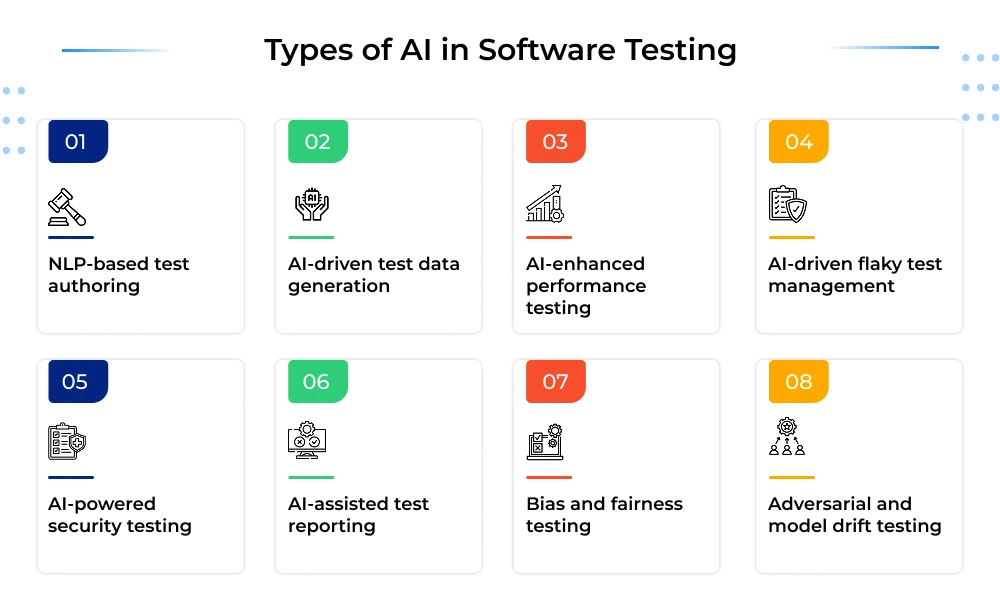
Notice the split running through all of this: some of it is AI testing your software, and some of it is testing the AI itself. That distinction only gets more important as more of what you’re shipping has a model built into it somewhere.
Top AI Software Testing Tools to Know
| Tool | AI Testing Approach | Coverage | Certifications |
|---|---|---|---|
| Applitools | Visual AI compares rendered pages against expected appearance; Autonomous adds AI-driven test creation, execution, and analysis | Web, mobile, PDF documents, Storybook components | ISO 27001, SOC 2 Type II |
| Mabl | Agentic testing platform, AI-native since 2017 | Web, mobile, API, plus AI-application output testing | Google Cloud Partner |
| Katalon | Named AI agents (Requirement Analyzer, Root Cause Analyzer, Flakiness Detector, self-healing) layered on a scripting foundation | Web, mobile, API, desktop | SOC 2 Type II, ISO 27001, CSA STAR Level 1 |
| ACCELQ | Codeless automation with an AI “Autopilot” layer | Web, mobile, API, desktop, mainframe | Forrester Wave Leader, Autonomous Testing |
| Virtuoso QA | Self-healing via Intelligent Object Identification; natural-language authoring | Web (core focus, per pages reviewed) | SOC 2 |
Applitools
- Applitools is built around Visual AI; compares rendered pages against the expected appearance the way a human eye would, not pixel-by-pixel
- Autonomous product adds AI-driven test creation, execution, and analysis on top of the visual engine
- Covers web, mobile, PDF documents, and Storybook components
- Customers cited include Lloyds Bank, Eli Lilly, and LabCorp
- ISO 27001 and SOC 2 Type II certified
Mabl
- Mabl is an agentic testing platform, AI-native since 2017 (not AI added onto an older scripting tool)
- Covers web, mobile, and API testing
- Includes dedicated testing for AI-application outputs (validating dynamic, non-deterministic model responses)
- Used by Mercedes-Benz, LendingClub Bank, and JetBlue
- Google Cloud Partner
Katalon
- Katalon is a broader platform: Studio, TestOps, TestCloud
- Named, task-specific AI agents layered on its scripting foundation — Requirement Analyzer (tickets → test cases), Root Cause Analyzer, Flakiness Detector, self-healing locators
- States customer data is not used to train its AI models
- SOC 2 Type II, ISO 27001, and CSA STAR Level 1 certified
ACCELQ
- Codeless, unified automation across web, mobile, API, and desktop from one console
- ACCELQ LIVE product built specifically for packaged enterprise apps like Salesforce, SAP, Workday, ServiceNow, Oracle, Pega
- Named a Forrester Wave Leader in Autonomous Testing
- Customers listed include Pfizer, Intel, NVIDIA, and Atlassian
Virtuoso QA
- Virtuoso QA is a codeless platform built around natural-language test authoring since 2018
- Intelligent Object Identification parses the DOM to understand elements the way a user sees them, so tests survive selector changes
- Journey Quality Insights explains why a test failed in plain language instead of a raw stack trace
- SOC 2 certified
Top Challenges When Working with AI in Testing
AI testing fixes a lot, but it doesn’t fix everything, and pretending otherwise sets teams up for a rough rollout. Here’s what actually trips people up once AI is running in production QA.
1. Data Privacy Risk
- AI needs realistic data to build meaningful tests, and “realistic” usually means data that looks like actual user activity
- The problem is that real-looking data often is real data, pulled straight from production
- Feed that into an AI testing tool in a regulated industry like healthcare, finance, or e-commerce, and you’re suddenly exposed to compliance risk under frameworks like GDPR or HIPAA
- Teams get around this by masking sensitive fields before the data ever touches the AI tool, or by generating synthetic data that mimics real usage patterns without containing anyone’s actual information
2. Inconsistent Behavior
- Self-healing scripts are supposed to adapt automatically when a UI element changes, but they don’t always adapt correctly
- Sometimes the AI latches onto the wrong element entirely, silently changing what a test is actually checking
- Other times a test that’s passed reliably for weeks suddenly fails with no code change behind it, which makes it hard to trust the result
- This unpredictability is a real problem because the entire value of automation rests on it being repeatable, not a coin flip you have to double-check every time
3. False Confidence from Inaccurate Results
- This is arguably the most dangerous challenge on this list, because it doesn’t announce itself
- A test can technically pass while validating the wrong thing entirely, giving the team a green checkmark that means nothing
- A real bug then walks straight past that test and into production, undetected until a user finds it
- It happens most often when AI-generated tests go live without anyone reviewing whether they actually check the intended business logic
4. The Black-box Problem
- Many AI models, especially deep learning ones, don’t explain their own reasoning
- Ask why a tool flagged a particular bug, predicted a specific failure point, or reshuffled test priorities, and you often won’t get a clear answer
- This matters more than it sounds like it should, because QA leads are the ones who have to justify a go/no-go release decision to stakeholders
- Standing behind a decision you can’t fully explain is a hard position to be in, and it slows down trust in the tool over time
5. Skill Gaps on the Team
- Being excellent at manual testing doesn’t automatically translate into knowing how to tune an AI model, interpret a probabilistic output, or troubleshoot why a prediction went wrong
- This is a genuinely different skill set, closer to data interpretation than traditional QA
- Teams that skip training and expect the tool to be intuitive out of the box usually end up underusing it or misreading its output
- Bridging this gap takes deliberate investment, not just handing someone a new tool and hoping they figure it out
6. Upfront Cost Before the Payoff
- Tooling, integration work, and training all come with real costs, and all of them land early
- The time and cost savings AI testing is known for show up later, once the system is actually running smoothly
- Smaller teams feel this gap the hardest, particularly when leadership expects fast returns on a tool that needs a few cycles to prove itself
- A realistic timeline set at the start avoids the disappointment of expecting immediate ROI that simply isn’t how this works
7. Struggles with Fast-Moving Applications
- AI models are trained on the application as it exists at a given point in time
- If a product ships new features weekly, that training can fall out of date fast, and the model needs retraining just to stay accurate
- This is especially true for apps introducing entirely new user flows or behaviors, not just minor UI tweaks
- Teams dealing with this usually pair AI with manual testing services for the fastest-changing parts of the app, leaning on AI where things are more stable
Closing Note
AI in software testing isn’t a replacement for QA teams; it’s a shift in what those teams spend their time on. The repetitive, pattern-based work- test creation, execution, maintenance- now runs largely on its own. What’s left for testers is the part that actually needs judgment: deciding what “good” looks like, catching what a model can’t, and knowing when a passing test still isn’t good enough.
The teams pulling ahead aren’t the ones chasing every AI tool on the market. They’re the ones pairing AI with human oversight deliberately, starting small, and scaling up as trust in the system builds.












 Sales Enquiries:
  Business queries:
  HR:
HR: 


