


 Healthcare Software Development Services
 Healthcare App Development Services
 Real Estate Web Development Services
 Real Estate App Development Company
 E-Commerce App Development Services
 E-Commerce Web Development Services
 Blockchain E-commerce Development Company
 Fintech Software Development
 Fintech App Development Services
 E-Learning App Development Services
 Restaurant App Development Company
 Mobile Game Development Company
 Travel App Development Company
 Automotive Web Design
 AI Traffic Management System
 AI Inventory Management Software
 Logistics App Development Services
 Machine Learning Development
 ChatGPT integration services
  AI Development Company
  AI Integration Services
  Natural Language Processing Company
 Mobile App Development
  IOS App Development
  Android App Development
  Cross-Platform App Development
  Augmented Reality (AR) App Development
  Virtual Reality (VR) App Development
  Web App Development
  SaaS App Development
 Custom Software Development Services
  Flutter
  React Native
  Swift (IOS)
  Kotlin (Android)
  Mean Stack Development
  AngularJS Development
  MongoDB Development
  Nodejs Development
  Database Development
 Ruby on Rails Development
 Expressjs Development
  Full Stack Development
  Web Development Services
  Laravel Development
  LAMP Development
  Custom PHP Development
  .Net Development
  User Experience Design Services
  User Interface Design Services
  Automated Testing
  Manual Testing
  Digital Marketing Services
 Ride-Sharing And Taxi Services
 Food Delivery Services
 Grocery Delivery Services
 Transportation And Logistics
 Car Wash App
 Home Services App
 ERP Development Services
 CMS Development Services
 LMS Development
 CRM Development
 DevOps Development Services
 AI Business Solutions
 AI Cloud Solutions
 AI Chatbot Development
 API Development
 Blockchain Product Development
 Cryptocurrency Wallet Development
 About Talentelgia
  Our Team
  Our Culture
 Healthcare App Development Services
 Real Estate Web Development Services
 E-Commerce App Development Services
 E-Commerce Web Development Services
 Blockchain E-commerce
Development Company
Blockchain E-commerce
Development Company Fintech App Development Services
 Blockchain Fintech
Development Company
Blockchain Fintech
Development Company E-Learning App Development Services
 Restaurant App Development Company
 Mobile Game Development Company
 Travel App Development Company
 AI Traffic Management System
 AI Inventory Management Software
 AI Development Company
 ChatGPT integration services
 AI Integration Services
 Machine Learning Development
 Machine learning consulting services
 Blockchain Development
 Blockchain Software Development
 Smart contract development company
 NFT marketplace development services
 Asset tokenization companies
 DeFi Wallet Development Company
 IOS App Development
 Android App Development
 Cross-Platform App Development
 Augmented Reality (AR) App
Development
Augmented Reality (AR) App
Development Virtual Reality (VR) App Development
 Web App Development
 Flutter
 React
Native
React
Native Swift
(IOS)
Swift
(IOS) Kotlin (Android)
 MEAN Stack Development
 AngularJS Development
 MongoDB Development
 Nodejs Development
 Database development services
 Expressjs Development
 Full Stack Development
 Web Development Services
 Laravel Development
 LAMP
Development
LAMP
Development Custom PHP Development
 User Experience Design Services
 User Interface Design Services
 Automated Testing
 Manual
Testing
Manual
Testing About Talentelgia
 Our Team
 Our Culture
Your support team gets 200 messages a day. Fifty are variations of “where’s my order?” Another thirty ask the same three billing questions. The rest? They need a human. This is where chatbot platforms come in, except most implementations crash before they go live. Not because the AI is bad. Because teams pick a platform for a free tier, realize it doesn’t talk to their CRM, and abandon it three months in.
By 2026, Gartner predicts 40% of enterprise applications will have embedded task-specific agents. But that’s only happening if you pick the right platform first. The issue: every vendor claims to be no-code, enterprise-grade, and easy. None of them are all three.
This guide ditches the feature-list approach. Instead, we’ll walk through a decision framework, three axes that actually matter when evaluating best chatbot development platforms for conversational AI, then match you to 10 real options based on your constraints: speed, customization, integration depth, and budget. This is going to be a non-fluff guide.
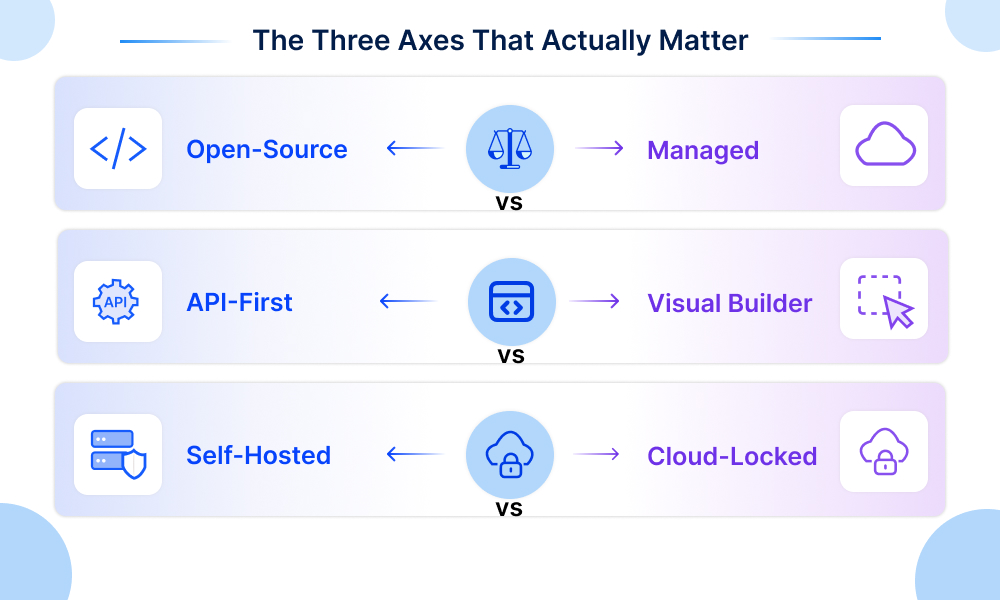
The Three Axes That Actually Matter
Before you consider your best chatbot development platform for conversational AI, make sure that you know how they stand on each of these three spectrums. And these axes will filter out 80% of your bad decisions right away.
Open-Source vs. Managed
With open source (Rasa, Botpress in self-hosted mode), you have full ownership of your data and freedom to customize the bot as needed.
Cost: You’re doing all the work yourself.
In managed platforms (for example, Chatbase), the provider manages the infrastructure.
Benefit: You have faster implementation. But you depend on their product roadmap and pricing.
API-First vs. Visual Builder
- In API first products (OpenAI Assistants, raw LLM integrations, and chatbot development frameworks), you get a skeleton. API development expertise is required—you have to develop the UI, conversation flow, everything yourself. You have full control.
- In visual builders (Dialogflow, Botpress cloud), non-technical teams can drag flows without coding. The tension: visual is faster to MVP; API is better long-term.
Self-Hosted vs. Cloud-Locked
- Self-hosted means your bot runs on your servers, compliance is easier, data doesn’t leave your network, but you manage scaling.
- Cloud-locked (most SaaS platforms) means the vendor owns your infrastructure; they scale infinitely, but you’re stuck with their terms.
Pick your position on all three. Most failed deployments happen when teams pick wrong on one axis and discover it six months in.
The 8 Platforms: Complete Breakdown
| Platform | Setup Time | Model Choice | Best For | Pricing Model |
|---|---|---|---|---|
| Chatbase | 5 min | Preset | Quick FAQs | Credit-based |
| Jotform | 10 min | Preset | Form conversion | Flat monthly |
| Dialogflow | 30 min–2 weeks | Google only | Google Cloud shops | Per-request |
| Watsonx | 30 min–2 weeks | IBM | Business users, Agent Assist | Custom |
| Copilot Studio | 1–2 weeks | GPT-4o, Anthropic | Microsoft 365 orgs | M365 licensing or PAYG |
| Amazon Lex | 1–2 weeks | AWS Bedrock | AWS shops, voice IVR | Per-request (voice expensive) |
| Voiceflow | 2–4 weeks | Multi-LLM | Omnichannel + observability | Custom per volume |
| Botpress | 1–2 weeks | Multi-LLM | Complex workflows | Base + AI Spend |
Each of these best chatbot development platforms for conversational AI is evaluated on the same criteria: best use case, core features, real strengths, real limitations, pricing, setup time, integration depth, and model flexibility.
1. Chatbase
Chatbase lets teams launch a working chatbot in about 10 minutes, though it lacks workflow logic and its credit-based pricing can swing unpredictably.
Core Features:
- Train on URLs, PDFs, documents, or paste text
- Supports 17+ LLMs (OpenAI, Anthropic, Google, Llama, etc.)
- Deploy to web chat, WhatsApp, Instagram, Slack, Messenger, email, custom APIs
- Built-in analytics dashboard
- Credit-based usage tracking
Real Strengths:
- Fastest launch: 10 minutes from zero to working bot (verified by users)
- Clean, intuitive UI. Non-technical teams succeed without hand-holding
- Multi-channel deployment is straightforward
- No coding required whatsoever
Real Limitations:
- No workflow logic. Can’t handle branching decisions, multi-step processes, or conditional routing
- Credit-based pricing unpredictable (GPT-4 vs Claude vs Gemini = wildly different costs)
- Standalone chatbot, not help desk integration. Works alongside Zendesk, not within it
- Limited customization for complex conversation flows
Pricing:
- Free: 100 credits/month
- Hobby: $40/month (2,000 credits, 1 agent)
- Standard: $150/month (12,000 credits, 2 agents)
- Pro: $500/month (40,000 credits, 3 agents)
- Enterprise: Custom
Setup Timeline: 5–10 minutes
Integration Depth: Light (Slack, WhatsApp, basic webhooks). Not deep CRM/helpdesk sync.
Best For: Quick FAQ automation. Teams drowning in repetitive “where’s my order?” questions.
2. Jotform AI Chatbot
Jotform’s AI Chatbot turns rigid forms into natural conversations that boost completion rates by 40%+, but it stays niche to structured data collection.
Core Features:
- Conversational form guidance (ask questions naturally, fill fields automatically)
- Agent builder for customizing tone and appearance
- Train on FAQs and business knowledge
- Embed on websites, landing pages, forms, standalone
- WordPress plugin support (new, 2026)
- Voice call support (50+ minutes/month)
- SMS support (250–1,000 messages/month depending on plan)
Real Strengths:
- One of the best chatbot development platforms for conversational AI.
- Form completion rates increase 40%+ when users answer conversationally instead of filling rigid forms
- Built specifically for structured data collection. Solves a real problem
- WordPress plugin makes deployment frictionless
- Pricing is flat and predictable (no surprise AI Spend bills)
- Supports voice and SMS, not just chat
Real Limitations:
- Not a general-purpose chatbot development platform. If your use case isn’t “collect structured data,” this is niche
- Limited integrations (Jotform ecosystem, basic webhooks)
- No advanced workflow logic or escalation to human agents
- Tied to Jotform forms; limited flexibility if you need full customization
Pricing:
- Free: 5 chatbots, 100 conversations/month, 10k sessions/month
- Bronze: $34/month (25 chatbots, 1k conversations, 100k sessions)
- Silver: $39/month (50 chatbots, 2.5k conversations, 1M sessions)
- Gold: $99/month (100 chatbots, 10k conversations, 2M sessions)
- Enterprise: Custom (unlimited everything)
Setup Timeline: 10–15 minutes for basic bot, 1 week for production with complex logic.
Integration Depth: Shallow (Jotform native, Zapier, webhooks). No deep CRM sync.
Best For: E-commerce, lead gen, event registration. Any scenario where you need to collect structured data conversationally.
3. Dialogflow (Google)
Dialogflow brings Google-grade NLU and native voice support across 95+ languages, though it locks you into Google’s own LLMs and pricing model.
Core Features:
- Two editions: ES (simpler, intent-based) and CX (advanced, state machines, visual flows)
- Natural language understanding with Google’s language models
- Multi-turn conversation management
- Integrations: Google Assistant, Alexa, WhatsApp, Slack, Facebook, Telegram, custom APIs
- Built-in speech recognition (ASR) and text-to-speech (TTS)
- Analytics and conversation logging
- Gemini 2.5 integration in CX (generative playbooks)
Real Strengths:
- NLU quality is excellent. Handles typos, accents, and industry jargon accurately
- Language support: 95+ languages in ES, 25+ in CX, plus real-time translation for 50+ more
- Native voice/phone support. Not bolted on; deeply integrated
- Google Cloud ecosystem integration (BigQuery for analytics, Cloud Functions for logic, Vertex AI for custom models)
- Mature, battle-tested platform. Production-grade reliability
Real Limitations:
- Google LLMs only. Can’t switch to OpenAI or Anthropic if you want generative features
- Locked into Google’s pricing and roadmap. If they deprecate something, you migrate
- CX is complex to set up compared to Botpress or Voiceflow
- Per-request pricing scales unpredictably with usage spikes
Pricing:
- ES: $0.002 per text request (free tier: 180 requests/month)
- CX: $0.007 per text request
- Speech: ~5–10× text request cost
- Enterprise support: $10k+/month
- Free tier is very limited
Setup Timeline: 2–4 weeks for production bot with integrations.
Integration Depth: Deep with Google Cloud. Moderate for third-party tools.
Best For: This chatbot-building platform is best for Google Cloud shops. Teams that need enterprise-grade NLU and voice support.
4. Watsonx Assistant (IBM)
Watsonx Assistant simplifies bot-building for non-technical business users with its “actions” model, but IBM’s legacy ecosystem and custom pricing make it enterprise-heavy.
Core Features:
- Action-based design (instead of intent/entity model)
- Visual action builder (drag-and-drop)
- Automatic improvements based on conversation patterns
- Agent Assist (real-time suggestions to human agents)
- Multi-channel: web, phone, messaging, Slack, Teams, custom APIs
- High-quality, warm TTS voices (not robotic)
- Cloud or on-premises deployment options
Real Strengths:
- Simplified mental model for business users. “Actions” are easier to understand than intents/entities
- Agent Assist is powerful. Helps humans, not just automation
- On-premises option is rare. Good for compliance-heavy industries
- IBM support is enterprise-grade
- Fast to production (30 min to basics, 1–2 weeks full feature)
Real Limitations:
- Less powerful than Botpress for complex workflows
- IBM ecosystem is legacy-heavy. Enterprise licensing can be painful
- Custom pricing. No public per-message costs. Requires engagement
- Not as modern/trendy as Voiceflow or Botpress
Pricing: Custom. IBM requires enterprise engagement. Typically $10k+/month for production.
Setup Timeline: 30 minutes to basics, 1–2 weeks for production with integrations.
Integration Depth: Deep for enterprise systems (SAP, Salesforce, Oracle, etc.)
Best For: Enterprises that want a conversational chatbot development solution but lack ML expertise. Business users, not engineers.
5. Microsoft Copilot Studio
Microsoft Copilot Studio embeds agents directly inside Teams and SharePoint with built-in compliance, but it ties you to Azure and isn’t truly no-code.
Core Features:
- Low-code agent builder
- Works inside Teams, SharePoint, Microsoft 365 Copilot
- Model choice: GPT-4o or Anthropic Claude
- Power Automate integration for workflows
- Compliance built-in (DLP, audit logging, eDiscovery)
- Azure infrastructure (cloud-native)
- Enterprise governance and access controls
Real Strengths:
- Seamless M365 integration. Agents live where users already work (Teams)
- More model flexibility than Dialogflow (not Google-only)
- Licensing efficiency. Included with Microsoft 365 Copilot if you already pay ($30/user/month)
- Enterprise compliance is built-in, not bolted on
- Familiar interface for Microsoft users
Real Limitations:
- Model choice limited compared to Botpress (no Groq, no bring-your-own)
- Azure infrastructure means you’re in the Microsoft ecosystem. No self-hosting
- Setup requires Azure knowledge. Not truly no-code
- Pricing for standalone deployments is expensive
Pricing:
- Included in Microsoft 365 Copilot: $30/user/month (if already purchased)
- Standalone PAYG: Prepaid Copilot Credit units (variable)
- Standalone Enterprise: $10k+/month + custom
Setup Timeline: 1–2 weeks for production deployment.
Integration Depth: Deep for Microsoft stack. Moderate for third-party.
Best For: Microsoft 365 organizations. Teams, SharePoint, Microsoft 365 Copilot native.
6. Voiceflow
Voiceflow stands out for its observability suite and native voice/omnichannel support, though it comes at a steep enterprise price of $5k–$20k/month.
Core Features:
- Omnichannel deployment: web chat, phone (inbound + outbound), WhatsApp, email, Instagram, custom APIs
- Native voice and phone support (not bolted on)
- Observability suite: conversation tracing, custom evaluations, staging environment
- Model flexibility: OpenAI, Anthropic, Google, Groq, or custom
- LLM-powered evals to catch regressions after updates
- Enterprise compliance: SOC 2 Type II, ISO 27001, GDPR, HIPAA
Real Strengths:
- Voice is a first-class citizen. Native implementation, not a feature bolted on
- Observability suite is rare. Trace conversations, define “good,” test before shipping
- Model flexibility. Swap models mid-deployment without rewriting flows
- Real production customers at scale (Turo, StubHub, Sanlam, Trilogy)
- Enterprise-ready compliance and security
Real Limitations:
- Custom pricing. Typically $5k–$20k/month. Not for budget-constrained teams
- Setup takes longer than Chatbase (4–8 weeks for complex deployments)
- Steeper learning curve than Jotform
- You need someone who understands observability and testing to fully leverage the chatbot building platform
Pricing: Custom, typically $5k–$20k/month depending on conversation volume
Setup Timeline: 2–4 weeks for simple bots, 4–8 weeks for complex multi-channel.
Integration Depth: Very deep (APIs, webhooks, omnichannel). Flexible architecture.
Best For: Teams building omnichannel agents (web, voice, WhatsApp, email) with strong observability needs.
7. Botpress
Botpress uniquely blends rigid workflows with agentic AI reasoning and skips per-seat costs entirely, but its usage-based “AI Spend” billing confuses buyers.
Core Features:
- Hybrid architecture: rigid workflows + agentic playbooks in same conversation
- Visual flow builder + code editor
- Model choice: OpenAI, Anthropic, Groq, or bring-your-own
- Mid-conversation handoff: workflow → playbook → workflow
- 750k agents in production
- No per-seat cost (Zendesk = $115/seat, Intercom = $85/seat, Botpress = $0)
- Works on top of Zendesk or Intercom (no rip-and-replace)
Real Strengths:
- Hybrid model is unique. Rigid logic where it matters (refunds, compliance), AI reasoning where it helps
- No per-seat cost is a massive cost advantage for large support teams (40 agents saves $55k–$91k/year)
- 750k agents in production. Not a startup
- $25M Series B (June 2025). Funded and stable
- Model flexibility. Swap models per agent without rewriting
Real Limitations:
- Usage-based AI Spend billing is unpredictable. High volume = surprise bills
- Pricing model (Base + AI Spend) confuses buyers. Real cost is often 2–3× base plan
- Setup is 1–2 weeks minimum. Not instant like Chatbase
- Learning curve steeper than visual builders
Pricing:
- Free: $0/month (100 conversations/month, no overages or top-ups)
- Plus: $189/month (250 conversations/mo included; extra packs of 100 = $65 each)
- Team: $939/month (1500 conversations/mo included; extra packs of 100 = $50 each)
- Enterprise: Custom pricing
Setup Timeline: 1–2 weeks for simple integrations, 2–4 weeks for complex workflows.
Integration Depth: Very deep (APIs, webhooks, Zendesk/Intercom native integration).
Best For: Teams with complex support workflows. Humans need to stay in control while AI handles reasoning.
8. Amazon Lex
Amazon Lex delivers Alexa-grade speech recognition with deep AWS integration, but its voice pricing runs steep, and setup demands real engineering skill.
Core Features:
- Based on Alexa’s ASR and NLU technology
- Native AWS Lambda integration for custom logic
- DynamoDB for conversation state
- Amazon Connect integration for contact center automation
- Automated chatbot designer (analyze transcripts, auto-generate intents/slots)
- Multi-turn conversation management
- CloudWatch for observability
Real Strengths:
- Alexa-grade speech recognition. Reliable at scale
- AWS ecosystem integration is seamless (Lambda, DynamoDB, Connect)
- Automated designer saves time analyzing conversation transcripts
- If you’re AWS-native, this is the natural choice
- Contact center integrations are production-grade
Real Limitations:
- Voice costs 5.3× text ($0.004/speech vs $0.00075/text). Voice gets expensive fast
- Separate Bedrock billing for generative features. Hidden costs
- Complex setup. You’re writing Lambda functions, managing IAM
- Not no-code. Requires engineering expertise
Pricing:
- Free tier: 10k text/month, 5k speech/month (6 months only)
- Text: $0.00075 per request
- Speech: $0.004 per request
- Bedrock: $0.0015–0.002 per 1K tokens
Setup Timeline: 1–2 weeks for simple bot, 3–4 weeks for contact center integration.
Integration Depth: Very deep with AWS. Moderate for third-party.
Best For: AWS-native organizations building voice IVR and contact center automation.
Wrapping Up
Your constraint picks the best chatbot development platform for conversational AI, not vice versa. One week? Chatbase gets you live in 72 hours. High volume with a budget? Botpress handles it, but setup takes two weeks. Locked into Google, Microsoft, or AWS? Use what you already own. The real killer isn’t platform choice; it’s integration. Audit your CRM, helpdesk, and payment stack before you pick anything.
If architecture design, seamless platform integration, and industry-specific deployment feel complex, Talentelgia Technologies specializes in AI chatbot development across real estate, healthcare, finance, and e-commerce












 Sales Enquiries:
  Business queries:
  HR:
HR: 


