



 Healthcare Software Development Services
 Healthcare App Development Services
 Real Estate Web Development Services
 Real Estate App Development Company
 E-Commerce App Development Services
 E-Commerce Web Development Services
 Blockchain E-commerce Development Company
 Fintech Software Development
 Fintech App Development Services
 E-Learning App Development Services
 Restaurant App Development Company
 Mobile Game Development Company
 Travel App Development Company
 Automotive Web Design
 AI Traffic Management System
 AI Inventory Management Software
 Logistics App Development Services
 Machine Learning Development
 ChatGPT integration services
  AI Development Company
  AI Integration Services
  Natural Language Processing Company
 Mobile App Development
  IOS App Development
  Android App Development
  Cross-Platform App Development
  Augmented Reality (AR) App Development
  Virtual Reality (VR) App Development
  Web App Development
  SaaS App Development
 Custom Software Development Services
  Flutter
  React Native
  Swift (IOS)
  Kotlin (Android)
  Mean Stack Development
  AngularJS Development
  MongoDB Development
  Nodejs Development
  Database Development
 Ruby on Rails Development
 Expressjs Development
  Full Stack Development
  Web Development Services
  Laravel Development
  LAMP Development
  Custom PHP Development
  .Net Development
  User Experience Design Services
  User Interface Design Services
  Automated Testing
  Manual Testing
  Digital Marketing Services
 Ride-Sharing And Taxi Services
 Food Delivery Services
 Grocery Delivery Services
 Transportation And Logistics
 Car Wash App
 Home Services App
 ERP Development Services
 CMS Development Services
 LMS Development
 CRM Development
 DevOps Development Services
 AI Business Solutions
 AI Cloud Solutions
 AI Chatbot Development
 API Development
 Blockchain Product Development
 Cryptocurrency Wallet Development
 About Talentelgia
  Our Team
  Our Culture
 Healthcare App Development Services
 Real Estate Web Development Services
 E-Commerce App Development Services
 E-Commerce Web Development Services
 Blockchain E-commerce
Development Company
Blockchain E-commerce
Development Company Fintech App Development Services
 Blockchain Fintech
Development Company
Blockchain Fintech
Development Company E-Learning App Development Services
 Restaurant App Development Company
 Mobile Game Development Company
 Travel App Development Company
 AI Traffic Management System
 AI Inventory Management Software
 AI Development Company
 ChatGPT integration services
 AI Integration Services
 Machine Learning Development
 Machine learning consulting services
 Blockchain Development
 Blockchain Software Development
 Smart contract development company
 NFT marketplace development services
 Asset tokenization companies
 DeFi Wallet Development Company
 IOS App Development
 Android App Development
 Cross-Platform App Development
 Augmented Reality (AR) App
Development
Augmented Reality (AR) App
Development Virtual Reality (VR) App Development
 Web App Development
 Flutter
 React
Native
React
Native Swift
(IOS)
Swift
(IOS) Kotlin (Android)
 MEAN Stack Development
 AngularJS Development
 MongoDB Development
 Nodejs Development
 Database development services
 Expressjs Development
 Full Stack Development
 Web Development Services
 Laravel Development
 LAMP
Development
LAMP
Development Custom PHP Development
 User Experience Design Services
 User Interface Design Services
 Automated Testing
 Manual
Testing
Manual
Testing About Talentelgia
 Our Team
 Our Culture
In 1996, the Ariane 5 rocket was destroyed due to a single error in its data conversion software 40 seconds after liftoff, resulting in losses amounting to hundreds of millions of dollars.
Every last penny would have been avoidable only if someone had noticed it in time.
That’s the real job of software testing, not just hunting bugs, but protecting everything built around the software: revenue, reputation, and the users depending on it to work.
What is Software Testing?
Software Testing is the process of evaluating an application to verify it works as expected, catches defects before they reach users, and holds up reliably as the product changes. That sounds simple. In practice, it ranges from checking whether a login button works to stress-testing whether your system survives 10,000 simultaneous users.
And herein lies the area where many make a mistake: testing is not an activity that happens right before deployment of the final product. Testing goes on in parallel with development all the way through, detecting bugs before they become too costly to fix.
This guide offers an exhaustive introduction for developers, project managers, and even people who do not have any knowledge about technologies in general, to understand everything about the introduction to software testing, its significance, process, types, life cycle, and tools.
Software Testing Basics You Must Know
Before getting into types, tools, and processes, you need to be clear about software testing basics. They’re the vocabulary every developer, QA engineer, and project manager uses daily.
1. Verification vs. Validation
Two terms that sound similar but do very different jobs:
- Verification asks: “Are we building the product right?” – It checks whether the software matches its specifications
- Validation asks: “Are we building the right product?” It confirms whether it actually solves the user’s problem
Both matter. Skipping either is how products ship, technically correct, but completely useless.
2. Static vs. Dynamic Testing
- Static testing reviews code and documents without running the software; think code reviews and requirement walkthroughs
- Dynamic testing executes the software and observes what happens in real time
Static testing catches problems before a single line runs. Dynamic testing catches what slipped through anyway.
3. Manual vs. Automated Testing
- In manual testing, there is direct interaction between a human tester and the product, making it suitable for exploratory testing and for UX problems that cannot be caught by any script.
- Automation testing executes tests by running predefined scripts, suitable for regression testing, performance testing, and CI/CD pipelines.
Neither replaces the other. The best teams use both.
4. Error, Defect, Failure – Not the Same Thing
- Error: a mistake made by a developer
- Defect/Bug: the flaw that the error created in the code
- Failure: what the user actually experiences when that defect surfaces
Testing finds defects. Debugging fixes them. Getting clear on the difference tells you exactly who needs to act and when.
Why Do We Need Software Testing?
Software testing catches bugs before users encounter them, preventing costly failures and damage to your reputation. It ensures the software works as intended, meets quality standards, and performs reliably under real-world conditions. Testing saves money by fixing issues early rather than after release. Without testing, you risk security vulnerabilities, user frustration, and lost revenue. It’s the safeguard between broken software and a working product.
Software has now become infrastructure. It runs hospital equipment, banking systems, airline controls, and the apps billions of people use every day. When it fails, the consequences are technical, financial, operational, and sometimes fatal.
That’s not a hypothetical. Here’s what untested or poorly tested software has already caused:
- 1985 – The Therac-25 radiation machine malfunctioned due to a software bug, delivering fatal overdoses to patients
- 1994 – A software error caused a China Airlines crash, killing 264 people
- 1999 – A software bug caused a $1.2 billion military satellite launch to fail
- 2015 – The Royal Bank of Scotland couldn’t process 600,000 payments due to a bug – and was fined £66 million
- 2016 – A Yahoo data breach exposed 500 million user credentials, traced back to a security vulnerability
- 2014 – Flipkart’s Big Billion Sale crashed under traffic load, leading to mass order cancellations and serious reputational damage
These aren’t edge cases; they’re patterns. And the numbers reinforce it:
- 26% of developers globally spend up to half their working time fixing software bugs, time that should go toward building
- Fixing a production bug costs 100x more than addressing it during the design phase
Importance of Software Testing
Software testing is one of the most consequential decisions made during the entire development process, and skipping it or doing it poorly exacts a cost that compounds fast.
Catching Bugs Early Saves Serious Money
The later a defect is found, the more expensive it becomes to fix. A bug caught during the design stage might cost $500 to resolve. That same bug discovered in production can cost $5,000 or more, and that is before accounting for downtime, customer loss, and emergency patching. The Consortium for Information & Software Quality puts the annual cost of software bugs in the US alone at $2.41 trillion. Most of those bugs were fixable early.
It Protects User Data and System Security
Security testing detects weaknesses before hackers: SQL injection attacks, authentication weaknesses, insecure APIs, and access control misconfigurations. Otherwise, sensitive information will be vulnerable. For industries that are highly regulated, such as healthcare and financial services, a single vulnerability means more than expenses; it means auditing, sanctions, and revocation of operating licenses.
It Ensures the Product Actually Works for Users
Functionality tests are designed to check whether every function within the software operates properly in reality rather than only during a controlled test environment, considering all different factors like the device, browser, operating system, screen size, and speed of internet connection.
Think of it this way: your login works perfectly on desktop Chrome. But on Safari mobile with a slow 4G connection, it times out. Your checkout process runs fine on Android. On iOS, the payment button doesn’t register the tap.
These aren’t rare scenarios. They’re the everyday reality of how people use software. And if your product fails them in these moments, they leave and don’t come back.
It Keeps Development Teams Productive
Most teams treat testing as the final gate before release. That’s the wrong model.
When testing runs parallel to development, catching issues at the unit level, during code reviews, and at every integration point, bugs are smaller in scope, cheaper to fix, and don’t cascade into larger system failures. A developer who gets a failing test back within hours fixes it in minutes. The same bug caught three sprints later, buried under new code, can take days to trace and resolve.
The downstream effect is real: developers spend their time writing new features, not rewinding through old ones. QA teams stop being the bottleneck at the end of the pipeline and start being a continuous quality signal throughout it.
It Ensures Regulatory Compliance
GDPR, HIPAA, PCI-DSS, SOC 2 – industries with strict data handling requirements can’t afford to skip compliance testing. It validates that access controls, encryption, data retention policies, and audit trails meet the required standards before the product ships, not after regulators come knocking.
Types of Software Testing
Different bugs require different kinds of testing. Some problems are in functionality, while others are related to performance. This is why different types of software testing focus on catching specific errors in the system.
At the broadest level, all testing falls into two categories: functional and non-functional.
Functional Testing
Functional testing mainly focuses on making sure that all components of the application perform as per the requirements specification document. In functional testing, it is not important how the code has been implemented internally. The primary aim is to ensure that the input/output behavior is correct.
The main types under functional testing:
- Unit Testing – It involves testing individual parts of software in isolation. If a program does not give the right value after performing calculations based on an input value, this will be caught through unit testing before it reaches anything else.
- Integration Testing – After the units function correctly, integration testing will determine whether they can perform together. There may be two units that have successfully performed their individual tests but have failed during communication attempts because of integration problems. This testing catches those interaction gaps – critical in microservice-heavy architectures where services like payments, inventory, and notifications constantly talk to each other.
- System Testing – Tests the entire system in a production-like environment. This is where full user journeys get validated: logging in, placing an order, completing payment, receiving confirmation, all in one connected flow.
- Acceptance Testing – Last stop before releasing. Ensures that the application is meeting the real business needs, not just technical specifications.
- Regression Testing – With every change that gets made to the code, what once worked fine might now have stopped working for reasons unknown. Regression testing checks all previous tests for any unexpected damage done due to these changes. It’s non-negotiable for fast-moving teams shipping daily.
Non-Functional Testing
Non-functional testing determines the efficiency of the software application when subjected to real-life scenarios, various platforms, and security risks.
- Performance Testing – Measures how the software behaves under heavy traffic, checking response times, stability, and system capacity under load. For an e-commerce platform during a major sale, performance testing can determine whether the site handles 50,000 simultaneous users smoothly or crashes under demand.
- Security Testing – Actively probes the application for vulnerabilities like SQL injection flaws, broken authentication, exposed APIs, and weak encryption. With the average cost of a data breach hitting $4.88 million in 2024, this isn’t optional for any product handling user data.
- Usability Testing – Identifies how actual end users work with the product. While a particular functionality may work flawlessly from an implementation point of view, it may fail when used by the user. Usability testing uncovers friction points before churn can be experienced.
- Compatibility Testing – Ensures the functionality of the application is consistent among different browsers, operating systems, screen sizes, and devices. An application that works well on Chrome (desktop version) but not on Safari (mobile version) would fail compatibility testing despite passing all other tests.
Manual vs. Automated – How Tests Get Executed
- Manual testing has a human tester interacting with the product directly, ideal for exploratory testing, UX evaluation, and early-stage development where scripts don’t yet exist. It’s flexible but doesn’t scale well for large regression cycles.
- Automated testing uses scripts and tools to run tests automatically, built for speed, repeatability, and CI/CD pipelines where tests need to run on every single code merge. The upfront investment pays off heavily on any product with frequent releases.
Most mature QA setups use both – automation handles the repetitive and high-volume work, while manual testers focus on the nuanced, judgment-heavy checks that no script can replicate.
Also Read: What are the Levels of Software Testing?
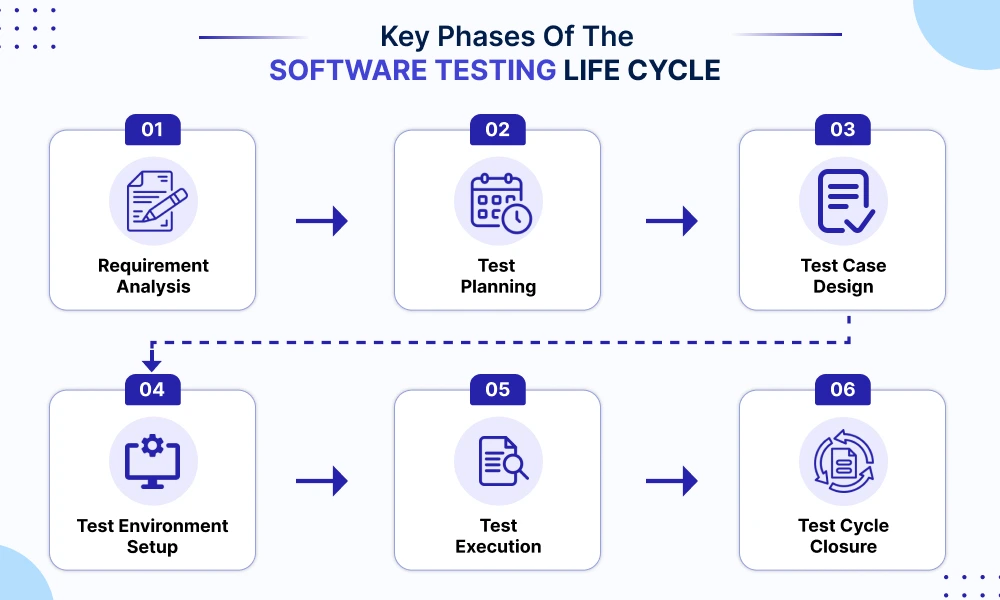
Key Phases of the Software Testing Life Cycle (STLC)
Software testing, like every other systematic process, also involves following a cycle. This process is known as the Software Testing Life Cycle (STLC), a step-by-step approach teams use to plan, execute, and improve software testing efficiently.
The goal is simple: catch issues early, improve software quality, and make releases more predictable.
1. Requirement Analysis
The testing process begins by knowing what the software should accomplish.
Stakeholders like developers, testers, business analysts, etc., get together and analyze both the functional and non-functional aspects of the application. This is done to understand what needs to be tested, what the possible risks are, and what constitutes success.
At this stage, teams also clarify:
- features to be tested
- expected user behavior
- possible edge cases
- testing priorities
The output of this phase is usually a Requirement Traceability Matrix (RTM), which maps requirements to test cases.
2. Test Planning
With all requirements in place, planning for the testing stage begins.
It involves defining:
- testing scope
- timelines and milestones
- testing tools
- team responsibilities
- resource requirements
- testing types and approaches
The team also decides which tests will be manual and which will be automated.
A detailed test plan helps maintain order in the whole testing process, preventing confusion later in development.
3. Test Case Design
In this phase, testers create detailed test cases and test scenarios based on the requirements.
Each test case clearly defines:
- what is being tested
- test steps
- required test data
- expected results
- pass/fail conditions
Good test cases make debugging faster because they clearly show where and why a failure occurred.
Teams may manage test cases using spreadsheets or dedicated tools like TestRail, Xray, Selenium, or Cypress.
4. Test Environment Setup
Before testing begins, the required environment must be prepared.
This includes:
- servers and databases
- browsers and operating systems
- mobile devices or simulators
- testing tools and configurations
- APIs and network settings
The goal is to create a stable environment that closely matches real production conditions so test results remain reliable.
5. Test Execution
This is the phase where testers actually run the tests.
Test cases are executed manually or through automation tools, and the actual results are compared against expected outcomes.
If issues are found, they are logged as defects and shared with the development team for fixes.
During execution, test cases may have statuses such as:
- Passed
- Failed
- Blocked
- Skipped
- Untested
Once bugs are fixed, testers perform retesting and regression testing to ensure existing functionality still works correctly.
6. Test Cycle Closure
After testing is completed, the team evaluates the overall testing process and prepares final reports.
This phase includes:
- analyzing test coverage
- reviewing defect trends
- documenting lessons learned
- measuring testing effectiveness
- identifying areas for improvement
The final test report assists in determining the quality of the product and its release risks before deployment.
An efficient STLC results in better reliability and scalability of software testing processes, particularly those for rapidly evolving products that undergo frequent releases.
Common Software Testing Tools
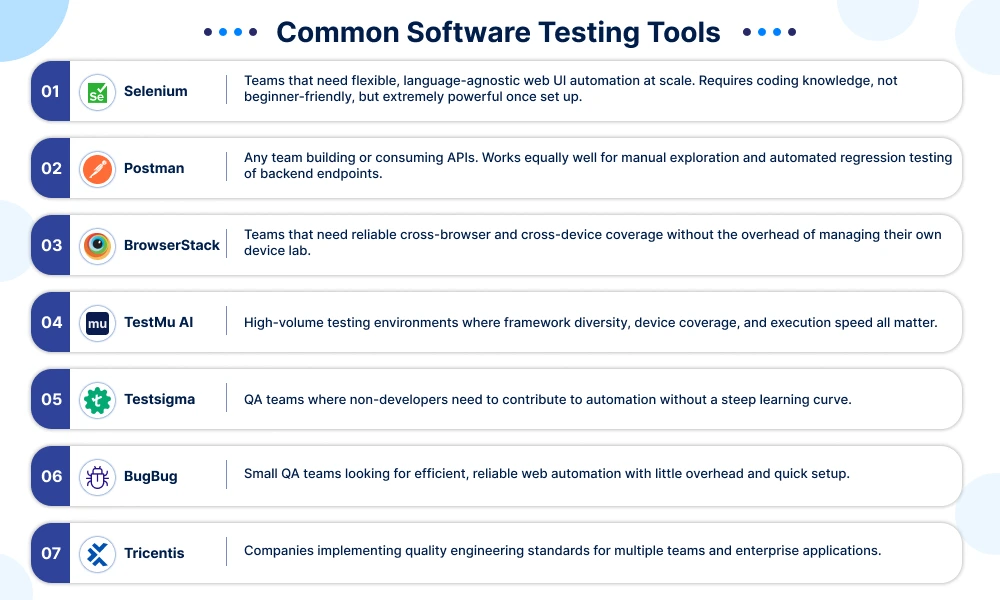
The right one depends on what you’re testing: an interface, an API, a user flow, or system performance under load. Here are the tools most teams actually rely on.
1. Selenium
This is the most popular open-source browser automation framework in the world. Since 2004, Selenium has remained the most relied-on automation framework for browser testing.
- Multi-language support: Java, Python, JavaScript, C#
- Test across all browsers like Chrome, Firefox, Safari, and Edge
- Parallel test execution via Selenium Grid on multiple machines
- CI/CD pipeline integration for testing on platforms like Jenkins, GitHub Actions
Best for: Teams that need flexible, language-agnostic web UI automation at scale. Requires coding knowledge, not beginner-friendly, but extremely powerful once set up.
2. Postman
Postman is the benchmark software used for API testing purposes. The application allows developers to create, send, and verify API requests using an intuitive interface, all without needing any coding skills to begin.
- Collections keep API requests organized by workflow or feature
- Environment variables handle dev, staging, and production switching without duplicating tests
- Built-in monitors schedule and run API tests automatically, with alerts on failures
- Postbot, Postman’s AI assistant introduced in 2025, auto-generates test assertions and flags response anomalies during debugging
Best for: Any team building or consuming APIs. Works equally well for manual exploration and automated regression testing of backend endpoints.
3. BrowserStack
BrowserStack is a cloud-based testing platform that enables users to get access to over 3,500 combinations of browsers and devices without setting up any local hardware.
- Uses Selenium, Cypress, and Playwright for running automated tests on real devices over the cloud.
- Percy is the visual testing solution used by the tool to perform pixel-perfect comparisons between two different builds.
- Built-in accessibility testing validates WCAG compliance automatically
- Parallel test execution reduces the runtime from hours to minutes.
Best for: Teams that need reliable cross-browser and cross-device coverage without the overhead of managing their own device lab.
4. TestMu AI
TestMu AI is an AI-native test orchestration and execution platform built for teams that test at serious scale.
- Runs manual and automated tests across 10,000+ real browsers, devices, and OS combinations
- Includes support for Selenium, Cypress, Playwright, Appium, Espresso, XCUITest, and many others, from a single platform
- HyperExecute helps you achieve 70% faster test execution than on legacy cloud grids
- Geo-location testing using GPS and IP emulation capabilities
- CI/CD, project management, and codeless automation support included
Best for: High-volume testing environments where framework diversity, device coverage, and execution speed all matter.
5. Testsigma
Testsigma is an AI-based automation tool that does not require coding skills and where test cases can be written in plain English, and therefore, is one of the most user-friendly solutions.
- Natural language test creation, no scripting knowledge required
- Automated flaky test detection by AI ensures reliability regardless of changes in the codebase
- Supports all kinds of testing: web, mobile, and APIs through one unified solution
- Integrates with GitHub, GitLab, and CI/CD pipelines out of the box
Best for: QA teams where non-developers need to contribute to automation without a steep learning curve.
6. BugBug
BugBug is a light, code-free web testing solution designed for web applications and SaaS software. Its Chrome extension captures the user’s actions and turns them into automated tests.
- Edit and Rewind lets you edit and re-run your tests, starting at a certain step
- Smart selectors help prevent flaky tests due to small changes in UI elements
- Automatically schedule cloud-based test executions with failure notifications
- Integrates with GitHub, GitLab, Bitbucket, and Jenkins for CI/CD workflows
Best for: Small QA teams looking for efficient, reliable web automation with little overhead and quick setup.
7. Tricentis
Tricentis is an enterprise testing solution that consolidates all aspects such as functional testing, performance testing, API testing, and test management.
- Automation through model-based testing saves scripting time in complicated test cases.
- Risk-based optimization determines which tests to conduct based on code changes, thereby reducing regression testing time.
- SAP, Salesforce, and custom enterprise applications are among its supported technologies, along with other web and API technologies.
- Provides unified reporting and governance across teams and tools
Best for: Companies implementing quality engineering standards for multiple teams and enterprise applications.
Conclusion
Software breaks. It always has, and it always will. But the difference is whether you catch it before your users do.
Testing is not the dull final process that delays product launches. Testing is what distinguishes the products that customers rely on from products that they will throw away once the first problem appears. Any part of STLC, any tests performed, and any tools used all serve one purpose – to verify that the product does its job properly.
With an understanding of what tools are available, it is time to put them into practice.












 Sales Enquiries:
  Business queries:
  HR:
HR: 


