


 Healthcare App Development Services
 Real Estate Web Development Services
 E-Commerce App Development Services
 E-Commerce Web Development Services
 Blockchain E-commerce Development Company
 Fintech App Development Services
 Fintech Web Development
 Blockchain Fintech Development Company
 E-Learning App Development Services
 Restaurant App Development Company
 Mobile Game Development Company
 Travel App Development Company
 Automotive Web Design
 AI Traffic Management System
 AI Inventory Management Software
 AI Development Company
  ChatGPT integration services
  AI Integration Services
  Generative AI Development Services
  Natural Language Processing Company
 Machine Learning Development
  Machine learning consulting services
  Blockchain Development
  Blockchain Software Development
  Smart Contract Development Company
  NFT Marketplace Development Services
  Asset Tokenization Company
 DeFi Wallet Development Company
 Mobile App Development
  IOS App Development
  Android App Development
  Cross-Platform App Development
  Augmented Reality (AR) App Development
  Virtual Reality (VR) App Development
  Web App Development
  SaaS App Development
 Flutter
  React Native
  Swift (IOS)
  Kotlin (Android)
  Mean Stack Development
  AngularJS Development
  MongoDB Development
  Nodejs Development
  Database Development
 Ruby on Rails Development
 Expressjs Development
  Full Stack Development
  Web Development Services
  Laravel Development
  LAMP Development
  Custom PHP Development
  .Net Development
  User Experience Design Services
  User Interface Design Services
  Automated Testing
  Manual Testing
  Digital Marketing Services
 Ride-Sharing And Taxi Services
 Food Delivery Services
 Grocery Delivery Services
 Transportation And Logistics
 Car Wash App
 Home Services App
 ERP Development Services
 CMS Development Services
 LMS Development
 CRM Development
 DevOps Development Services
 AI Business Solutions
 AI Cloud Solutions
 AI Chatbot Development
 API Development
 Blockchain Product Development
 Cryptocurrency Wallet Development
 About Talentelgia
  Our Team
  Our Culture
 Healthcare App Development Services
 Real Estate Web Development Services
 E-Commerce App Development Services
 E-Commerce Web Development Services
 Blockchain E-commerce
Development Company
Blockchain E-commerce
Development Company Fintech App Development Services
 Finance Web Development
 Blockchain Fintech
Development Company
Blockchain Fintech
Development Company E-Learning App Development Services
 Restaurant App Development Company
 Mobile Game Development Company
 Travel App Development Company
 Automotive Web Design
 AI Traffic Management System
 AI Inventory Management Software
 AI Development Company
 ChatGPT integration services
 AI Integration Services
 Machine Learning Development
 Machine learning consulting services
 Blockchain Development
 Blockchain Software Development
 Smart contract development company
 NFT marketplace development services
 IOS App Development
 Android App Development
 Cross-Platform App Development
 Augmented Reality (AR) App
Development
Augmented Reality (AR) App
Development Virtual Reality (VR) App Development
 Web App Development
 Flutter
 React
Native
React
Native Swift
(IOS)
Swift
(IOS) Kotlin (Android)
 MEAN Stack Development
 AngularJS Development
 MongoDB Development
 Nodejs Development
 Database development services
 Ruby on Rails Development services
 Expressjs Development
 Full Stack Development
 Web Development Services
 Laravel Development
 LAMP
Development
LAMP
Development Custom PHP Development
 User Experience Design Services
 User Interface Design Services
 Automated Testing
 Manual
Testing
Manual
Testing About Talentelgia
 Our Team
 Our Culture
Your digital journey doesn’t end with launching a software product. Your website or app may be live, but the real work begins after launching in today’s competitive digital marketplace. Software support and maintenance are important determining factors for the success of your application or for its decline.
A common misunderstanding businesses have is treating the mobile app development as a single-point undertaking vs. a long-term collaboration with their technology partner. The lack of ongoing support and negligence results in poor usability, security exposure, the application becomes irrelevant, and ultimately, the application people have invested in fails. Any business wishing to succeed in the mobile space must understand the necessity of ongoing support after the launch.
Understanding Software Maintenance & Support Services: The Ultimate Guide
The launch of a web development or software product marks the start of a long journey ahead. Most people think that the life cycle of a software product, along with the post-launch support, is of little to no use, but in reality, they determine the future success of the product. Once the software is live, the work of the developer begins: fixing bugs, responding to customer service questions, optimizing system performance, and so on.
Having a structured approach to post-launch planning is a strategy to win customer loyalty. Studies show that customers who receive excellent service return to the business and tell others about their experience. In fact, a recent research from Zendesk revealed that around 75% of customers return to businesses that provide excellent & timely service.
In this blog, we’ll discuss the steps involved in planning for effective post-launch support and why it’s essential for any software product’s ongoing success.
What is Post-Launch Maintenance & Support?
All necessary work to keep the website running and secure with regular upgrade tasks starts after the website is launched. The person who manages the website should keep an eye on how well the site works, change the content, and try to improve the SEO. Also, they do some checking of the security and backup files. The only purpose of doing maintenance after releasing the website is so that everything works decently after the product is live.
Website maintenance is not only about solving bugs. Companies also use actions that stop problems before they come, so their website can run fine. Maintenance after launching takes care of all the major parts to win online by upgrading plugins, fast loading, and improving the user experience.
Types of Software Maintenance: The Four Pillars of Modern Maintenance
Maintenance isn’t a singular task; it’s a four-dimensional strategy. To stay competitive in 2026, you need to master all four:
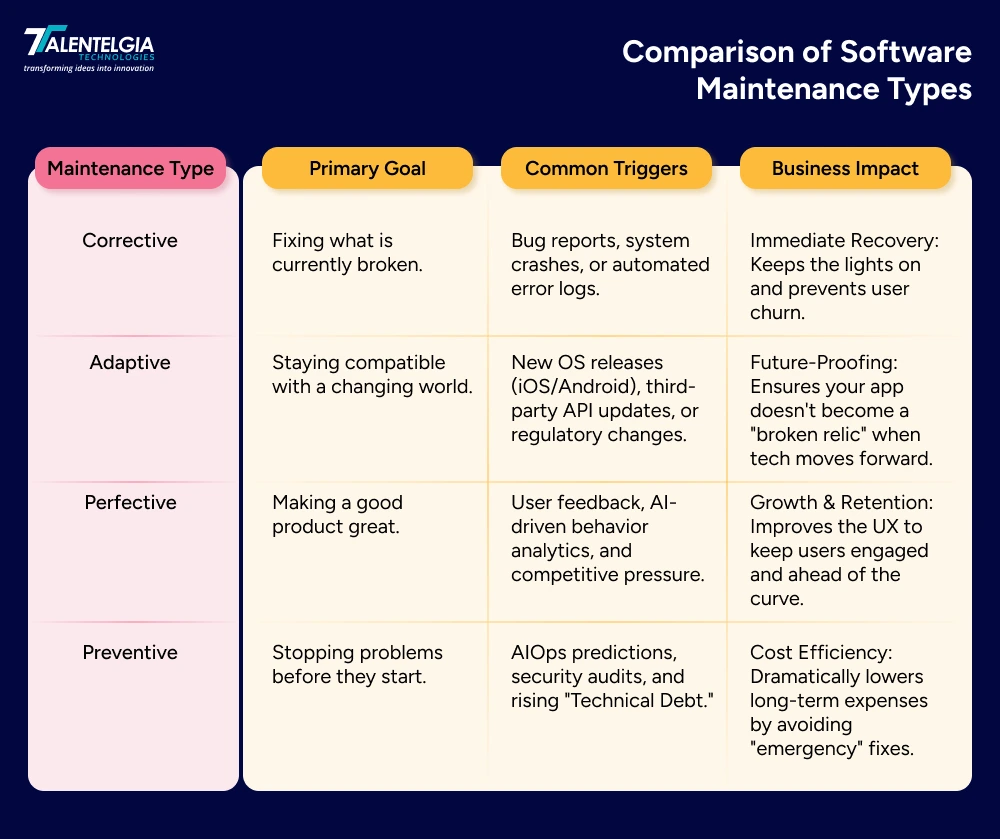
- Corrective Maintenance (The Firefighters): This is the classic “bug fixing.” No matter how much you test, real users will find edge cases. This pillar focuses on patching glitches and restoring functionality when things go sideways.
- Adaptive Maintenance (The Shape-Shifters): Technology never stands still. Adaptive maintenance ensures your app works with the latest browser updates, new hardware (like foldable screens), and updated third-party APIs.
- Perfective Maintenance (The Visionaries): This is about evolution. Based on user feedback and behavior analytics, you refine the UI, add requested features, and optimize the code to make the experience “perfect.”
- Preventive & Predictive Maintenance (The 2026 Edge): Using AIOps (Artificial Intelligence for Operations), this pillar uses data to foresee a crash before it happens. It’s about refactoring “messy” code and optimizing databases to prevent future technical debt.
Critical Components of Software Maintenance
If you want your post-launch phase to be a success, these components must be in your 2026 playbook:
- 24/7 Performance Monitoring: Real-time dashboards (like Datadog or Sentry) that track uptime, load speeds, and server health.
- DevSecOps & Security Patching: Continuous vulnerability scanning to protect against polymorphic malware and sophisticated ransomware.
- User Feedback Loops: A direct pipeline from your customer support tickets to your development backlog.
- Compliance-as-Code: Automatically updating your system to meet shifting global regulations like the EU AI Act or GDPR 3.0.
- Cloud Cost Optimization (FinOps): Ensuring your scaling infrastructure doesn’t eat your entire budget as traffic grows.
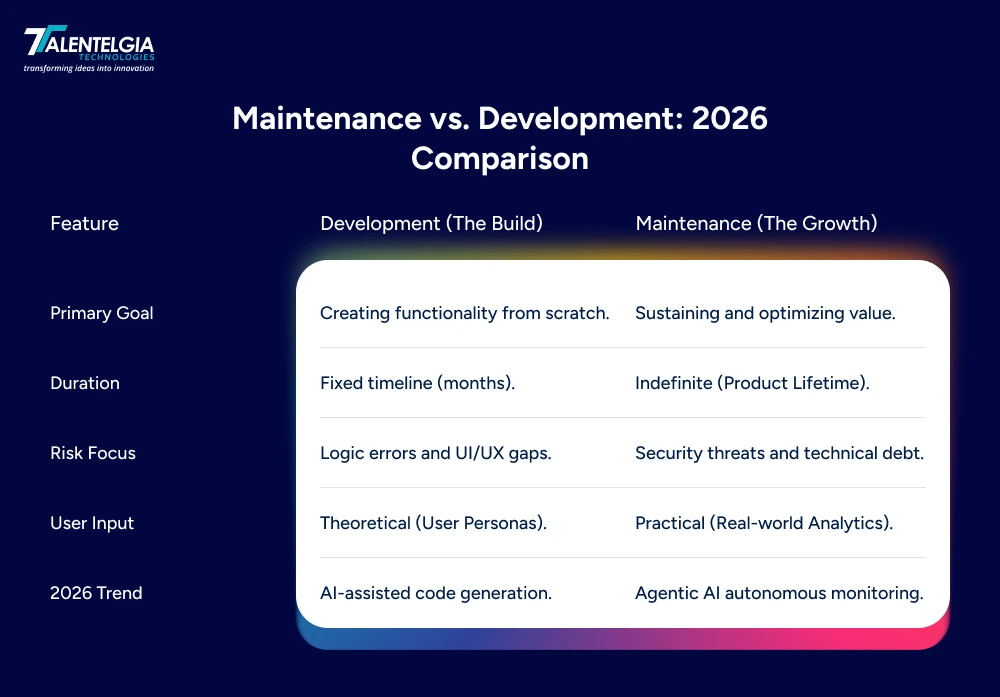
Why Maintenance Is Just As Critical as Development?
Customer engagement is a continuous effort that doesn’t end with the launch of your app. Once your app is out, users will likely report bugs and suggest improvements. Regular improvements, support, and responsiveness to users are crucial to building loyalty. Furthermore, it fosters a positive app environment that consumers will want to use. Frequent updates lead to better trust, lower churn, and longer retention. Retention is the most important factor when considering the cost of acquiring new downloads. Happy users will spread the word, leading to more downloads.
1. Enhancing App Performance and Stability
A “bug-free” launch is a myth. Real-world usage exposes edge cases that even the best QA teams can’t predict. Maintenance ensures that as your user base grows, your app doesn’t slow down or crash.
Users now expect sub-second load times. Continuous performance tuning (optimizing databases and cleaning up code) ensures your app stays snappy. If it lags, users won’t just complain—they’ll delete it.
2. Adapting to Evolving User Needs and Market Trends
Your launch version is based on a “best guess” of what users want. Once they start using the app, their feedback becomes your roadmap.
The Feedback Loop: Maintenance allows you to pivot. Whether it’s adding a “Dark Mode,” integrating a new 2026 payment gateway, or simplifying a checkout process, staying flexible keeps your users engaged. If you don’t evolve with the trends, a leaner competitor will.
3. Ensuring App Security and Data Protection
In 2026, cyber threats are powered by AI, meaning they can find “holes” in your code faster than ever. Security isn’t a one-time setup; it’s a constant battle.
The Digital Shield: Regular maintenance includes “security patching.” Every time a new vulnerability is discovered in a library or framework you use, your maintenance team closes that door before a hacker can walk through it. This protects your data and, more importantly, your brand’s reputation.
4. Driving Long-Term Growth and Competitive Advantage
Software has a “shelf life.” Without maintenance, it quickly turns into “Legacy Tech”—expensive to fix and impossible to update.
The Innovation Engine: By consistently paying down Technical Debt (cleaning up messy, “rushed” code), you keep your app agile. This allows you to launch new features in days rather than months, giving you a massive advantage over competitors who are stuck fighting fires in their old, unmaintained systems.
Challenges In Implementing, Maintaining, & Support & How To Fix Them?
Maintenance sounds simple—until it isn’t. These 5 universal challenges turn post-launch activities into support nightmares. Each challenge gets a reality check with practical fixes that real teams use to escape this phase:
1. The “Quick-Fix” Trap
When things break, it’s tempting to apply a “digital band-aid” just to get back online. While this works for an hour, these tiny shortcuts add up over time, creating a messy foundation known as Technical Debt. Eventually, your software becomes so cluttered with these temporary fixes that it becomes nearly impossible to add new features without breaking something else.
- How to Fix: Follow the “20% Rule.” Dedicate 20% of every update cycle to cleaning up old code and permanentizing those temporary fixes. It’s like tidying your house for 10 minutes a day so you never have to spend an entire weekend deep-cleaning.
2. The “Launch and Leave” Mentality
Many businesses treat a software launch like a finished race, but in 2026, it’s actually the starting line. If you stop investing the moment the app goes live, performance will slowly drop, and small bugs will turn into major crashes. This “set it and forget it” approach is the number one reason why once-great apps eventually fail and lose their users.
- How to Fix: Budget for a “Product Life” rather than a “Project Launch.” Shift your mindset to see maintenance as a continuous journey. Even a small, dedicated monthly “health check” ensures your app stays as fast and reliable as it was on day one.
3. Staying “In Sync” with Technological Evolution
The digital world never sits still. Every few months, Apple and Google release new phone updates, browsers change their rules, and new security threats appear. If your software doesn’t evolve at the same speed as the phones and computers your customers are using, it will eventually stop working or feel “glitched” and outdated.
- How to Fix: Use a “Compatibility Calendar.” Every quarter, have your team test the app against the latest device updates and security standards. Making small, proactive tweaks every few months is much cheaper than a massive “emergency” rebuild when the app suddenly stops working.
4. The Customer Feedback Chaos
Once your app is live, you’ll get a flood of feedback—some users love it, some find bugs, and some want 50 new features. The challenge is knowing what to listen to. If you try to please everyone at once, you’ll end up with a bloated, confusing app that does too many things poorly instead of one thing perfectly.
- How to Fix: Use a “Priority Filter.” Group feedback into three buckets: Critical Fixes (things that are broken), Big Wins (features many people want), and Nice-to-Haves. Focus on the “Critical” first, then the “Big Wins,” and politely ignore the rest to keep your app simple and focused.
5. Hidden Costs of Growing Fast
Success is great, but it can be expensive. As more people use your app, your server costs and data needs go up. Many businesses are surprised by a “success tax”—a massive server bill they didn’t plan for. Without a scaling plan, your maintenance costs can grow faster than your profits, making your successful app a financial burden.
- How to Fix: Implement “Smart Scaling.” Regularly review your cloud and server subscriptions to ensure you aren’t paying for extra space you aren’t using. By using tools that grow with you, you ensure that your costs only go up when your user base (and revenue) does.
Conclusion
In short, the work doesn't stop when an app is launched, and cross platform app development companies like Talentelgia Technologies provide post-launch support that focuses on revision and enhancement of the app's overall experience. In order to maintain app relevance, user satisfaction, and adapt to the markets, consistent app updates are needed. Post-launch support allows the app to sustain competitive advantages and ultimately increase usefulness and relevance to the users.
Keeping an app updated is the digital equivalent of keeping an engine's oil changed; regardless of the usage, the app's health, relevance, and user satisfaction will improve and keep the engine running smoothly.











 Write us on:
  Business queries:
  HR:
HR: 


