


 Healthcare App Development Services
 Real Estate Web Development Services
 E-Commerce App Development Services
 E-Commerce Web Development Services
 Blockchain E-commerce Development Company
 Fintech App Development Services
 Fintech Web Development
 Blockchain Fintech Development Company
 E-Learning App Development Services
 Restaurant App Development Company
 Mobile Game Development Company
 Travel App Development Company
 Automotive Web Design
 AI Traffic Management System
 AI Inventory Management Software
 AI Development Company
  ChatGPT integration services
  AI Integration Services
  Generative AI Development Services
  Natural Language Processing Company
 Machine Learning Development
  Machine learning consulting services
  Blockchain Development
  Blockchain Software Development
  Smart Contract Development Company
  NFT Marketplace Development Services
  Asset Tokenization Company
 DeFi Wallet Development Company
 Mobile App Development
  IOS App Development
  Android App Development
  Cross-Platform App Development
  Augmented Reality (AR) App Development
  Virtual Reality (VR) App Development
  Web App Development
  SaaS App Development
 Flutter
  React Native
  Swift (IOS)
  Kotlin (Android)
  Mean Stack Development
  AngularJS Development
  MongoDB Development
  Nodejs Development
  Database Development
 Ruby on Rails Development
 Expressjs Development
  Full Stack Development
  Web Development Services
  Laravel Development
  LAMP Development
  Custom PHP Development
  .Net Development
  User Experience Design Services
  User Interface Design Services
  Automated Testing
  Manual Testing
  Digital Marketing Services
 Ride-Sharing And Taxi Services
 Food Delivery Services
 Grocery Delivery Services
 Transportation And Logistics
 Car Wash App
 Home Services App
 ERP Development Services
 CMS Development Services
 LMS Development
 CRM Development
 DevOps Development Services
 AI Business Solutions
 AI Cloud Solutions
 AI Chatbot Development
 API Development
 Blockchain Product Development
 Cryptocurrency Wallet Development
 About Talentelgia
  Our Team
  Our Culture
 Healthcare App Development Services
 Real Estate Web Development Services
 E-Commerce App Development Services
 E-Commerce Web Development Services
 Blockchain E-commerce
Development Company
Blockchain E-commerce
Development Company Fintech App Development Services
 Finance Web Development
 Blockchain Fintech
Development Company
Blockchain Fintech
Development Company E-Learning App Development Services
 Restaurant App Development Company
 Mobile Game Development Company
 Travel App Development Company
 Automotive Web Design
 AI Traffic Management System
 AI Inventory Management Software
 AI Development Company
 ChatGPT integration services
 AI Integration Services
 Machine Learning Development
 Machine learning consulting services
 Blockchain Development
 Blockchain Software Development
 Smart contract development company
 NFT marketplace development services
 IOS App Development
 Android App Development
 Cross-Platform App Development
 Augmented Reality (AR) App
Development
Augmented Reality (AR) App
Development Virtual Reality (VR) App Development
 Web App Development
 Flutter
 React
Native
React
Native Swift
(IOS)
Swift
(IOS) Kotlin (Android)
 MEAN Stack Development
 AngularJS Development
 MongoDB Development
 Nodejs Development
 Database development services
 Ruby on Rails Development services
 Expressjs Development
 Full Stack Development
 Web Development Services
 Laravel Development
 LAMP
Development
LAMP
Development Custom PHP Development
 User Experience Design Services
 User Interface Design Services
 Automated Testing
 Manual
Testing
Manual
Testing About Talentelgia
 Our Team
 Our Culture
When an organization purchases shiny new software, the focus is often about what it can do: reduce business friction, improve productivity, automation, improved security, faster time-to-market and/or digital transformation. The flip-side of the cost/benefit equation– what the software will really cost the organization, and not just in sticker price– might not be as exciting when it comes to securing approval for buying the software. But it is equally important in predicting the return on any investment made in enterprise software.
After all, if you can’t accurately forecast or calculate your Total Cost of Ownership (TCO) for a software implementation project over the entire lifecycle of the product, then what foundation do you have to base your decision on, particularly for buying IT products or services? The harsh reality: Capterra’s 2025 research shows 57% of software buyers regret purchases – 34% blame hidden expenses that explode beyond sticker price– like administration, training, integrations, customizations, and downtime costs that dwarf the sticker price. TCO for software isn’t optional accounting homework; it’s your competitive edge that separates smart buyers from expensive lessons.
What exactly is TCO?
At its simplest, Total Cost of Ownership (TCO) for software is the sum of every single dollar you will spend on a piece of software from the day you start looking at it to the day you finally turn it off. In the software world, we often use the “Iceberg Analogy.” The tip of the iceberg—the part you see—is the purchase price or the monthly subscription. But the massive chunk hidden underwater represents the costs of implementation, customization, user training, and long-term support.
In particular, many of the costs of ERP systems depend on how the customer chooses to host the software. There are generally three options, each with dramatically different financial fingerprints:
- On-Premise (The “DIY” Route): You host the software on your own servers in your own office. This usually means a huge upfront cost for hardware and a dedicated IT team to keep it running. Your TCO is high at the start, but you have total control.
- Cloud/SaaS (The “Rental” Route): You pay a monthly fee to access the software over the internet. The provider handles all the “boring” stuff like server maintenance and security. This makes your TCO predictable and easy to budget, though costs can grow as you add more users.
- Hybrid (The “Mixed” Route): You keep your most sensitive data on your own servers but use the cloud for everything else. This offers the best of both worlds but often has a “Complexity Tax” because you have to pay to keep two different systems talking to each other.
Total Cost of Ownership (TCO) Formula
The most accurate way to calculate the Total Cost of Ownership is to look at the entire lifespan of the software (typically a 3-year or 5-year window).
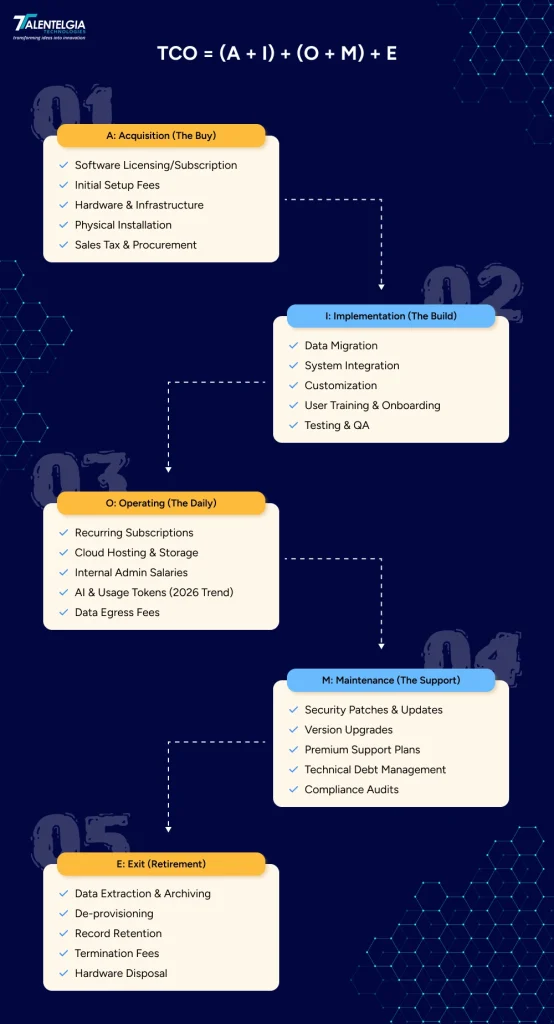
The formula is:
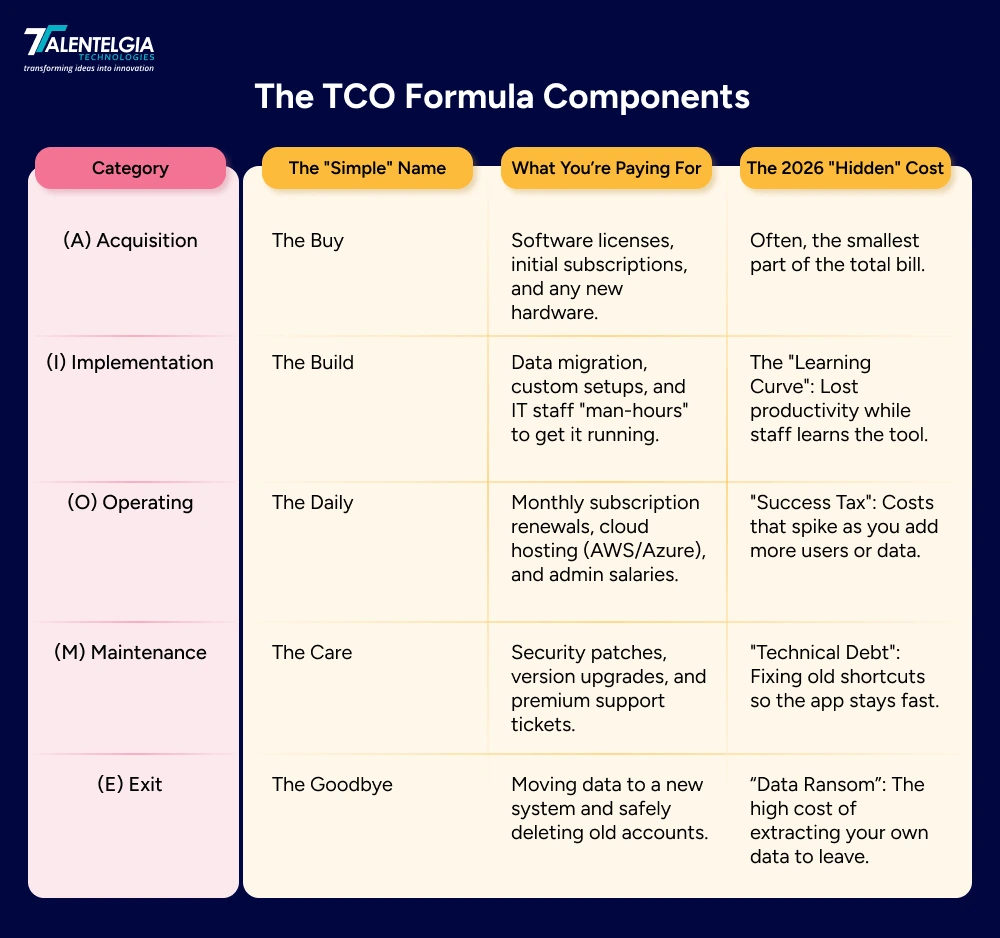
Breaking Down The Variables
1. (A) Acquisition Costs: The Initial “Buy”
This is the “sticker price” you see on the website or contract. It’s the easiest to calculate but often represents the smallest piece of the pie.
- Includes: Software license fees, initial subscription costs, and any required hardware or server purchases.
2. (I) Implementation Costs: The “Build”
Before the software is useful, it has to be integrated into your business. This is where many budgets fail because they underestimate the “man-hours” required.
- Includes: Data migration (moving files from the old system), custom coding to make the software fit your workflow, and the cost of the IT team’s time during the rollout.
3. (O) Operating Costs: The “Daily Drive”
These are the recurring expenses required to keep the software running every single day. In 2026, this often includes “usage-based” costs.
- Includes: Monthly/annual subscription renewals, cloud hosting fees (like AWS or Azure), and the salaries of the internal admins who manage the system.
4. (M) Maintenance & Support Costs: The “Care”
Software is like a living thing—it needs regular check-ups to stay healthy, secure, and compatible with new technology.
- Includes: Security patches to prevent hacks, version upgrades to get new features, and premium support plans for when things inevitably go wrong.
5. (E) Exit & Retirement Costs: The “Goodbye”
Eventually, you will move on to a newer tool. In 2026, “breaking up” with your software isn’t free.
- Includes: De-provisioning user accounts, safely archiving data to meet legal requirements, and the cost of extracting that data to move it to your next platform.
Why Does TCO Matter In 2026?
TCO allows leaders to take a broader view of the costs or benefits of a purchase, which leads to a stronger understanding of the long-term value. The advantages of using TCO methodologies are:
1. Improved Asset Management
TCO provides a bird’s-eye view of your entire “Software Inventory.” It helps you track the full lifecycle of every tool—from the day you install it to the day it becomes “Legacy Tech.” By knowing the total cost, you can identify which tools are still providing value and which ones are simply taking up digital shelf space.
2. Informed Decision Making
Choosing custom software based on the “sticker price” is a recipe for disaster. TCO allows you to make data-backed choices between competing products. It answers the hard questions: Is it cheaper to build this in-house or subscribe to a service? Or should we pay more upfront for a “plug-and-play” tool to save on setup hours later?
3. Accurate Financial Budgeting
Nothing kills a department’s credibility like asking for an emergency “integration budget” six months after a purchase. TCO eliminates financial surprises by forecasting costs over a 3-to-5-year window. This predictability makes the CFO happy and ensures you have the funds needed for long-term support and updates.
4. Continuous Cost Optimization
Once you see the “hidden” costs—like underused licenses or high cloud storage fees—you can start trimming the fat. TCO reveals where you are overpaying, allowing you to consolidate tools and negotiate better rates. In 2026, “Cost Optimization” is the difference between a profitable year and a wasteful one.
5. Robust Risk Management
A “cheap” software choice often carries high risks, such as frequent downtime or weak security. TCO forces you to put a price tag on these risks. By including the costs of cybersecurity insurance, compliance audits (like GDPR 3.0), and the potential revenue lost during a system crash, you get a true picture of the “Price of Risk.”
6. Transparent Vendor Evaluation
TCO creates a “Level Playing Field” for comparing vendors. Vendor A might have a $10/user fee, while Vendor B has a $15/user fee. However, if Vendor A charges extra for “Premium Support” and “API Access,” TCO will show that Vendor B is actually the more economical partner in the long run.
Key Factors Influencing the Total Cost of Ownership Maintenance Software
These are the six “Ghost Costs” that determine whether your software investment stays profitable or becomes a money pit.
1. Initial Acquisition Costs
This is your entry fee. It includes the software license, the initial subscription, any new hardware (like servers or laptops), and the legal fees spent vetting the vendor. It’s the most visible cost, but usually the smallest.
2. Operating Costs
These are the “daily drive” expenses. Think of monthly cloud hosting fees (AWS/Azure), power and cooling for on-site servers, and the salaries of the IT staff who manage the tool every day. In 2026, this also includes “AI token” usage fees.
3. Maintenance Costs
Software is like a car—it needs oil changes. Maintenance covers security patches to prevent hacks, version upgrades to keep things modern, and premium support plans for when the system inevitably glitches.
4. Training Costs
A tool is only useful if people know how to use it. This factor includes the cost of workshops, onboarding sessions, and the “productivity dip”—the lost work time while your team is climbing the learning curve.
5. Downtime Costs
This is the “Hidden Killer.” When your software crashes, you lose revenue, employee productivity stops, and your brand reputation takes a hit. In 2026, the cost of just one hour of downtime can often exceed the entire yearly license fee.
6. Disposal Costs
Breaking up is hard (and expensive). When you move to a new tool, you have to pay to extract your data, archive old records for legal reasons, and securely wipe your old servers. Many SaaS contracts also have “early exit” fees hidden in the fine print.
Steps to Calculate the Total Cost of Ownership (TCO) Software
Software TCO is a very crucial phase that entails estimating all the costs incurred for building, maintaining, and scaling the product through its lifecycle.
For a breakdown of the methodology step by step, focusing on how the CTO’s role and responsibilities shift during different stages from MVP to scaling through hypergrowth, read here.
1. Scope Determination
Before you spend a dime, you need to decide exactly what the software will do—and what it won’t do. If you don’t set clear boundaries early, you’ll face “Scope Creep,” where the project keeps growing and getting more expensive.
2. Infrastructure & Technology Selection
This is where you decide where your software will live. Choosing between Cloud (SaaS), On-Premise, or a Hybrid model completely changes your TCO.
3. Development & Maintenance Costs
This is the combination of the initial construction and the “oil changes” needed later.
- The Build: The cost of designers, developers, and testers to launch the app.
- The Care: Ongoing costs like bug fixes, small feature updates, and technical support. In 2026, you should also include AI Usage Fees if your app uses automated assistants.
4. Security & Compliance Costs
In 2026, staying safe is a major part of your budget. You have to protect user data from hackers and stay on the right side of the law.
5. Monitoring & Optimization
Once the software is live, you need to watch how it performs. “Monitoring” tells you if something is broken, while “Optimization” helps you find ways to save money.
Conclusion
Understanding the total cost of ownership of a software can help you make better-informed decisions on which content platform is right for your business now and down the road. But what do you do once you’ve found the perfect platform and are ready to pull the trigger?

Now, it’s time for the migration to your new software platform. But if you're going to migrate, you'll need to get your hands around the actual cost of migration. Contact our technical team for more info.










 Write us on:
  Business queries:
  HR:
HR: 


