



 Healthcare Software Development Services
 Healthcare App Development Services
 Real Estate Web Development Services
 Real Estate App Development Company
 E-Commerce App Development Services
 E-Commerce Web Development Services
 Blockchain E-commerce Development Company
 Fintech Software Development
 Fintech App Development Services
 E-Learning App Development Services
 Restaurant App Development Company
 Mobile Game Development Company
 Travel App Development Company
 Automotive Web Design
 AI Traffic Management System
 AI Inventory Management Software
 Logistics App Development Services
 Machine Learning Development
 ChatGPT integration services
  AI Development Company
  AI Integration Services
  Natural Language Processing Company
 Mobile App Development
  IOS App Development
  Android App Development
  Cross-Platform App Development
  Augmented Reality (AR) App Development
  Virtual Reality (VR) App Development
  Web App Development
  SaaS App Development
 Custom Software Development Services
  Flutter
  React Native
  Swift (IOS)
  Kotlin (Android)
  Mean Stack Development
  AngularJS Development
  MongoDB Development
  Nodejs Development
  Database Development
 Ruby on Rails Development
 Expressjs Development
  Full Stack Development
  Web Development Services
  Laravel Development
  LAMP Development
  Custom PHP Development
  .Net Development
  User Experience Design Services
  User Interface Design Services
  Automated Testing
  Manual Testing
  Digital Marketing Services
 Ride-Sharing And Taxi Services
 Food Delivery Services
 Grocery Delivery Services
 Transportation And Logistics
 Car Wash App
 Home Services App
 ERP Development Services
 CMS Development Services
 LMS Development
 CRM Development
 DevOps Development Services
 AI Business Solutions
 AI Cloud Solutions
 AI Chatbot Development
 API Development
 Blockchain Product Development
 Cryptocurrency Wallet Development
 About Talentelgia
  Our Team
  Our Culture
 Healthcare App Development Services
 Real Estate Web Development Services
 E-Commerce App Development Services
 E-Commerce Web Development Services
 Blockchain E-commerce
Development Company
Blockchain E-commerce
Development Company Fintech App Development Services
 Blockchain Fintech
Development Company
Blockchain Fintech
Development Company E-Learning App Development Services
 Restaurant App Development Company
 Mobile Game Development Company
 Travel App Development Company
 AI Traffic Management System
 AI Inventory Management Software
 AI Development Company
 ChatGPT integration services
 AI Integration Services
 Machine Learning Development
 Machine learning consulting services
 Blockchain Development
 Blockchain Software Development
 Smart contract development company
 NFT marketplace development services
 Asset tokenization companies
 DeFi Wallet Development Company
 IOS App Development
 Android App Development
 Cross-Platform App Development
 Augmented Reality (AR) App
Development
Augmented Reality (AR) App
Development Virtual Reality (VR) App Development
 Web App Development
 Flutter
 React
Native
React
Native Swift
(IOS)
Swift
(IOS) Kotlin (Android)
 MEAN Stack Development
 AngularJS Development
 MongoDB Development
 Nodejs Development
 Database development services
 Expressjs Development
 Full Stack Development
 Web Development Services
 Laravel Development
 LAMP
Development
LAMP
Development Custom PHP Development
 User Experience Design Services
 User Interface Design Services
 Automated Testing
 Manual
Testing
Manual
Testing About Talentelgia
 Our Team
 Our Culture

A three-second page load delay costs a site nearly 40% of its visitors, and that’s before anyone reads a word of content. Google now factors load speed, interaction responsiveness, and visual stability directly into search rankings through Core Web Vitals. And sites that miss these thresholds lose visibility regardless of how good the content is. Accessibility compliance has also moved from optional to legally enforced across the US and EU.
None of this is new information. Performance, security, accessibility, and clean architecture have been part of good development for years. What’s different is that skipping them now shows up faster and costs more in terms of rankings, compliance risk, and users who leave and don’t come back.
This piece covers what web standards actually are, who defines them, and the web development best practices that separate sites built to hold up under real traffic from ones that break the moment they get any.
What Are Web Standards?
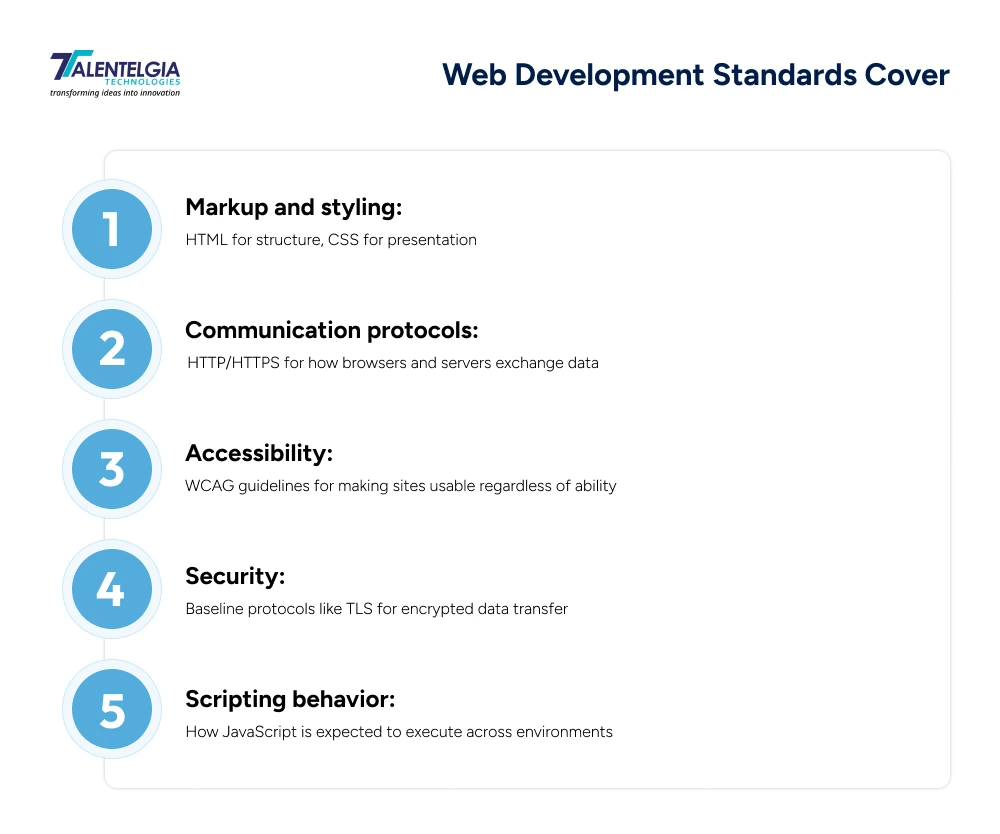
Web standards refer to the technical rules governing how web browsers, servers, and computer programs are meant to function. It’s like the shared rulebook that keeps a site built in one country rendering correctly on a browser built in another. Without them, every browser would interpret HTML and CSS differently, and nothing on the web would work predictably.
What are Web Development Best Practices?
Best practices build on top of these standards; they’re the informed choices developers make within that rulebook to build something fast, secure, and maintainable, not just technically compliant.
These are the guidelines teams actually rely on to keep a site running well past launch day, fast enough to hold attention, secure enough to survive an attack attempt, built to grow without a full rebuild eighteen months in.
Most Important Web Development Best Practices
1. Define Scope Before Writing a Single Line of Code
Most failed projects don’t fail during development. They fail during planning, or more accurately, during the planning that never happened. Before a stack is chosen or a wireframe is drawn, a team needs to agree on:
- What the site or app is actually supposed to do.
- Who it’s built for, and what their workflow looks like.
- What success is measured against: traffic, conversions, onboarding time, support tickets reduced.
- Which existing systems it has to integrate with (CRM, payment gateways, internal tools).
Skip this step, and features get bolted on mid-build, timelines slip, and the final product drifts from whatever business goal justified it in the first place. Discovery work is cheap. Rebuilding six months in is not.
2. Design Mobile-First, Not Mobile-Adjusted
Over 60 percent of all internet traffic comes from phone screens, and Google indexes the mobile website before the desktop one. Desktop-first designs with subsequent optimization almost inevitably end up in some kind of compromise in terms of too small tap targets, hidden navigation, or pinch-to-zoom.
Mobile-first design changes the process order – everything starts with the smallest screen and then is enhanced for tablets and desktops.
3. Hit Core Web Vitals, Not Just “Feels Fast”
Page speed used to be a vague quality signal. Now it’s measured, scored, and tied directly to search ranking. Google’s three benchmarks:
- LCP (Largest Contentful Paint) – under 2.5 seconds
- INP (Interaction to Next Paint) – under 200 milliseconds
- CLS (Cumulative Layout Shift) – below 0.1
Arriving there entails techniques such as lazy-loading of images, code splitting, CDN distribution, asset compression, and removal of unnecessary JavaScript. The stakes here are high because even a single second of delayed load time might translate into losses from potential visitors that are unlikely to wait for improvements.
4. Build Security In, Don’t Bolt It On
Security bolted on right before launch is usually security that doesn’t hold. By then the APIs are already built, the third-party integrations are already wired in, and every one of those connections is a door nobody’s checked the lock on. Getting this right means thinking about it from day one, not week twelve:
- Validating and sanitizing every input server-side.
- Enforcing HTTPS and secure headers across the board.
- Running dependency scanning as a standing pipeline step, not a one-off.
- Following OWASP’s guidance on the most common attack vectors, including broken access control and supply-chain vulnerabilities.
The cost math is lopsided. Preventing a vulnerability during development is a code review. Fixing it after a breach is a PR crisis, a legal review, and a much larger invoice.
5. Make Accessibility a Starting Point, Not a Patch
Accessibility standard WCAG 2.2 AA should be the bare minimum you are designing to; it’s certainly not the level of accessibility that comes after receiving a complaint. You’ll need fully accessible semantic HTML, functional keyboard navigation, enough color contrast, and interactive features that aren’t dependent on dragging alone.
This is not only about being compliant but, more than ever, about being able to enforce accessibility in both the United States and Europe. An accessible site tends to be a more usable one across the board: clearer structure, more predictable interactions, fewer dead ends for every visitor, disability or not.
6. Keep Architecture Modular
A site that runs fine for a thousand visitors can completely fall over at a hundred thousand if the underlying system wasn’t built to grow. Scalable architecture means the system can absorb growth without a ground-up rewrite. In practice, that looks like:
- Separating frontend and backend concerns cleanly
- Designing APIs before the features that consume them
- Choosing modular monoliths over premature microservices for most mid-sized teams
- Planning for traffic spikes and integration growth from day one, not after the first outage
The teams that get burned here usually adopted complexity too early, or postponed structure until the codebase was already too tangled to fix cheaply.
7. Build SEO Into the Architecture, Not Just the Content
SEO used to mean stuffing in the right keywords and writing a good meta description. Now it starts with how the site is built: clean URLs, pages search engines can actually read without extra JavaScript getting in the way, and structured data (schema markup) that helps search engines understand your content.
There’s also a newer piece to think about: AI search. Tools like ChatGPT and Google’s AI Overviews now answer questions directly, often without sending the user to a website at all. Content written in clear, well-organized sections is more likely to be pulled into those AI answers.
Also Read: AI In SEO: Understanding The Fundamentals
8. Automate Testing and Deployment
Manual deployments are slow and leave room for human error at the worst possible moment. A mature CI/CD pipeline runs automated tests on every change before it reaches production, catching bugs while they’re still cheap to fix rather than after users find them.
Strong pipelines typically include automated testing across unit, integration, and end-to-end levels, staged rollouts with rollback ready if something breaks, and consistent monitoring once code ships. Teams that track this maturity often look at deployment frequency and mean time to recovery as real indicators of how healthy their delivery process actually is, not just how fast they can push code.
Building this in-house takes time most teams don’t have, which is why many opt for dedicated automated testing services instead, getting the same coverage and rigor without diverting developers away from actual feature work.
Who Sets Web Development Standards?
“The Standards” do not belong to a singular organization. They are a combination of formal organizations and industry consensus.
- The World Wide Web Consortium (W3C) is responsible for the standards of HTML, CSS, and accessibility standards, such as WCAG.
- The Internet Engineering Task Force (IETF) is responsible for the basic internet protocols such as HTTP/HTTPS.
- Open Web Application Security Project (OWASP) publishes the vulnerability guidelines most development teams build against, including the widely referenced OWASP Top 10.
There are also countless organizations and engineering groups at firms such as Google and Mozilla that are constantly shaping the definition of what is considered good without being part of any formal standardization process. This is often exactly where new web development trends start before they eventually harden into a standard.
Who Should Follow These Web Development Best Practices
This guide is written for:
- Founders and business owners evaluating a development vendor or trying to understand what they’re actually paying for.
- Product and marketing teams who work closely with developers but don’t write code themselves.
- Junior developers who know how to build but haven’t yet seen why these practices matter once something goes live.
- Senior engineers looking for a shared reference to align teams and stakeholders around.
Conclusion
None of these web development best practices work in isolation. A fast site with no security is a liability. An accessible site built on architecture that can’t scale just delays the same problem. That’s the part most guides skip. These aren’t seven separate boxes to check; they’re one system, and skipping any of them puts pressure on the rest.
The web standards covered earlier exist so browsers and devices behave predictably. Best practices are what a team does inside that structure to build something that actually holds up, under real traffic, real attackers, and real users who leave the second something feels slow or broken.
Get the fundamentals right early, and everything built after them gets easier, not harder. And if you’re planning a build and want these principles handled right from day one, our web development services at Talentelgia Technologies are built around exactly this.
Frequently Asked Questions (FAQs)
Is mobile-first design still necessary in 2026?
Yes. Over 60% of global web traffic comes from phones, and Google indexes the mobile version of a site before desktop. Designing for the smallest screen first, then scaling up, avoids the compromises that come from retrofitting a desktop-first layout for mobile.
What is the WCAG accessibility standard, and is it legally required?
WCAG (Web Content Accessibility Guidelines) sets the benchmark for making sites usable regardless of ability. WCAG 2.2 AA is the current baseline most teams build against. Enforcement has tightened across the US and EU, making accessibility a legal requirement, not just good practice.
How does AI search change SEO best practices?
Tools like ChatGPT and Google's AI Overviews now answer questions directly, often without sending users to a website. Content structured in clear, well-organized sections with direct answers and FAQ formatting has a better chance of being pulled into those AI-generated responses.
What happens if a website doesn’t follow security best practices?
Unaddressed vulnerabilities like unvalidated inputs or unpatched dependencies become entry points for attackers. A breach costs far more than prevention: incident response, legal review, reputational damage, and lost user trust, on top of the technical fix itself.
How often should a website be tested and maintained after launch?
Launch isn't the finish line. Dependencies need regular updates, security patches should be applied as soon as they're released, and performance should be monitored continuously, not just checked during periodic audits, to catch issues before users do.













 Sales Enquiries:
  Business queries:
  HR:
HR: 


