



 Healthcare Software Development Services
 Healthcare App Development Services
 Real Estate Web Development Services
 Real Estate App Development Company
 E-Commerce App Development Services
 E-Commerce Web Development Services
 Blockchain E-commerce Development Company
 Fintech Software Development
 Fintech App Development Services
 E-Learning App Development Services
 Restaurant App Development Company
 Mobile Game Development Company
 Travel App Development Company
 Automotive Web Design
 AI Traffic Management System
 AI Inventory Management Software
 Logistics App Development Services
 Machine Learning Development
 ChatGPT integration services
  AI Development Company
  AI Integration Services
  Natural Language Processing Company
 Mobile App Development
  IOS App Development
  Android App Development
  Cross-Platform App Development
  Augmented Reality (AR) App Development
  Virtual Reality (VR) App Development
  Web App Development
  SaaS App Development
 Custom Software Development Services
  Flutter
  React Native
  Swift (IOS)
  Kotlin (Android)
  Mean Stack Development
  AngularJS Development
  MongoDB Development
  Nodejs Development
  Database Development
 Ruby on Rails Development
 Expressjs Development
  Full Stack Development
  Web Development Services
  Laravel Development
  LAMP Development
  Custom PHP Development
  .Net Development
  User Experience Design Services
  User Interface Design Services
  Automated Testing
  Manual Testing
  Digital Marketing Services
 Ride-Sharing And Taxi Services
 Food Delivery Services
 Grocery Delivery Services
 Transportation And Logistics
 Car Wash App
 Home Services App
 ERP Development Services
 CMS Development Services
 LMS Development
 CRM Development
 DevOps Development Services
 AI Business Solutions
 AI Cloud Solutions
 AI Chatbot Development
 API Development
 Blockchain Product Development
 Cryptocurrency Wallet Development
 About Talentelgia
  Our Team
  Our Culture
 Healthcare App Development Services
 Real Estate Web Development Services
 E-Commerce App Development Services
 E-Commerce Web Development Services
 Blockchain E-commerce
Development Company
Blockchain E-commerce
Development Company Fintech App Development Services
 Blockchain Fintech
Development Company
Blockchain Fintech
Development Company E-Learning App Development Services
 Restaurant App Development Company
 Mobile Game Development Company
 Travel App Development Company
 AI Traffic Management System
 AI Inventory Management Software
 AI Development Company
 ChatGPT integration services
 AI Integration Services
 Machine Learning Development
 Machine learning consulting services
 Blockchain Development
 Blockchain Software Development
 Smart contract development company
 NFT marketplace development services
 Asset tokenization companies
 DeFi Wallet Development Company
 IOS App Development
 Android App Development
 Cross-Platform App Development
 Augmented Reality (AR) App
Development
Augmented Reality (AR) App
Development Virtual Reality (VR) App Development
 Web App Development
 Flutter
 React
Native
React
Native Swift
(IOS)
Swift
(IOS) Kotlin (Android)
 MEAN Stack Development
 AngularJS Development
 MongoDB Development
 Nodejs Development
 Database development services
 Expressjs Development
 Full Stack Development
 Web Development Services
 Laravel Development
 LAMP
Development
LAMP
Development Custom PHP Development
 User Experience Design Services
 User Interface Design Services
 Automated Testing
 Manual
Testing
Manual
Testing About Talentelgia
 Our Team
 Our Culture
One of the most process-driven functions in any company is sales pipeline management. Leads come in from multiple channels, need to be qualified, assigned, followed up with, and tracked through every stage of the buying journey, all in real time. That process, when run manually, is slow, unreliable and resource-intensive. And that is how you miss things. Response times suffer. Conversion rates reflect it. This inconsistency can be mitigated by automating your sales pipeline.
n8n is an open-source workflow automation tool to connect your lead sources together, assign incoming prospects, trigger follow-up sequences, and update your pipeline status without any effort on your part! Google Sheets is the core of your data layer. It holds, categorizes, and presents each lead in a system that is accessible to everyone on your team and allows for action in actual time. In combination, these mimic the basic functions of a CRM at minimal cost, where you have total control over your pipeline structure and management. This guide elaborates on how to build that system the right way, from lead capture through reporting, so your sales operation can function at the speed and consistency that manual management simply cannot provide.
What Is Sales Pipeline Automation?
Sales pipeline automation is the use of technology to handle the repetitive, operational tasks that move a lead through your sales process, without your team having to do it manually at every step.
The logic of it is rather simple. When a certain action occurs, a pre-set response triggers automatically.
What it actually covers:
- Lead capture — getting prospects from forms, ads, emails and other streams into one system
- Lead assignment — directing a lead to the correct rep depending on the territory
- Follow-up scheduling — triggering reminders and outreach sequences automatically
- Stage updates — moving deals through the pipeline based on rep activity or prospect behavior
- Notifications — alerting the right people when something needs attention
- Reporting — generating pipeline summaries and performance data without manual compilation
What it isn’t:
Automation doesn’t replace your sales team or the relationship-building that actually closes deals. It handles the process so your reps can focus on the conversations. The goal is to automate the workflow, not the human interaction.
Why Use n8n + Google Sheets for Sales Pipeline Automation?
Many organizations assume automation requires expensive CRM platforms or complex engineering setups. However, n8n combined with Google Sheets provides a lightweight and flexible alternative that works exceptionally well for growing teams.
n8n: A Powerful Workflow Automation Tool
n8n is an open-source automation platform that allows businesses to connect apps, APIs, and services together without heavy coding requirements. It enables teams to design workflows that automatically perform tasks based on triggers and conditions.
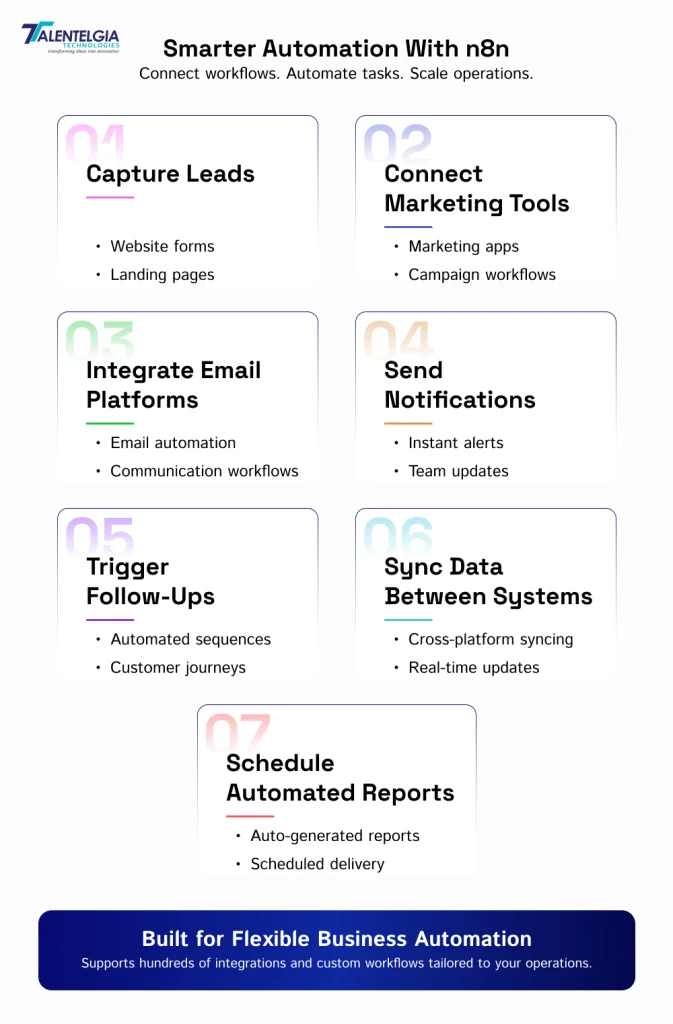
With n8n, you can:
- Capture leads from websites
- Connect marketing tools
- Integrate email platforms
- Send notifications
- Trigger follow-up sequences
- Sync data between systems
- Schedule automated reports
Because it supports hundreds of integrations and custom workflows, it can adapt easily to your business needs.
Google Sheets: A Simple Yet Effective Data Hub
Google Sheets is a centralised database where all lead data can be stored, updated, and analysed as you go.
It is especially useful because:
- Teams already know how to use it
- It supports collaboration
- It works in real time
- It integrates easily with automation tools
- It requires no technical setup
- It is cost-effective
Together, n8n and Google Sheets create a flexible pipeline automation system similar to a lightweight CRM.
Common Sales Challenges Solved by Automation
Before automation, most sales teams operated with the same set of problems. Some are obvious. Most are quietly draining revenue in the background. Let us talk about them in detail:
- One of the biggest issues is missed follow-ups. When reminders are handled manually, sales representatives often forget to reconnect with prospects. This leads to lost opportunities.
- Another challenge is scattered lead data. Leads may exist across multiple sources like spreadsheets, emails, CRM exports, or WhatsApp conversations, making tracking difficult.
- Manually building pipeline reports takes data from multiple sources and often becomes outdated by the time it’s used.
- Managers struggle to see which leads are active, which deals are progressing, and which opportunities are stuck.
How Sales Pipeline Automation Works Using n8n + Google Sheets
Let’s talk about how a typical automated workflow operates from start to finish.
Step 1: Lead Capture from Multiple Sources
Leads come to your system from a variety of sources like:
- Website contact forms
- Landing pages
- Social media ads
- Chatbots
- Email campaigns
- Third-party lead platforms
n8n detects these incoming leads automatically with the help of triggers connected to these platforms.
Step 2: Data Validation and Structuring
Raw data is usually messy. People might enter incomplete emails, leave certain details blank, and sometimes even fill out the same form twice. So, before n8n stores any lead, it first verifies whether the information from the leads is complete and formatted properly.
For example:
- Email addresses are checked for accurate formatting
- Phone numbers are standardized
- Duplicate leads are filtered
- Required fields are validated
It is a much needed step. If you skip it, it means your team will end up wasting time on contacts with wrong numbers or working on duplicate leads without realizing it. Clean data ensures there is zero wasted effort.
Step 3: Automatic Entry into Google Sheets
After validation, the lead information is inserted into a structured Google Sheet.
Each new row represents a lead and contains fields such as:
- Name
- Phone number
- Lead source
- Status
- Assigned representative
- Follow-up date
This creates a centralized dashboard where the entire team can monitor pipeline activity.
Step 4: Lead Assignment to Sales Representatives
n8n can automatically assign leads based on predefined conditions such as:
- Geographic region
- Product category
- Campaign source
- Team availability
- Lead priority level
This eliminates manual distribution and ensures faster response times.
Step 5: Automatic Follow-Up Scheduling
Most of the deals do not close in the very first contact. Research proves that it takes multiple touchpoints to convert a lead into a customer. Yet, follow-ups are where most sales processes break down completely. Automation solves this by:
- Scheduling reminders
- Triggering email sequences
- Notifying sales representatives
- Updating follow-up dates
In this way, every lead gets consistent attention on a structured timeline, no matter how busy the team is or how many more deals are there in progress.
Step 6: Status Tracking Across Pipeline Stages
As leads move through the pipeline, their status can automatically update.
Typical pipeline stages include:
- New Lead
- Contacted
- Qualified
- Proposal Sent
- Negotiation
- Won
- Lost
These updates allow teams to quickly understand deal progress without reviewing individual conversations.
Step 7: Real-Time Notifications for Sales Teams
n8n can send instant alerts when important actions occur.
Examples include:
- New lead received
- Follow-up overdue
- Deal status changed
- Proposal accepted
- Lead inactive for too long
These notifications can be sent directly via email, Slack, WhatsApp, or internal dashboards. It all depends on where your team actually works. There is no need to log in to a separate system to stay informed.
Step 8: Automated Reporting and Performance Insights
Managers often spend hours preparing pipeline reports manually.
Automation simplifies this process by generating:
- Daily lead summaries
- Weekly performance reports
- Conversion tracking dashboards
- Representative activity reports
These insights help leadership make faster and smarter decisions
Real Automation Workflow Scenarios You Can Automate
There are several practical workflows businesses commonly implement using n8n and Google Sheets.
- One example is website lead capture automation, where contact form submissions instantly create a structured pipeline entry and notify the sales team.
- Another scenario involves automatic follow-up reminders, ensuring representatives never miss scheduled communication with prospects.
- You can also automate deal stage updates, allowing sales process status to change based on customer responses or engagement activity.
- Daily lead summaries can be sent to managers automatically, helping them monitor deal progress without manual tracking.
- Additionally, region-based lead routing ensures prospects are assigned to the correct representatives immediately after submission.
Example Structure of an Automated Google Sheets Pipeline
A well-designed pipeline spreadsheet typically includes structured columns that support tracking and automation.
Recommended columns include:
- Lead Name
- Email Address
- Phone Number
- Company Name
- Lead Source
- Assigned Sales Representative
- Pipeline Stage
- Priority Level
- Next Follow-Up Date
- Last Contacted Date
- Deal Value
- Notes
This structure ensures all relevant information remains visible and actionable.
Key Benefits of Using n8n + Google Sheets for Sales Automation
Let us discuss the real advantages that businesses gain from using n8n + Google Sheets for sales automation:
- Cost-Effective Automation: You can build robust workflows without the need to invest in expensive CRM subscriptions or enterprise licenses. That is a great option for small and mid-sized teams.
- Rapid Deployment: n8n workflows can quickly be set up. It doesn’t work like traditional CRM systems that take weeks to implement. With n8n, teams can immediately start automating leads and follow-ups.
- Faster Lead Engagement: With automation, every lead is contacted right after submission. So, there is minimal risk of missed opportunities and a high chance of increased conversions.
- Reduced Administrative Workload: Reps can now spend less time on redundant tasks like data entry, follow-up reminders, and report generation. This way, the team can invest more time in building relationships and closing deals.
- Improved Data Accuracy: Automatic data handling eliminates human errors from manual entry, keeping leads, contacts, and deal information clean, consistent, and actionable.
Common Mistakes to Avoid When Building Sales Automation Workflows
These are certain mistakes that consistently disturb your automation setup:
- One of them is failing to define clear pipeline stages. Without structured statuses, reporting becomes confusing.
- Another issue is skipping data validation steps, which can lead to duplicate or incomplete records.
- Some teams often try to automate everything at once. 15-step workflows, complex conditional logic, multiple integrations, all before they’ve even validated that the basics work. It can leave leads unassigned and unattended.
- If you’re not tracking what’s happening in your pipeline, you won’t know what’s working and what isn’t. Automated reports don’t take long to set up, and they make a significant difference in how you manage the pipeline going forward.
- Finally, businesses sometimes ignore reporting automation, which prevents them from measuring success accurately.
Who Should Use This Automation Approach?
This solution works particularly well for:
- Startups managing early-stage sales activity
- Marketing agencies handling multiple client leads
- Small businesses without CRM infrastructure
- Consulting firms tracking prospects manually
- Recruitment agencies managing candidate pipelines
- Service providers handling inbound inquiries
It provides flexibility without technical complexity.
Conclusion
Overall, n8n and Google Sheets based sales pipeline automation is a cost-effective and scalable solution for businesses seeking to improve lead management without the need to deploy a comprehensive CRM. Automating lead capture, task assignment, appointment scheduling, pipeline progress tracking, and reporting makes your teams more productive and boosts conversions. Instead of using manual spreadsheets and fragmented processes, organizations can build an automation machine to shape their sales process into something that is well-organized, agile, and driven by data.











 Sales Enquiries:
  Business queries:
  HR:
HR: 


