



 Healthcare App Development Services
 Real Estate Web Development Services
 E-Commerce App Development Services
 E-Commerce Web Development Services
 Blockchain E-commerce Development Company
 Fintech App Development Services
 Fintech Web Development
 Blockchain Fintech Development Company
 E-Learning App Development Services
 Restaurant App Development Company
 Mobile Game Development Company
 Travel App Development Company
 Automotive Web Design
 AI Traffic Management System
 AI Inventory Management Software
 AI Software Development
  AI Development Company
  AI App Development Services
  ChatGPT integration services
  AI Integration Services
  Generative AI Development Services
  Natural Language Processing Company
 Machine Learning Development
  Machine learning consulting services
  Blockchain Development
  Blockchain Software Development
  Smart Contract Development Company
  NFT Marketplace Development Services
  Asset Tokenization Company
 DeFi Wallet Development Company
 Mobile App Development
  IOS App Development
  Android App Development
  Cross-Platform App Development
  Augmented Reality (AR) App Development
  Virtual Reality (VR) App Development
  Web App Development
  SaaS App Development
 Flutter
  React Native
  Swift (IOS)
  Kotlin (Android)
  Mean Stack Development
  AngularJS Development
  MongoDB Development
  Nodejs Development
  Database Development
 Ruby on Rails Development
 Expressjs Development
  Full Stack Development
  Web Development Services
  Laravel Development
  LAMP Development
  Custom PHP Development
  .Net Development
  User Experience Design Services
  User Interface Design Services
  Automated Testing
  Manual Testing
  Digital Marketing Services
 Ride-Sharing And Taxi Services
 Food Delivery Services
 Grocery Delivery Services
 Transportation And Logistics
 Car Wash App
 Home Services App
 ERP Development Services
 CMS Development Services
 LMS Development
 CRM Development
 DevOps Development Services
 AI Business Solutions
 AI Cloud Solutions
 AI Chatbot Development
 API Development
 Blockchain Product Development
 Cryptocurrency Wallet Development
 About Talentelgia
  Our Team
  Our Culture
 Healthcare App Development Services
 Real Estate Web Development Services
 E-Commerce App Development Services
 E-Commerce Web Development Services
 Blockchain E-commerce
Development Company
Blockchain E-commerce
Development Company Fintech App Development Services
 Finance Web Development
 Blockchain Fintech
Development Company
Blockchain Fintech
Development Company E-Learning App Development Services
 Restaurant App Development Company
 Mobile Game Development Company
 Travel App Development Company
 Automotive Web Design
 AI Traffic Management System
 AI Inventory Management Software
 AI Software Development
 AI Development Company
 ChatGPT integration services
 AI Integration Services
 Machine Learning Development
 Machine learning consulting services
 Blockchain Development
 Blockchain Software Development
 Smart contract development company
 NFT marketplace development services
 IOS App Development
 Android App Development
 Cross-Platform App Development
 Augmented Reality (AR) App
Development
Augmented Reality (AR) App
Development Virtual Reality (VR) App Development
 Web App Development
 Flutter
 React
Native
React
Native Swift
(IOS)
Swift
(IOS) Kotlin (Android)
 MEAN Stack Development
 AngularJS Development
 MongoDB Development
 Nodejs Development
 Database development services
 Ruby on Rails Development services
 Expressjs Development
 Full Stack Development
 Web Development Services
 Laravel Development
 LAMP
Development
LAMP
Development Custom PHP Development
 User Experience Design Services
 User Interface Design Services
 Automated Testing
 Manual
Testing
Manual
Testing About Talentelgia
 Our Team
 Our Culture

By setting out the sequence and schedule of each task and every target of the project from start to end, a project timeline schedule brings some structure to complex projects and helps clarify what has to be done when. Well-structured project timelines lead to clearer planning of the task and its elements, and help make the organization & communication more effective. They also help to streamline the planning and provide structure, even for any custom software development.
In modern project management, tools like Gantt Charts and project management software enhance collaboration and guide the flow of the project, which are a necessity. Good software project timelines will lead to improvements in the project delivery and stakeholders’ satisfaction. Gartner Survey reveals that only 48% of the projects or digital initiatives fail to meet their business targets and deadlines. Having an agile project management timeline helps your team stay focused and keeps your plan from getting dragged further.
To find out more about the history of timelines, their use in education, organizing personal tasks and scheduling, and various aspects of projects, take a look at our introductory guide on how to make a project timeline.
Understanding Software Project Management Timeline: Save Hours of Work!
A project development timeline illustrates what needs to be done when. A timeline schedule breaks the project down from the beginning to the end, with all the components and milestones. When there’s an effective timeline, everyone is aware of the expectations and the task deadline. Timelines show when an individual stakeholder needs to be engaged and what work is dependent on another individual for completion, so that no work is held up, blocked, or stalled.
When a project is consistently run over time without an effective timeline schedule, the company generates costs higher than expected, and causes more frustration among stakeholders. Creating a project timeline from start to finish enables managers to identify and address risks involved to keep the project running on time and stick to the plan.
What is a Project Management Timeline?
A project timeline includes all the time intervals between each task associated with the completion of the project. Picture this: a hospital network recently designed a patient management system, which makes patient management, record keeping, and billing easier. They spent 3 weeks planning the project and 4 weeks finalizing the design. After that, they partnered with a SaaS App development company to build a scalable and secure solution tailored to their needs. The software development lasted 10 weeks, and they spent an additional 3 months on software deployment to troubleshoot, test, and ensure compliance with the planned software features.
The software was also released for the staff to provide additional feedback and for the hospital to make the final adjustments, which also count in 3 months. Scope, size, means of integration, the developer’s level and skill, and the assets available to the development team are some of the factors that influence a software development project’s timeline.
Types of Project Timelines
Different projects need different timeline formats. Here are the main types, explained simply:
| Timeline Type | Best For | Complexity | Stakeholder-Friendly |
| Gantt Charts | Dependencies | High | Technical teams |
| Kanban | Ongoing work | Low | Agile teams |
| Roadmaps | Strategy | Medium | Executives |
| Milestones | Deadlines | Low | Everyone |
| Chronological | Simple | Very Low | Clients |
| Swimlanes | Teams | High | Managers |
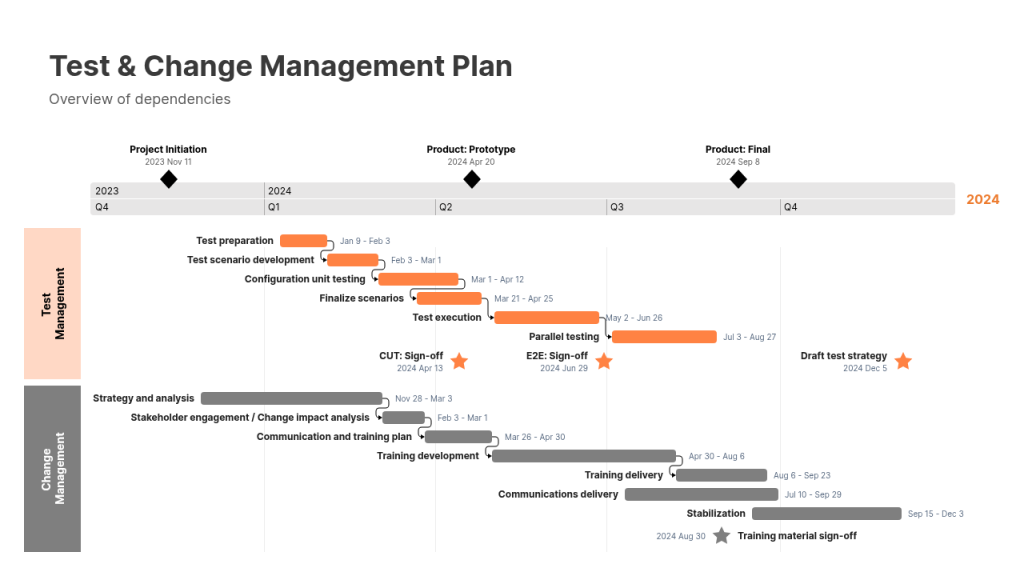
1. Gantt Charts
- What it is: Bar chart showing tasks, durations, and dependencies over time
- When to use: Complex projects with clear start/end dates and task relationships
- Good for: Software releases, construction-like phases
- Example: Development → Testing → Deployment (bars don’t overlap)
- Tool: MS Project, ClickUp, Smartsheet
2. Kanban Timelines
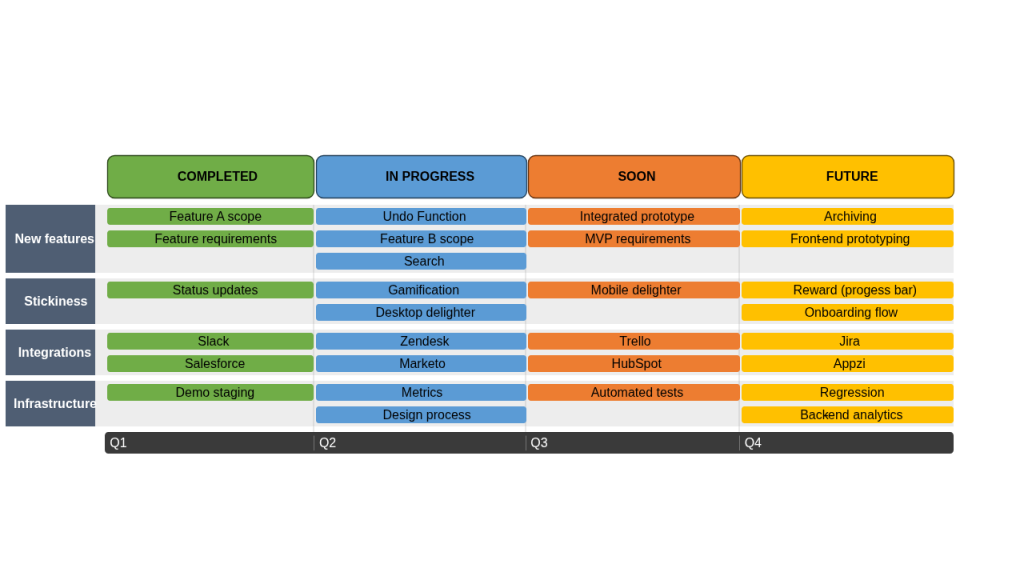
- What it is: Visual board showing work in progress (To Do → In Progress → Done)
- When to use: Ongoing work, agile teams, continuous delivery
- Good for: Maintenance, support tickets, feature factories
- Example: Bug fixes moving across columns with cycle time tracking
- Tool: Trello, Jira, Monday.com
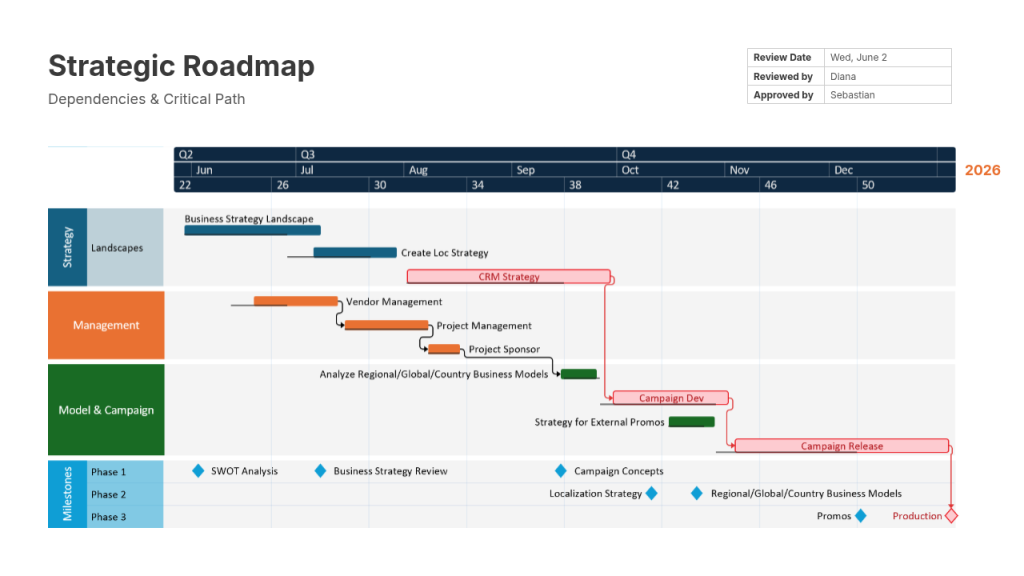
3. Roadmaps
- What it is: High-level view of features/releases over quarters or months
- When to use: Stakeholder communication, product planning
- Good for: Executive updates, sales enablement
- Example: Q1 Login → Q2 Payments → Q3 Analytics
- Tool: Productboard, Aha!, Roadmunk
Also Read:- Product Roadmap Mistakes that Cost Founders Millions
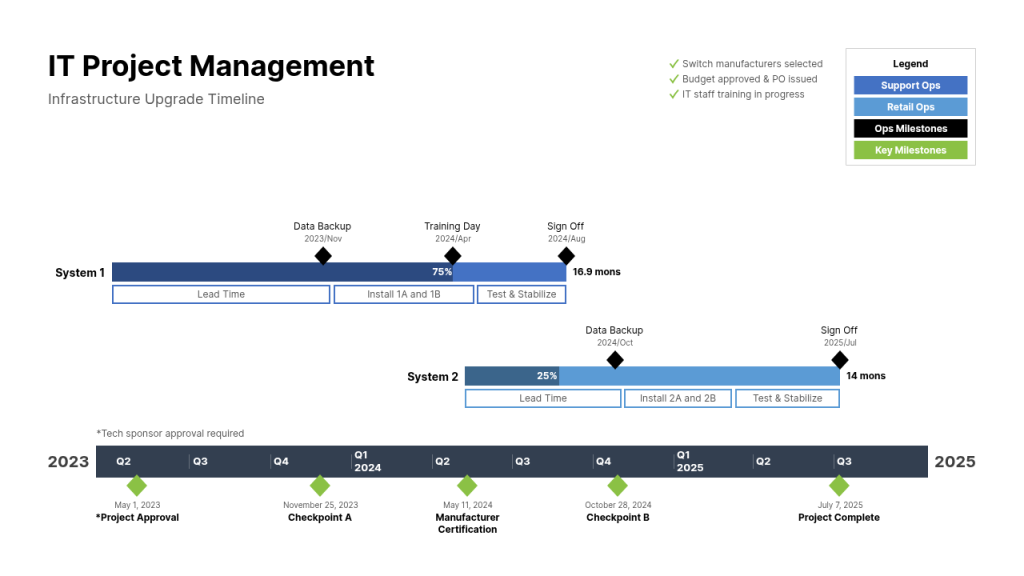
4. Milestone Timelines
- What it is: Key dates/markers (Alpha, Beta, Launch) with dates only
- When to use: Fixed deadlines, marketing campaigns, regulatory submissions
- Good for: External reporting, investor updates
- Example: Beta Test: June 15 → Launch: August 1
- Tool: Excel, Google Sheets, PowerPoint
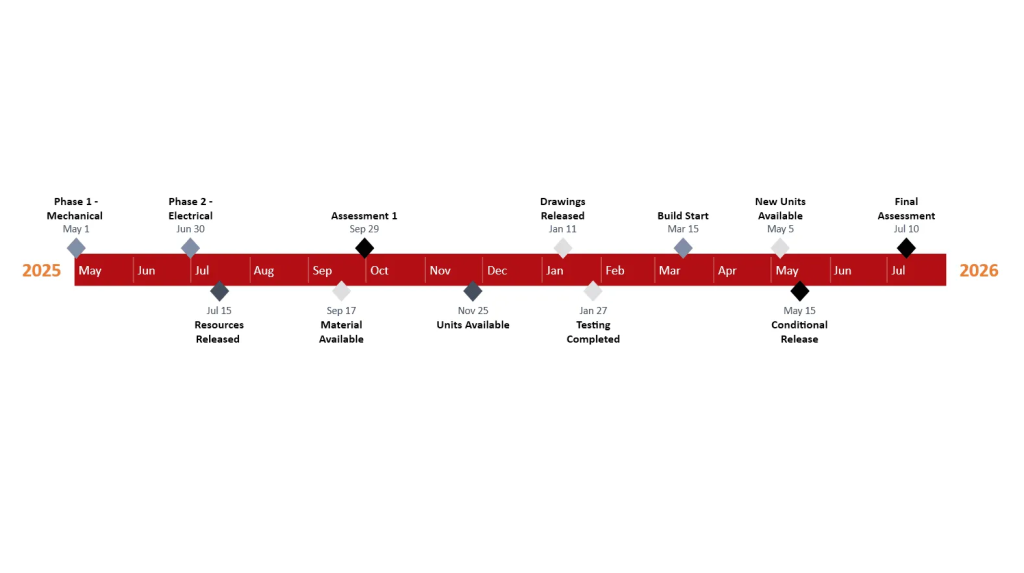
5. Chronological Timelines
- What it is: Simple date-by-date list (Week 1: Planning, Week 2: Design)
- When to use: Simple projects, client proposals, internal kickoffs
- Good for: Linear projects, non-technical stakeholders
- Example: Mon: Kickoff → Wed: Wireframes → Fri: Review
- Tool: Google Docs, Notion, Word
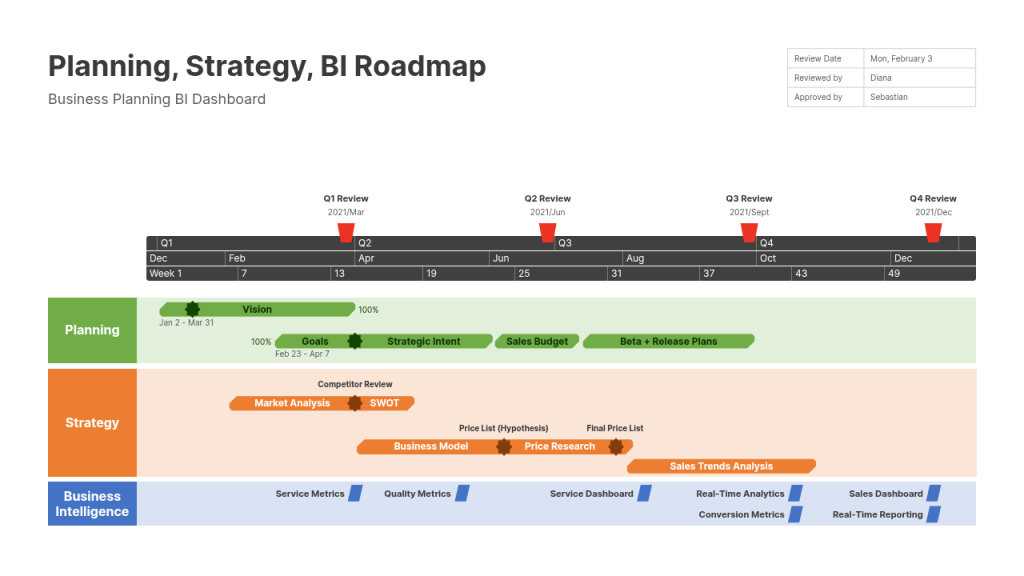
6. Swimlane Timelines
- What it is: Gantt chart split by teams/roles (Dev lane, QA lane, Design lane)
- When to use: Cross-functional projects, multiple departments
- Good for: Resource planning, dependency visibility across teams
- Example: Frontend team works UI while Backend builds APIs (parallel lanes)
- Tool: Lucidchart, Miro, Visio
Also Read:- Build vs Buy Software – Decision Making Process & Key …
Why Is It Important to Set a Timeline for Software Projects?
Time estimation isn’t just scheduling—it’s the heartbeat of project success. Without realistic timelines, software projects bleed money, miss market windows, and shatter team morale. Here’s why timeline mastery separates thriving projects from expensive disasters:
1. Say No to Uncertainties
Realistic timelines eliminate guesswork. You know exactly when features will ship instead of hoping “soon.” No more vague promises or endless “just one more week” delays.
2. All Deliverables Are Timely Met
Every milestone hits on schedule—stakeholder demos, beta releases, final handoff. Clients get what they paid for when promised, building trust for future work.
3. Your Project Stays on Schedule
No more fire drills or weekend coding marathons. Teams work steady paces, maintain quality, and avoid burnout. Predictable delivery becomes your reputation.
4. Project Scope and Cost Are in Control
Clear timelines prevent scope creep from sneaking in. When stakeholders see the timeline impacts of “small changes,” they think twice. Budget stays locked because time stays locked.
5. Project Launch at the Right Time
Hit the market when competitors can’t. E-commerce apps launch before holidays. Fintech beats regulatory deadlines. Timing creates competitive advantage.
6. Lucrative Market Opportunities
First-to-market captures the biggest revenue. Realistic timelines get MVPs live while others plan endlessly. Early launches mean early cash flow and market dominance.
7. Ensure Outsourcing Transparency
Offshore teams prove delivery dates with concrete timelines. No more “different time zone” excuses. Clients see daily progress against planned milestones.
Key Tips To Estimate Timelines for Software Projects
Staying parallel with the project requires more than just a solid plan. You have to adjust to new expectations, deadlines, communicate with your team, and expect the unexpected. Here is what effective project managers do to estimate timelines for software projects:
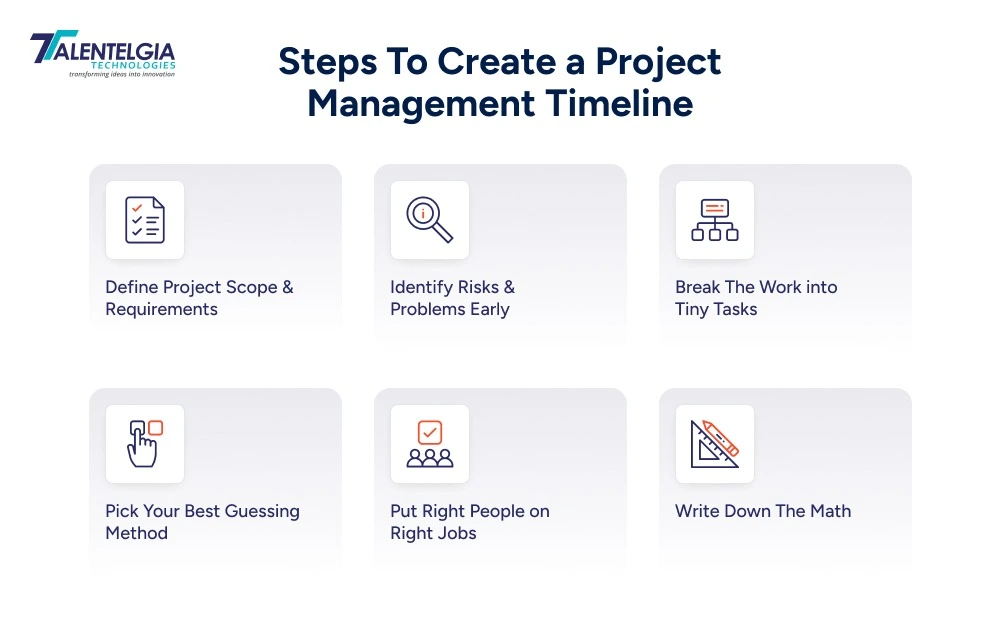
1. Define Project Scope and Requirements
First, nail down exactly what you’re building. Meet with stakeholders and write every feature in plain English:
- “Users log in with email/password”
- “Cart shows running total”
- “Admin sees sales dashboard”
Create a simple list, splitting must-haves from nice-to-haves. Get everyone, client, designers, developers, and managers to read and agree to these terms. Include acceptance criteria too: “Login works on mobile, shows error for wrong password.” Having a clear scope prevents any confusion about unrecognized features that could lead to arguments later. This single step cuts timeline confusion by half.
2. Identify Risks and Problems Early
Think ahead—what could go wrong? List your top worries: payment API breaks during testing, designer goes on vacation, offshore team hits time zone issues, client changes mind about colors.
Rate each risk:
- “High—add 3 extra days,”
- “Medium—add 1 day buffer.”
Common gotchas include third-party services going down, unexpected browser bugs, or legal/compliance delays. Talk to your team—they spot issues management misses. Document each risk with a plan: “If Stripe fails, switch to PayPal backup.” Early risk planning saves weeks of fire-drill fixes.
3. Break The Work into Tiny Tasks
Break “build app” into daily jobs everyone understands. Instead of “shopping cart feature,” create:
- Day 1—sketch cart design
- Day 2—code add-to-cart button
- Day 3—test empty cart errors
- Day 4—mobile responsiveness
- Day 5—admin sees cart data.
Small tasks (1-3 days max) are estimated accurately because they’re concrete. Big vague features hide twice the work. Daily completion gives the team momentum—finished tasks build confidence. Use sticky notes or Trello cards so everyone sees progress. This granular breakdown reveals the true 50% non-coding work everyone forgets.
4. Pick Your Best Guessing Method
- Choose how your team estimates time—don’t wing it. Try these proven approaches:
- Past projects (“Login took 5 days last time”)
- Group vote (everyone picks 1, 2, 3, 5 days on cards)
- Safe range (best case 3 days, likely 6 days, worst 12 days—average them)
- Add it up (all small tasks + 20% cushion)
Never trust one person’s gut feel. Run two methods, take the middle number. Teams using planning poker cut estimate errors by 30%. Document why you picked each number
5. Put Right People on Right Jobs
Match skills to work like pairing shoes with outfits. Simple forms and CRUD screens can be best handled by a junior developer. A complex payment gateway or real-time chat will require a Senior engineer. Know your team’s real speed:
- Senior finishes 25 story points/week
- Mid-level 18 points/week
- Brand new grad 10 points/week.
Mixing wrong skills doubles timelines. Consider ramp-up time too; new hires work 50% slower in the first month.
6. Put The Numbers on a Spreadsheet
Show exactly how you got each number. Example:
- “Login page = 3 days design + 4 days code + 2 days testing + 2 days buffer = 11 days total.”
- Share a Google Sheet with simple formulas that everyone can verify.
- List assumptions clearly: “Works if Stripe API stays stable, team works normal hours.”
- Include buffer breakdown: “25% integration issues, 15% client feedback.”
- Track actual vs. estimate after completion: “Login took 10 days vs. 11 estimated.”
This builds trust and improves the next project’s accuracy by 25%.
Conclusion
The success of the project is highly influenced by having a good strategy for making a project timeline for software development. This is achieved by having realistic and positive timelines, which is ultimately an outcome of thorough planning as well as finding possible pitfalls and planning how to address them, while also communicating with everyone involved in the project.
At Talentelgia, we believe that the most important aspect of planning a software development project is the ability to communicate and the ability to make adjustments to the plan as the project unfolds.














 Write us on:
  Business queries:
  HR:
HR: 


