



 Healthcare App Development Services
 Real Estate Web Development Services
 E-Commerce App Development Services
 E-Commerce Web Development Services
 Blockchain E-commerce Development Company
 Fintech App Development Services
 Fintech Web Development
 Blockchain Fintech Development Company
 E-Learning App Development Services
 Restaurant App Development Company
 Mobile Game Development Company
 Travel App Development Company
 Automotive Web Design
 AI Traffic Management System
 AI Inventory Management Software
 AI Software Development
  AI Development Company
  AI App Development Services
  ChatGPT integration services
  AI Integration Services
  Generative AI Development Services
  Natural Language Processing Company
 Machine Learning Development
  Machine learning consulting services
  Blockchain Development
  Blockchain Software Development
  Smart Contract Development Company
  NFT Marketplace Development Services
  Asset Tokenization Company
 DeFi Wallet Development Company
 Mobile App Development
  IOS App Development
  Android App Development
  Cross-Platform App Development
  Augmented Reality (AR) App Development
  Virtual Reality (VR) App Development
  Web App Development
  SaaS App Development
 Flutter
  React Native
  Swift (IOS)
  Kotlin (Android)
  Mean Stack Development
  AngularJS Development
  MongoDB Development
  Nodejs Development
  Database Development
 Ruby on Rails Development
 Expressjs Development
  Full Stack Development
  Web Development Services
  Laravel Development
  LAMP Development
  Custom PHP Development
  .Net Development
  User Experience Design Services
  User Interface Design Services
  Automated Testing
  Manual Testing
  Digital Marketing Services
 Ride-Sharing And Taxi Services
 Food Delivery Services
 Grocery Delivery Services
 Transportation And Logistics
 Car Wash App
 Home Services App
 ERP Development Services
 CMS Development Services
 LMS Development
 CRM Development
 DevOps Development Services
 AI Business Solutions
 AI Cloud Solutions
 AI Chatbot Development
 API Development
 Blockchain Product Development
 Cryptocurrency Wallet Development
 About Talentelgia
  Our Team
  Our Culture
 Healthcare App Development Services
 Real Estate Web Development Services
 E-Commerce App Development Services
 E-Commerce Web Development Services
 Blockchain E-commerce
Development Company
Blockchain E-commerce
Development Company Fintech App Development Services
 Finance Web Development
 Blockchain Fintech
Development Company
Blockchain Fintech
Development Company E-Learning App Development Services
 Restaurant App Development Company
 Mobile Game Development Company
 Travel App Development Company
 Automotive Web Design
 AI Traffic Management System
 AI Inventory Management Software
 AI Software Development
 AI Development Company
 ChatGPT integration services
 AI Integration Services
 Machine Learning Development
 Machine learning consulting services
 Blockchain Development
 Blockchain Software Development
 Smart contract development company
 NFT marketplace development services
 IOS App Development
 Android App Development
 Cross-Platform App Development
 Augmented Reality (AR) App
Development
Augmented Reality (AR) App
Development Virtual Reality (VR) App Development
 Web App Development
 Flutter
 React
Native
React
Native Swift
(IOS)
Swift
(IOS) Kotlin (Android)
 MEAN Stack Development
 AngularJS Development
 MongoDB Development
 Nodejs Development
 Database development services
 Ruby on Rails Development services
 Expressjs Development
 Full Stack Development
 Web Development Services
 Laravel Development
 LAMP
Development
LAMP
Development Custom PHP Development
 User Experience Design Services
 User Interface Design Services
 Automated Testing
 Manual
Testing
Manual
Testing About Talentelgia
 Our Team
 Our Culture
Artificial intelligence has been considered to be an important topic for more than a year now. Nowadays advanced chatbots, including ChatGPT, are more popular. You will be surprised to learn that the majority of people who use Apple’s assistant (Siri) believe that it is not very intelligent. What if you could have the positive aspects of both technologies used simultaneously? You can easily integrate chatGPT with Siri on your iphone.
But you need to prepare some requirements and connections. Make sure everything is ready before you start to integrate chatGPT with Siri.
Requirements to Get ChatGPT to Work with Siri
ChatGPT App
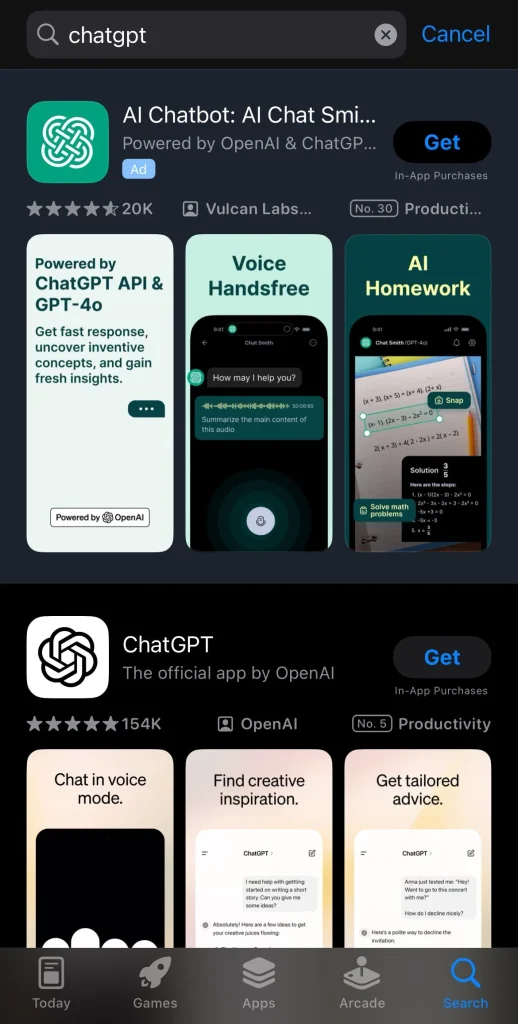
Earlier, we could integrate ChatGPT with Siri using shortcuts like Siri Pro or Siri GPT. However since ChatGPT has developed its own features and an interactive chat tool, this approach is now ineffective. Yes, it is now possible to get this application on your iPhone and make your chatting more efficient. First, you need to install OpenAI’s ChatGPT through the App Store app.
Create a Shortcut
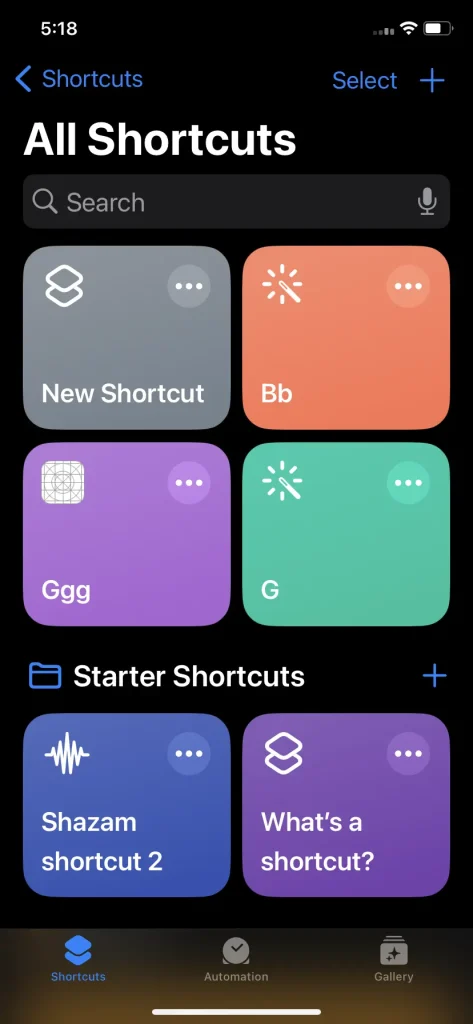
Specifically, to use ChatGPT with Siri on your iPhone, you will need to start by creating a Shortcut which in turn will initiate a new conversation with the ChatGPT app. If you want to get answers to your questions while using Siri to activate this Shortcut, it will launch the ChatGPT app for you.
Integrate ChatGPT with Siri on Your iPhone
After you’ve installed the ChatGPT app, now it’s time to create a custom shortcut and see it’s working.
- First, make sure you’ve got a ChatGPT account. You can log in or sign up for free. (https://chatgpt.com/ ) .
- Open your iPhone, proceed to the Shortcuts app, and click on the “+” button at the right upper corner.
- It might be named “New Shortcut” by default. Tap the little arrow to change the name according to your preferences
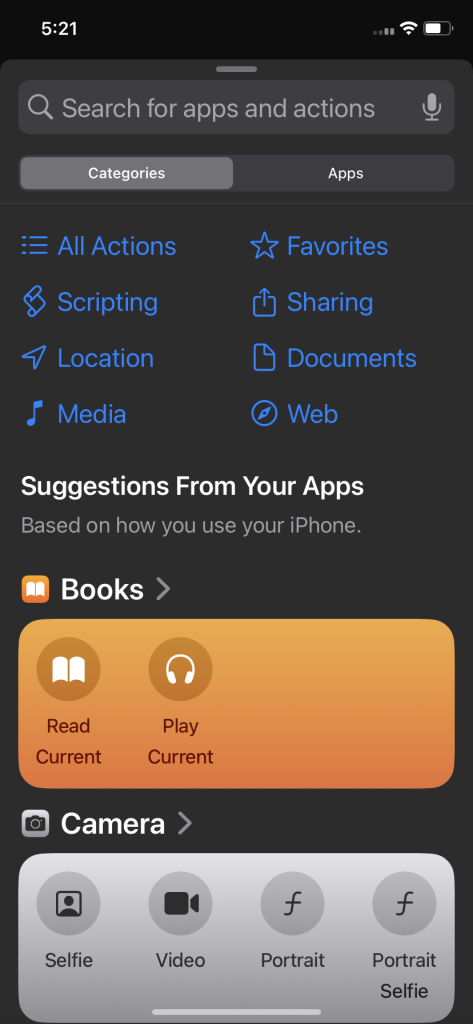
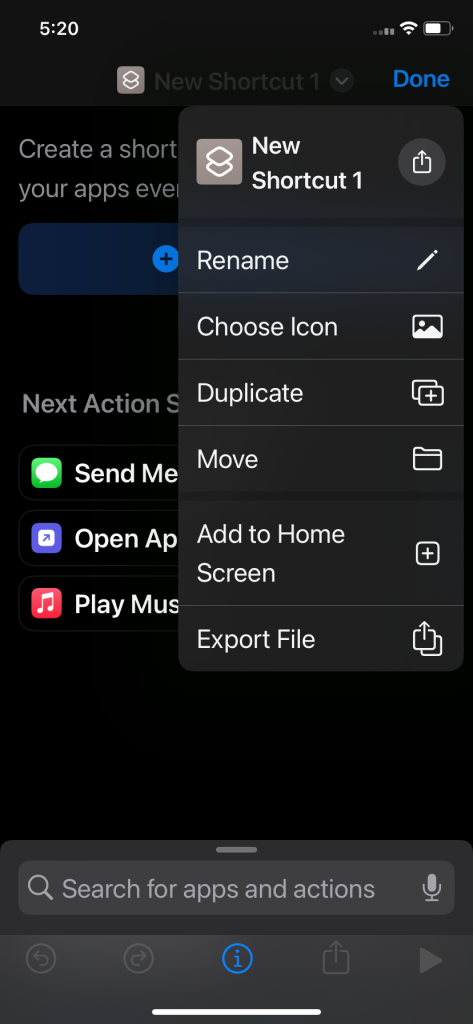
Select “Start voice conversations with ChatGPT” here, then tap on Done.
Next, tap on “Add Action” and type “ChatGPT” in the Search bar at the top.
And there you go! You can now utilize ChatGPT with Siri on your iPhone to have conversations. For the shortcut to be activated one has to tell Siri ‘Hey Siri’ to activate the shortcut or the user has to open the shortcut app and select this option.
Also, Don’t forget that this Shortcut can be added to the Action Button or the Back Tap feature on your iPhones.
Remember, sometimes the shortcut might take a bit to connect to ChatGPT’s server, or it might be temporarily down. But it usually works fine.
Also Read: How to integrate ChatGPT into an app?
Frequently Asked Questions
For which platform can one download the ChatGPT app?
You can download the ChatGPT on iPhone through the app store of iPhone devices, which is called App Store.
Why would it be important to create a Shortcut for ChatGPT?
Shortcuts enable you to easily incorporate Siri commands to start a new conversation with ChatGPT and thus are helpful in a way to access ChatGPT’s abilities.
Can I customize the Shortcut further?
Yes, you can customize the Shortcut by adding it to the Action Button or the Back Tap gesture on your iPhone for easier access.













 Write us on:
  Business queries:
  HR:
HR: 


