



 Healthcare App Development Services
 Real Estate Web Development Services
 E-Commerce App Development Services
 E-Commerce Web Development Services
 Blockchain E-commerce Development Company
 Fintech App Development Services
 Fintech Web Development
 Blockchain Fintech Development Company
 E-Learning App Development Services
 Restaurant App Development Company
 Mobile Game Development Company
 Travel App Development Company
 Automotive Web Design
 AI Traffic Management System
 AI Inventory Management Software
 AI Software Development
  AI Development Company
  AI App Development Services
  ChatGPT integration services
  AI Integration Services
  Generative AI Development Services
  Natural Language Processing Company
 Machine Learning Development
  Machine learning consulting services
  Blockchain Development
  Blockchain Software Development
  Smart Contract Development Company
  NFT Marketplace Development Services
  Asset Tokenization Company
 DeFi Wallet Development Company
 Mobile App Development
  IOS App Development
  Android App Development
  Cross-Platform App Development
  Augmented Reality (AR) App Development
  Virtual Reality (VR) App Development
  Web App Development
  SaaS App Development
 Flutter
  React Native
  Swift (IOS)
  Kotlin (Android)
  Mean Stack Development
  AngularJS Development
  MongoDB Development
  Nodejs Development
  Database Development
 Ruby on Rails Development
 Expressjs Development
  Full Stack Development
  Web Development Services
  Laravel Development
  LAMP Development
  Custom PHP Development
  .Net Development
  User Experience Design Services
  User Interface Design Services
  Automated Testing
  Manual Testing
  Digital Marketing Services
 Ride-Sharing And Taxi Services
 Food Delivery Services
 Grocery Delivery Services
 Transportation And Logistics
 Car Wash App
 Home Services App
 ERP Development Services
 CMS Development Services
 LMS Development
 CRM Development
 DevOps Development Services
 AI Business Solutions
 AI Cloud Solutions
 AI Chatbot Development
 API Development
 Blockchain Product Development
 Cryptocurrency Wallet Development
 About Talentelgia
  Our Team
  Our Culture
 Healthcare App Development Services
 Real Estate Web Development Services
 E-Commerce App Development Services
 E-Commerce Web Development Services
 Blockchain E-commerce
Development Company
Blockchain E-commerce
Development Company Fintech App Development Services
 Finance Web Development
 Blockchain Fintech
Development Company
Blockchain Fintech
Development Company E-Learning App Development Services
 Restaurant App Development Company
 Mobile Game Development Company
 Travel App Development Company
 Automotive Web Design
 AI Traffic Management System
 AI Inventory Management Software
 AI Software Development
 AI Development Company
 ChatGPT integration services
 AI Integration Services
 Machine Learning Development
 Machine learning consulting services
 Blockchain Development
 Blockchain Software Development
 Smart contract development company
 NFT marketplace development services
 IOS App Development
 Android App Development
 Cross-Platform App Development
 Augmented Reality (AR) App
Development
Augmented Reality (AR) App
Development Virtual Reality (VR) App Development
 Web App Development
 Flutter
 React
Native
React
Native Swift
(IOS)
Swift
(IOS) Kotlin (Android)
 MEAN Stack Development
 AngularJS Development
 MongoDB Development
 Nodejs Development
 Database development services
 Ruby on Rails Development services
 Expressjs Development
 Full Stack Development
 Web Development Services
 Laravel Development
 LAMP
Development
LAMP
Development Custom PHP Development
 User Experience Design Services
 User Interface Design Services
 Automated Testing
 Manual
Testing
Manual
Testing About Talentelgia
 Our Team
 Our Culture
Artificial Intelligence has transitioned from being optional to necessary within organizations, and it is already integrated into various industries. In manufacturing, it brings advanced predictive analytics, while in banking, it helps with the real-time detection of fraudulent activities. Furthermore, in eCommerce and retail, it enhances personalized shopping experiences. However, AI system integration into business also comes with challenges, and the biggest challenge of all is dealing with AI automation for legacy systems.
Legacy systems have been integrated into business operations for many years, and it is understandable why many businesses are hesitant to replace them. One thing to note is that these legacy systems were not built to support the current AI-driven business transformation today. New Technologies like AI, low-code, and hyper-automation are helping modern businesses and startups minimize their Capital Expenditures (CapEx). In contrast, over 80% of enterprises still rely on applications that are over a decade old and are unable to progress and scale.
As per a Forbes report, 90% of businesses are still using outdated apps to perform their core functions. To modernize their operations and enhance their level of automation, almost all businesses are setting aside some funds and investing in AI. This creates a hybrid environment where AI is implemented on systems that were not initially intended to accommodate it.
Understanding The Concept of AI Integration In Legacy Systems: Challenges & Limitations
Before discussing the role of AI in business, let’s establish some primary concepts. Digital transformation encompasses the shift from manual processes and hardcopy systems to the use of digital tools (i.e., applications, platforms, and online systems) that enhance operational efficiency and improve accessibility for customers. AI automation goes a step further— it’s about enabling organizations to think of themselves as intelligence-driven, i.e., business based on data, algorithms, and adaptive systems that can learn, evolve, and make decisions autonomously.
What are Legacy Systems?
In tech circles, “Legacy” is often used as a polite synonym for “obsolete,” but that’s a misconception. A Legacy System is any mission-critical software, hardware, or database architecture that, while functional, is based on outdated technologies that make it difficult to integrate with modern platforms. Think of it like a vintage 1960s elevator in a skyscraper. It still gets people to the 50th floor, but you can’t exactly plug a touch-screen interface or a predictive weight sensor into its analog pulley system without some serious engineering.
Legacy systems are more than just old code; they represent the entire business, and due to their value, businesses are often hesitant to change them. This is why some manufacturers are still using industrial control systems that were designed long before the cloud even existed. This explains why these systems are still in use because they’re:
- Stable
- Proven
- Deeply integrated into business workflows.
However, these systems are rapidly changing. The volume of data is high, customers are expecting instant responses, and competitors are integrating AI into legacy systems to optimize costs and provide additional services.
Why AI Automation for Legacy Systems is Important in 2026?
When old systems obstruct teams from achieving their objectives, businesses need to undertake legacy app modernization. At the organizational level, changes to these systems allow businesses to increase efficiency, maximize productivity, and enhance the ability to make decisions supported by data. Additionally, it allows businesses to respond to changes in the marketplace, deploy new technologies, and fulfil compliance obligations.
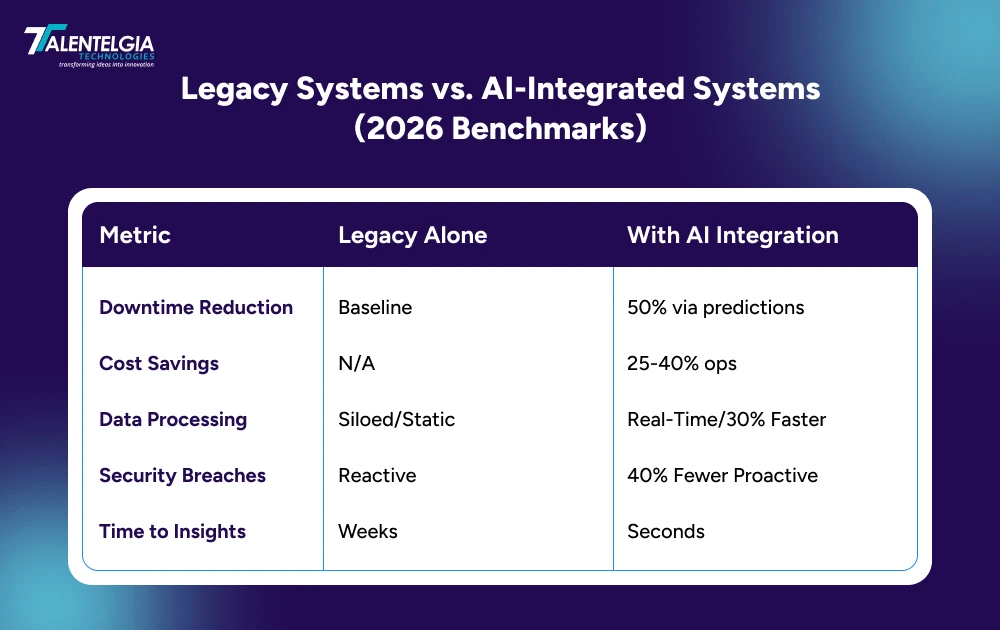
- Operational Resilience and Efficiency: AI shifts IT teams from reactive “firefighting” to proactive management by predicting legacy failures before they occur. Integrating AI-driven “self-healing” protocols can slash incident resolution costs from an average of $15 down to just $2 per ticket, drastically boosting system uptime and bottom-line margins.
- Smarter Decisioning and Root-Cause Intelligence: Legacy systems are often “black boxes” containing decades of valuable “Dark Data.” AI performs digital archaeology, mining these trapped logs to provide real-time root-cause intelligence. This transforms static, historical records into a dynamic engine that suggests the “best next move” during high-stakes market volatility.
- Scalable Modernization without “Rip and Replace”: You no longer need to destroy your foundation to innovate. By using “AI wrappers” and the Strangler Fig pattern, you can incrementally replace old modules with modern microservices. This allows you to preserve mission-critical business logic while scaling your capabilities, avoiding the catastrophic risks and costs of a “Big Bang” system overhaul.
- Competitive Agility: 2026 is the year of Agentic AI, where autonomous agents handle complex workflows. Without an integration layer, your legacy core becomes a “dead zone” where these agents cannot see or act. Integrating AI ensures your business can pivot its offerings in days rather than months, keeping you ahead of leaner, AI-native competitors.
Key Challenges of Implementing AI Automation for Legacy Systems
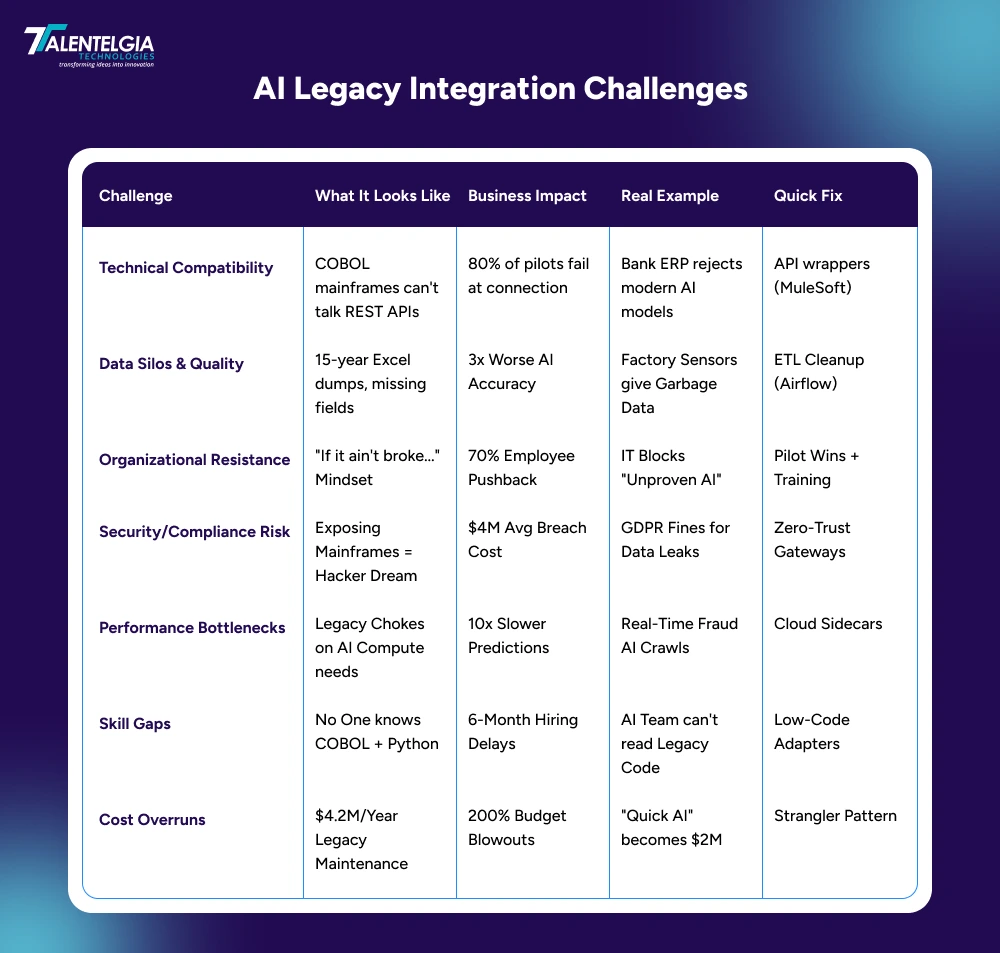
There are many challenges that come with successfully incorporating AI into legacy systems. To achieve success, business leaders must be willing to confront these challenges:
1. Compatibility Challenges
Legacy systems are often written in old programming languages (like COBOL or early Java) that don’t speak the same “language” as modern AI models. They were built to work in silos, not to share data through APIs. To make them talk to each other, you have to build complex bridges or “wrappers,” which can lead to data errors and constant system timeouts.
2. Security Risks
Old systems were often built under the assumption that they would stay “inside” the company firewall, hidden from the public internet. They lack the modern encryption and authentication protocols that AI needs to run safely. When you open a connection to the outside world for your AI to function, you might accidentally open a backdoor that exposes your sensitive data to new kinds of cyber threats.
3. High Maintenance Costs
Working with old code is expensive. It’s often undocumented, meaning nobody really knows how it works deep down. Every time you try to change or “fix” something to make room for AI, you run the risk of breaking three other things that were working fine before. Your engineering team ends up spending more time fixing unexpected bugs than actually building the new AI features you paid for.
4. User Dissatisfaction
Users today expect AI to be near-instant. However, legacy systems can be slow because they were built for bulk batch processing, not real-time requests. When your AI gives a result quickly but the legacy database takes ten seconds to fetch the underlying info, the user gets a “stuttering” experience. That lag is a dealbreaker for most modern users.
5. Compliance Requirements
In 2026, regulations like GDPR and new AI ethics laws require strict control over who sees what data and how it’s used. Older systems rarely have the built-in audit trails or privacy tools needed to meet these modern standards. Trying to retrofit compliance into an old system is difficult and often leads to gaps where you aren’t sure if you’re actually meeting the legal requirements for data privacy.
How To Integrate AI with Legacy Systems in 2026?
Many businesses think that integrating AI into non-AI legacy systems can be an uphill task. This is not necessarily true. Most businesses have systems that already work; they just need a push to work smarter. If included with caution, AI can give businesses that initial boost. A practical approach to this is to simplify the process. Start with your data and do some cleaning and evaluation of what is usable. Before going live, test the data models and, from there, progressively implement the models. This approach keeps daily operations running because the AI is only incorporated where it is most effective.
Step 1: Audit & Plan – Map Exactly What You Have (2-4 weeks)
Take inventory of your current systems. Identify where AI can help most—like speeding up reports, predicting problems, or automating approvals. This creates your starting point and success metrics. Poor planning causes 80% of failures. Clear maps reveal 25% hidden inefficiencies you didn’t know existed.
Simple Checklist:
- List everything: What does each system do? (invoicing, inventory, customer records)
- Spot bottlenecks: Where are manual steps? Errors? Delays? (reports take 3 days?)
- Choose 1-2 pilots: Pick low-risk wins first—customer reports, maintenance schedules
- Set measurements: Track current speed/costs: “1,000 invoices/week, 5% errors”
- Simple budget: $20K for assessment tools + 1 expert week
Real Example: Banks discover fraud detection gaps worth millions during audits.
Result: Clear 90-day roadmap with 3 priority areas.
Step 2: Build Integration Layer – Create Safe Data Bridges (4-6 weeks)
Build middleman connectors between old systems and AI. Data flows out safely, AI processes it, and results flow back. The old system never changes. Like a translator—old system “speaks COBOL,” AI “speaks JSON,” connector translates both ways.
Simple Checklist:
- Pick connectors: Use ready-made tools (MuleSoft, Boomi, Zapier Enterprise)
- Read-only first: AI pulls data out (sales records) without writing back
- Add security: User login, data encryption, limit calls (100/hour max)
- Background testing: AI runs predictions, but humans make decisions
- Team roles: Business defines needs, IT builds bridges, AI team trains models
Real Example: Retailers connect POS systems to inventory AI in 4 weeks.
Result: $50K. Time Saved: Skip months of custom development.
Step 3: Clean & Organize Data – Prepare AI’s Raw Material (4 weeks)
Old systems store valuable data in messy formats. Extract, clean, and organize so AI can use it effectively. Garbage data = garbage predictions. Clean data gives 3x better AI accuracy. Messy data wastes millions.
Simple Checklist:
- Copy data safely: Move to secure storage (AWS S3, Snowflake, Google BigQuery)
- Remove junk: Delete duplicates, fill missing fields, standardize formats
- Protect privacy: Remove names/SSNs, track data access
- Set clear rules: “AI predicts sales but never sees credit cards.”
- Quality gate: 90% clean data before AI training starts
Real Example: Manufacturers clean 10-year sensor data → 50% better failure predictions.
Pro Tip: Start with non-sensitive data (usage logs, not personal info).
Step 4: Test & Deploy AI Gradually – Prove It Works First (4-6 weeks)
Run AI alongside old processes first. Let it make suggestions while humans control decisions. Gradually increase AI responsibility. Test with real data, no real risk. Like training wheels before solo riding.
Simple Checklist:
- Start simple: Basic predictions (churn risk), chatbots (FAQs), approvals (<$1K)
- Shadow mode: AI suggests for 2 weeks—humans approve/reject (builds trust)
- Small groups first: 5% users → 25% → 100% over 4 weeks
- Daily tracking: Speed gains? Accuracy? User feedback?
- Quick retrain: AI wrong 20%? Feed corrections back (1-2 days)
Real Example: Banks test fraud AI on 5% transactions → 40% detection boost.
Result: 80% user acceptance before full rollout.
Step 5: Monitor & Scale – Keep AI Sharp Forever (Ongoing)
Set up simple dashboards tracking AI health. Fix problems before users notice. Add more AI capabilities as wins accumulate. AI “drifts” over time—needs regular tuning like car maintenance.
Simple Checklist:
- Live dashboards: AI accuracy, speed, cost savings (Power BI, Google Data Studio)
- Smart alerts: “AI accuracy fell below 85%—check now!” (email/Slack)
- Weekly reviews: User feedback, new opportunities, accuracy trends
- Scale successes: Invoice AI saves 20% time. Add purchase orders
- Plan next phase: 6 months → advanced AI (voice, image analysis)
Real Example: Retailers scale from reports → full supply chain optimization in 12 months.
Conclusion
Business leaders see integrating AI with legacy systems not as a quick fix, but as a potential move to revitalize their foundational systems, improve agility, and create new value without a disruptive rewrite. With a well-planned, phased approach with an emphasis on data quality and governance, you can transform your legacy systems from a hindrance to a strong, competitive advantage.

At Talentelgia, we combine our strong legacy modernization expertise with deep AI automation knowledge. We develop practical roadmaps and offer results-oriented solutions to help businesses transition to an AI-powered future based on legacy and modernized by innovation.










 Write us on:
  Business queries:
  HR:
HR: 


