



 Healthcare App Development Services
 Real Estate Web Development Services
 E-Commerce App Development Services
 E-Commerce Web Development Services
 Blockchain E-commerce Development Company
 Fintech App Development Services
 Fintech Web Development
 Blockchain Fintech Development Company
 E-Learning App Development Services
 Restaurant App Development Company
 Mobile Game Development Company
 Travel App Development Company
 Automotive Web Design
 AI Traffic Management System
 AI Inventory Management Software
 AI Software Development
  AI Development Company
  AI App Development Services
  ChatGPT integration services
  AI Integration Services
  Generative AI Development Services
  Natural Language Processing Company
 Machine Learning Development
  Machine learning consulting services
  Blockchain Development
  Blockchain Software Development
  Smart Contract Development Company
  NFT Marketplace Development Services
  Asset Tokenization Company
 DeFi Wallet Development Company
 Mobile App Development
  IOS App Development
  Android App Development
  Cross-Platform App Development
  Augmented Reality (AR) App Development
  Virtual Reality (VR) App Development
  Web App Development
  SaaS App Development
 Flutter
  React Native
  Swift (IOS)
  Kotlin (Android)
  Mean Stack Development
  AngularJS Development
  MongoDB Development
  Nodejs Development
  Database Development
 Ruby on Rails Development
 Expressjs Development
  Full Stack Development
  Web Development Services
  Laravel Development
  LAMP Development
  Custom PHP Development
  .Net Development
  User Experience Design Services
  User Interface Design Services
  Automated Testing
  Manual Testing
  Digital Marketing Services
 Ride-Sharing And Taxi Services
 Food Delivery Services
 Grocery Delivery Services
 Transportation And Logistics
 Car Wash App
 Home Services App
 ERP Development Services
 CMS Development Services
 LMS Development
 CRM Development
 DevOps Development Services
 AI Business Solutions
 AI Cloud Solutions
 AI Chatbot Development
 API Development
 Blockchain Product Development
 Cryptocurrency Wallet Development
 About Talentelgia
  Our Team
  Our Culture
 Healthcare App Development Services
 Real Estate Web Development Services
 E-Commerce App Development Services
 E-Commerce Web Development Services
 Blockchain E-commerce
Development Company
Blockchain E-commerce
Development Company Fintech App Development Services
 Finance Web Development
 Blockchain Fintech
Development Company
Blockchain Fintech
Development Company E-Learning App Development Services
 Restaurant App Development Company
 Mobile Game Development Company
 Travel App Development Company
 Automotive Web Design
 AI Traffic Management System
 AI Inventory Management Software
 AI Software Development
 AI Development Company
 ChatGPT integration services
 AI Integration Services
 Machine Learning Development
 Machine learning consulting services
 Blockchain Development
 Blockchain Software Development
 Smart contract development company
 NFT marketplace development services
 IOS App Development
 Android App Development
 Cross-Platform App Development
 Augmented Reality (AR) App
Development
Augmented Reality (AR) App
Development Virtual Reality (VR) App Development
 Web App Development
 Flutter
 React
Native
React
Native Swift
(IOS)
Swift
(IOS) Kotlin (Android)
 MEAN Stack Development
 AngularJS Development
 MongoDB Development
 Nodejs Development
 Database development services
 Ruby on Rails Development services
 Expressjs Development
 Full Stack Development
 Web Development Services
 Laravel Development
 LAMP
Development
LAMP
Development Custom PHP Development
 User Experience Design Services
 User Interface Design Services
 Automated Testing
 Manual
Testing
Manual
Testing About Talentelgia
 Our Team
 Our Culture
Are you spending too much time onboarding new clients? Are manual tasks hindering your growth? If so, you’re not alone. This is where many businesses face obstacles in establishing a seamless and effective onboarding experience. In fact, 9 out of 10 organizations report up to 40% abandonment rates during onboarding, and some face even higher numbers. Even more worrying, 5% of businesses have no visibility into their onboarding performance or where drop-offs happen (source: ABBYY).
The good news? Automation can revolutionize how you onboard and manage new clients. It saves time, reduces errors, and ensures a high-quality, consistent experience for every client. But where do you start? What tools should you use? And how do you ensure the process still feels personal?
In this blog, we’ll explain each one as best we can. You will discover what client onboarding is, why automating it changes the game, and how to do it step by step. Plus, we’ll share best practices for how to do it right. Ready to upgrade your onboarding process? Let’s dive in!
What is Customer Onboarding?
Customer onboarding is the first step of developing a lasting relationship with your customers. It’s about bringing new customers on board with your product or service, teaching them how it works, and showing them how to succeed with it on their own.
Designing a seamless and successful onboarding experience leads to an impactful first impression, higher customer satisfaction levels, and significantly better retention rates. When customers feel empowered to use your product, the more likely they are to stick around, use it as intended, and come to love it enough to promote it.
Customer onboarding typically includes four key phases:
Pre-Boarding: The first stage entails collecting essential customer details, e.g., names, emails, and company information, and setting up expectations. It’s your chance to establish trust from the start.
Example: A Software as a Service (SaaS development company) sends a tailored welcome email along with setup instructions immediately after a customer signs up.
Onboarding: This is when you introduce the product officially, using guided tours, tutorials, or walkthroughs. The aim is to introduce the users to the major functionalities and also provide steps to follow to get started.
Training: In this active phase, customers interact to learn how to use the product more effectively and productively. This is done via live demos, Q&As, or help center resources to realize value from the product.
Transition: Here, the customer starts to use the product regularly. Throughout this phase, continued support and check-ins can reinforce use and encourage deeper engagement.
Why Go For Automated Client Onboarding?
Manual onboarding is time-consuming, error-prone, and often frustrating for both teams and clients. Automation not only streamlines the process but also delivers faster, more accurate, and delightful onboarding experiences from day one. Here’s why you should go for automated client onboarding:
1. Enhanced Efficiency
Manual onboarding can consume time and resources and has multiple tedious processes, including data collection, document verification, and compliance checks. This challenge was faced by one of the leading Life insurance companies. Agents collected customer data and documents on a handheld Android device, only to have the backend team vet everything manually. This resulted in delays, more work, and a potential for fraud.
To address this, they deployed Nividous Smart Bots that come with built-in AI, machine learning, and intelligent OCR capabilities. The bots automated the end-to-end onboarding process — from data and document capture in the field, to identity validation with facial authentication and liveliness detection. Additionally, bots compared photos in real-time with KYC documents and auto-completed the application forms within the mobile app.
The results were impressive:
- 60% reduction in full-time employee workload
- 75% of onboarding tasks are automated
- 50% drop in fraudulent data
- Over 90% improvement in data accuracy
2. Client Satisfaction
First impressions matter. When a client comes on board, they want a good, clean, professional start to the relationship. A long, complicated onboarding process can cause frustration, doubt, or even drop-offs. This is why automation is a critical component of creating the client experience from day one.
For instance, a higher education consultancy called Scentia was grappling with delays and inefficiencies stemming from an overwhelmingly manual onboarding process. With Make and custom integrations with existing tools like Pipedrive and Outlook, they built a business automation workflow from lead capture through document verification and even communication.
After automation, Scentia achieved:
- 10+ hours saved per week by eliminating manual updates and follow-ups.
- Faster lead response times with automated emails and notifications.
- Improved data accuracy across all tools with automatic syncing.
- Personalized client journeys without increasing admin workload.
- Increased customer outreach and engagement.
- Flexible workflows that can scale or adapt without technical hassle.
3. Reduced Operational Costs
Automating onboarding processes reduces the demand for extra admin personnel, which can save your business massive overhead expenses. Rather than hiring people to chase the rabbit of documents or wait for other people to update records, automation performs these steps in the blink of an eye with zero human error.
For instance, Cleverly was spending $12K/month on virtual assistants for data entry, reporting, and dashboard updates. Spending 2 days on onboarding, delays in report deliverables, human errors, cost to customer, and operations — a lot of things were going wrong. By implementing automation in their client onboarding process, they were able to achieve the following results:
After Automation – Key Results:
- Saved $12K/month by replacing VAs with automation
- Onboarding delays have been reduced to zero
- Enabled 24/7 real-time reporting
- Eliminated manual errors
- Clients received faster, accurate updates, boosting satisfaction
Steps To Automate the Client Onboarding Process
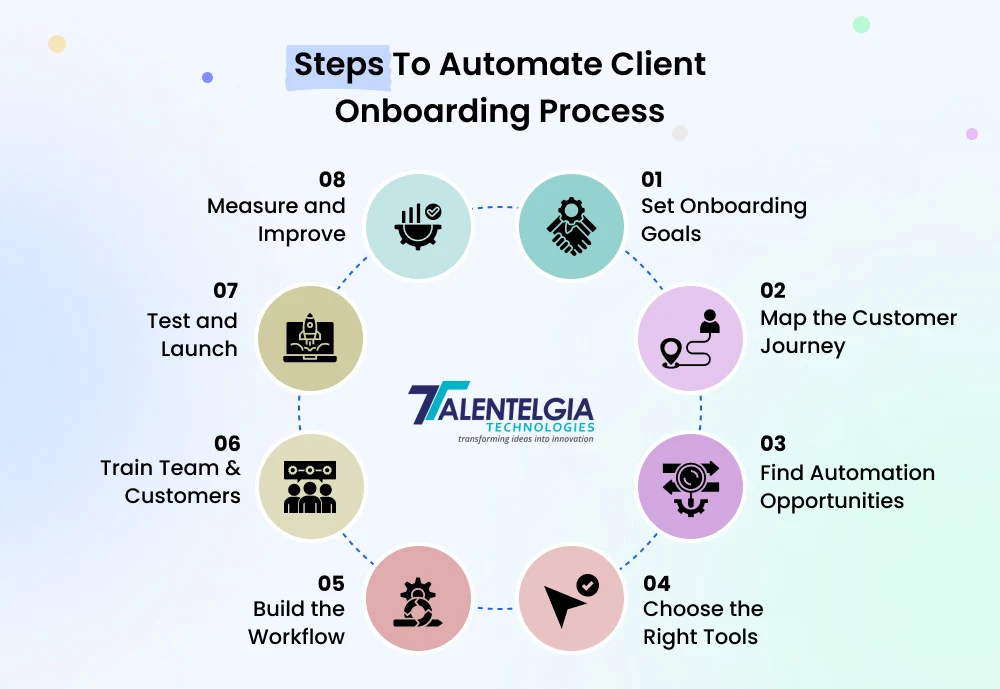
1. Set Clear Objectives
The first step to creating a successful and seamless onboarding experience is defining your client onboarding goals. This is the stage in which you onboard and integrate new clients into your business—and so you want to be clear and directed from the beginning.
Think about what your clients need to accomplish during this process. Is it:
- Understanding your services
- Submitting key documents
- Accessing their dashboard
- Scheduling the first kickoff call?
Every such milestone should correspond to a wider purpose: trust, clarity, and laying the groundwork for a longer-lasting bond.
As an example, if you’re providing a SaaS offering, one onboarding objective could be how quickly clients can complete their account setup, go live with key products, and onboard their team within 48 hours. When these goals are clear, it’s much easier to align your automation strategy around them, which translates to faster time-to-value, reduced drop-offs, and higher client satisfaction.
2. Map The Customer Journey
Once you’ve established what you want to achieve through onboarding, the next critical step is mapping out the entire client journey. It means knowing every stage, from when your client first signs up until they start to use the service completely.
Divide your process into smaller, concrete milestones. Identify tasks and key touchpoints that shape the client experience and can be automated at each stage. These are points of interaction that are vital for establishing trust and ensuring there is clarity and satisfaction.
Some common onboarding stages include:
- Initial sign-up or inquiry submission
- Welcome emails and introductory calls
- Document or information collection
- Dashboard or platform access setup
- Kickoff meeting or project launch
- First service deliverable or check-in
Also, see who from the client side is in the loop at each step — is it the founder, an account manager, or the tech team? Recognizing the stakeholders and the desired outcomes gives insight into how to structure the experience.
3. Spot Key Areas For Automation in Onboarding
Once you’ve mapped out the client journey, it’s time to get granular and determine what aspects of your onboarding workflow would benefit from automation. This measure removes tedious manual tasks that hamper operations and overload your employees.
Start by asking:
- Which tasks are being repeated across all client accounts?
- What processes can be simplified for faster execution?
- Are there frequent bottlenecks that automation could remove?
Divide clients into segments according to demographics, service needs, or behavior. Then, take this insight and apply it to offering personalized onboarding experiences through:
- Automated welcome emails
- Self-service account setup
- In-app product tours or tutorials
- Automated scheduling for intro or training calls
- Feedback collection through email or chatbot prompts
The goal here is to make the onboarding experience intuitive, personalized, and scalable while reducing internal workload.
Select The Right Tools For Seamless Automation
After identifying which processes to automate, the next most important step is to determine which tools and technologies to use. Your ideal tech stack must adhere to your onboarding goals, streamline repeated workflows, and integrate seamlessly with your existing tech.
Look for tools that offer:
- Scalability – Can they scale with your business as customer needs change?
- Flexibility – Is it possible to tailor workflows to your specific onboarding structure?
- Integration Capabilities – Does it sync with your CRM, email platform, or project management tools?
- User-Friendly — Is the tool easy for both your team members and clients to use?
Popular tools to consider include:
- CRM Systems (like HubSpot or Zoho) for centralized customer data
- Email Automation Tools (like Mailchimp or ActiveCampaign) for onboarding sequences
- Client Project Platforms (like Rocketlane or Asana) for seamless collaboration
- Survey Tools (like Typeform or Rocketlane Forms) for collecting client insights
Case Study: Digital Impulse
Digital Impulse wanted to integrate and automate customer communication using MailChimp. With the Standard Plan (£110.27/month for 10,000 contacts), they developed four behavioral email automation-based campaigns — from samples to reactivation of cold leads.
Each email was tailored to the user’s journey stage and triggered based on actions like requesting a quote or placing a sample order. Before launching, they ensured a robust data infrastructure and API integrations were in place to dynamically segment their audience.
Results:
- 25% increase in email open rates
- 40% boost in engagement through more quote and sample requests
- 15% lift in conversions, turning hesitant leads into paying customers
5. Build A Seamless Automated Workflow
After you’ve defined your goals and chosen your foundational tools, it’s time to construct a systematic, automated onboarding process. This means identifying the multitude of steps your customer takes and setting up automation triggers to move them from sign-up to success, all without sacrificing the human element.
Break the journey into small steps first:
- Welcome emails after sign-up
- Helpful prompts for product walkthroughs or account setup
- Status for pending activity follow-up
- Surveys to collect feedback or satisfaction
Ensure that every step leads to the next logically, using automation triggers to push users through the funnel. Integration with your CRM, project management tools, and communication platforms must be seamless to minimize manual effort and ensure data is synced accurately and instantly.
6. Train Your Team
Without the right mindset of your team and customers, a great onboarding automation system can become a wasted tool. That’s why training is one of the most important — but often missed — pieces of the puzzle.
First, look at your internal team. Ensure every team member knows:
- How does the automation workflow work
- Their particular function in assisting it
- Who to contact for assistance and escalation when necessary
Conduct short, focused training sessions or develop quick reference guides to ensure your staff feels motivated and aligned with the new process.
Next, empower your customers. Help them navigate the onboarding journey by:
- Providing interactive in-app walkthroughs
- Adding tooltips that explain core features as they go
- Using visual cues like progress bars to show what’s next
- Gamifying the experience to make learning more engaging
On top of that, create a self-serve help center with video tutorials, FAQs, and step-by-step guides. This benefits both their onboarding experience and decreases support requests.
7. The Launch & Testing Phase
After you have built your automated onboarding workflow, don’t deploy it to all customers right away, but instead test it with a small sample of customers.
This pilot phase enables you to:
- Catch technical errors or logic holes in the flow
- Evaluate customer response and user-friendliness
- Collect feedback from internal teams and users
Track all the touchpoints — from email open rates to onboarding completion — and be ready to iterate quickly. Testing before a full-scale rollout mitigates friction, enhances efficiency, and positions you for success in the long term.
8. Monitor Performance
Automation is not a “set it and forget it” strategy. If you want it to work make sure to track performance and optimize based on data.
Some important onboarding metrics you should track are:
- Time to onboard: How long does it take users to finish onboarding?
- Time-to-first-value: When are they getting actual value from your service?
- Customer satisfaction: Are users pleased with the onboarding experience?
- Onboarding success: How many users are leaving halfway through?
- Customer retention and churn rates: Are you onboarding the right way for long-term engagement?
Pair quantitative data with qualitative feedback from users at different stages. Look for patterns, identify pain points, and make improvements. A high-performing onboarding automation system evolves. Keep refining it to maximize impact and deliver a consistently great experience.
Best Practices To Automate Your Client Onboarding Process
Automating your client onboarding isn’t just about speed—it’s about creating a smoother, smarter experience from day one. Follow these best practices to strike the perfect balance between efficiency and engagement:
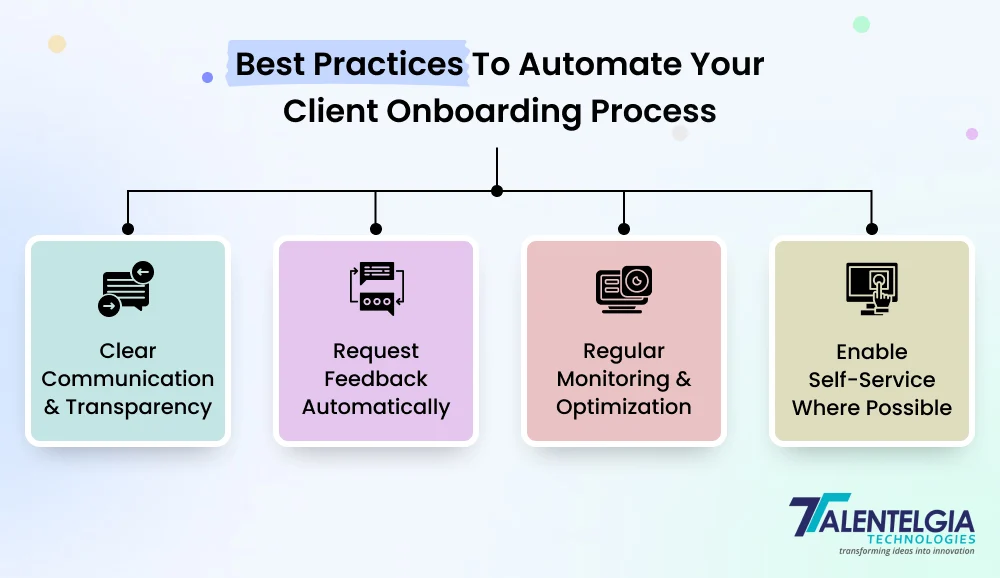
1. Clear And Transparent Communication
A well-executed client onboarding process is built on clear communication. This can be accomplished via automated emails with an unsubscribe from email option and in-app messages that clearly outline next steps, timelines, and point-of-contact information, so clients always know what to expect. They shouldn’t have to wait for someone to tell them where the updates are. This not only instills trust but also minimizes back-and-forth discussions and consequent delays.
To streamline the experience, help set up a shared “Welcome Hub” or client dashboard displaying what’s been completed, what’s open, and what’s to come. Use automation to:
- Trigger updates when tasks are completed or delayed.
- Send onboarding timelines right after sign-up.
- Introduce their onboarding manager early with contact info.
Pro Tip: A transparent onboarding workflow is not only about updates — it is about empowerment. And when clients can follow along with their progress, they have a greater sense of control and confidence around your process.
2. Enable Self-Service
Providing self-service during onboarding allows clients to act in their own time without perpetually waiting on your team. Simple procedures such as uploading KYC documents, signing contracts, or scheduling kickoff calls can all be managed via self-service portals that are intuitive. This endows clients with a sense of control, minimizes friction, and speeds up the onboarding timeline.
To make self-service truly effective, ensure the experience is guided and intuitive. You can:
- Embed video walkthroughs and contextual tooltips within your app to guide users.
- Offer a searchable, always-available knowledge base to answer common queries.
- Use smart forms that auto-fill known data, minimizing manual input.
Pro Tip: Consider your self-service portal as a product — continually test and improve the UX, and ensure your clients are never left feeling stuck.
3. Request Feedback Automatically
Instead of waiting for problems to arise, proactively ask your clients how things are going with their onboarding experience. Automated triggers allow you to send brief feedback forms over time after major events like account setup, training sessions, or project handoffs. It demonstrates to clients that you care and provides early indicators for you to course-correct.
To make the feedback process smooth and actionable:
- Keep forms short (1–3 questions max) with rating scales and an optional comment box.
- Use conditional logic to tailor questions based on their journey stage.
- Close the loop by sharing how you’ve used feedback to improve.
Pro Tip: Timing is key — send feedback requests when the experience is fresh in the client’s mind, not weeks later.
4. Regular Monitoring & Optimization
Even the best automated onboarding flow needs tuning. Regularly analyze performance metrics like drop-off points, task completion rates, and average length of onboarding to identify inefficiencies or friction points. Combine this data with client feedback for a complete picture.
Focus on continuous improvement by:
- Setting KPIs for each onboarding stage (e.g., time to first value).
- A/B testing email copy or task flows to improve engagement.
- Scheduling monthly audits to update content or workflows as your product evolves.
Pro Tip: Don’t just watch — do. Build a feedback-to-action loop so your team can iterate quickly and keep your onboarding tight and effective.
Conclusion
Client onboarding is the set-up for everything that comes next, and automating it where possible makes sure that the set-up is clear, consistent, and client-centric. Each touchpoint is a chance to add value and build trust — from setting clear expectations, to enabling self-service, to proactively collecting feedback.

Going forward, keep in mind: automation does not replace the human element — it augments it. Once you have that, your team can start to work on what matters most — building great relationships and driving results. If done correctly and equipped with the right resources, automated onboarding can turn into one of your most powerful drivers for growth, retention, and longevity.












 Write us on:
  Business queries:
  HR:
HR: 


