



 Healthcare Software Development Services
 Healthcare App Development Services
 Real Estate Web Development Services
 Real Estate App Development Company
 E-Commerce App Development Services
 E-Commerce Web Development Services
 Blockchain E-commerce Development Company
 Fintech Software Development
 Fintech App Development Services
 E-Learning App Development Services
 Restaurant App Development Company
 Mobile Game Development Company
 Travel App Development Company
 Automotive Web Design
 AI Traffic Management System
 AI Inventory Management Software
 Logistics App Development Services
 Machine Learning Development
 ChatGPT integration services
  AI Development Company
  AI Integration Services
  Natural Language Processing Company
 Mobile App Development
  IOS App Development
  Android App Development
  Cross-Platform App Development
  Augmented Reality (AR) App Development
  Virtual Reality (VR) App Development
  Web App Development
  SaaS App Development
 Custom Software Development Services
  Flutter
  React Native
  Swift (IOS)
  Kotlin (Android)
  Mean Stack Development
  AngularJS Development
  MongoDB Development
  Nodejs Development
  Database Development
 Ruby on Rails Development
 Expressjs Development
  Full Stack Development
  Web Development Services
  Laravel Development
  LAMP Development
  Custom PHP Development
  .Net Development
  User Experience Design Services
  User Interface Design Services
  Automated Testing
  Manual Testing
  Digital Marketing Services
 Ride-Sharing And Taxi Services
 Food Delivery Services
 Grocery Delivery Services
 Transportation And Logistics
 Car Wash App
 Home Services App
 ERP Development Services
 CMS Development Services
 LMS Development
 CRM Development
 DevOps Development Services
 AI Business Solutions
 AI Cloud Solutions
 AI Chatbot Development
 API Development
 Blockchain Product Development
 Cryptocurrency Wallet Development
 About Talentelgia
  Our Team
  Our Culture
 Healthcare App Development Services
 Real Estate Web Development Services
 E-Commerce App Development Services
 E-Commerce Web Development Services
 Blockchain E-commerce
Development Company
Blockchain E-commerce
Development Company Fintech App Development Services
 Blockchain Fintech
Development Company
Blockchain Fintech
Development Company E-Learning App Development Services
 Restaurant App Development Company
 Mobile Game Development Company
 Travel App Development Company
 AI Traffic Management System
 AI Inventory Management Software
 AI Development Company
 ChatGPT integration services
 AI Integration Services
 Machine Learning Development
 Machine learning consulting services
 Blockchain Development
 Blockchain Software Development
 Smart contract development company
 NFT marketplace development services
 Asset tokenization companies
 DeFi Wallet Development Company
 IOS App Development
 Android App Development
 Cross-Platform App Development
 Augmented Reality (AR) App
Development
Augmented Reality (AR) App
Development Virtual Reality (VR) App Development
 Web App Development
 Flutter
 React
Native
React
Native Swift
(IOS)
Swift
(IOS) Kotlin (Android)
 MEAN Stack Development
 AngularJS Development
 MongoDB Development
 Nodejs Development
 Database development services
 Expressjs Development
 Full Stack Development
 Web Development Services
 Laravel Development
 LAMP
Development
LAMP
Development Custom PHP Development
 User Experience Design Services
 User Interface Design Services
 Automated Testing
 Manual
Testing
Manual
Testing About Talentelgia
 Our Team
 Our Culture
Regardless of whether you’re new to development or have been around a long time, chances are good that you’ve heard people use terms like Git, GitHub, and GitLab quite intensively. They are often mentioned in the same breath, which can give the impression that all three serve similar purposes. But they don’t. Each has a specific job which, if you understand it, can make your life much easier.
In this piece, we’ll simplify matters. You’ll understand the Git vs GitLab difference, and we will also compare Git vs GitHub vs GitLab so you know how they intertwine. We’ll break down what Git itself does, how GitHub and GitLab add to it, and how these tools allow developers to collaborate better, control their code bases more safely, work faster on projects — all without getting buried in technical details.
Once you’re aware of what each tool is used for, it’ll be easier to choose the right one. Git enables you to keep track of the changes made to your code, and GitHub and GitLab provide functions for things like collaboration, automation, and security in software development workflows. If you’re not sure what the difference is in Git vs GitLab or Git vs GitHub vs GitLab, you could easily find yourself using too many tools or even just the wrong ones. Getting this right can save time, prevent fumbling, and help ensure your projects hum along smoothly, regardless of your team’s size.
What Is Git?
Git is a tool that helps developers keep track of changes in their code. Instead of saving multiple copies of files, such as final, final-2, or latest, Git stores a clear history of every change made. This makes it easy to see who changed what, when it was changed, and even go back to an older version if something breaks.
Introduction to Git as a Version Control System
Git is a version control system that tracks changes in your code over time. It works locally on your computer, so an internet connection is not required. Developers use Git to experiment with new features, fix bugs, and collaborate safely without affecting the main project.
Key Features & Basic Workflow
Some of the best things about Git are:
- Records changes per file
- It makes branches so you can work on new features safely
- Allows you to integrate what has been done back onto the trunk
- Enables you to go back to previous versions if necessary
The basic Git workflow is straightforward:
- Make changes to your code
- Commit those changes
- Create branches for new work
- Pull in changes when everything is fine and dandy
Git vs Other Version Control Systems
Git is significantly faster than the previous generation of version control tools. It doesn’t depend on a single central server, which allows you to work offline and yet maintain full control of your code. This is one of the reasons Git has become the most popular version control system today—it’s great for individual developers and large teams.
What Is GitLab?
GitLab is an application built on top of Git that helps teams store code, collaborate on the same code, and control the process of creating software quickly and easily. But, where Git itself is “just” version control, GitLab’s functionality includes tools that not only make collaboration easy, but also feature automated functionality and project tracking.
Definition and Purpose
GitLab is a web-based DevOps lifecycle tool that provides a Git repository manager, providing wiki, issue-tracking, and CI/CD pipeline features, using an open-source license. Its primary goal is to help developers plan & build software, test it, and deploy it from a single platform. Instead of a bunch of different tools for code hosting, CI/CD, and project management, GitLab evolves them all into one service.
Core Features of GitLab
GitLab offers a lot of inborn capabilities that adapt to the needs of modern development teams, which include:
- Code Git repositories to store and manage code
- Automation of tests and deployments for applications via CI/CD pipelines
- Tasks and bug tracking with issue tracking integration
- Merge requests for code review and acceptance of changes
- Tools for security and monitoring to keep your projects safe
With such features, GitLab is preferred by teams requiring an all-in-one development tool.
Hosting Options: Cloud vs Self-Hosted
GitLab provides two primary hosting options:
- Hosted by GitLab: Simple to install and perfect for remote teams who don’t want to set up their own server
- Self-Hosted GitLab: Host it on your own servers for greater control over data security and customization
This flexibility means that teams can pick what works best for their budget, security concerns, and technical deployment.
What Is GitHub?
GitHub is a widely used platform that allows developers to store their code in the cloud and collaborate with others on projects. It’s based on Git and is popular among individuals, teams, and open-source contributors who want an easy way to share their code with others.
Definition and Purpose
GitHub is a Git repository hosting service in the cloud. It exists so that developers can easily upload their Git repositories, facilitate code discussions, and conduct project management in one place. It’s best known for open-source projects and public code sharing.
Core Features of GitHub
GitHub provides some important features that make working in teams and managing code easier:
- Git repositories for code storage and collaboration
- Pull Requests for code review and discussion of code changes
- GitHub Actions for automation of tasks such as testing and deployment
- Bug and task tracking with Issues and project boards
- Access control for team permissioning
These are the tools that keep developers working well together, whether they’re distributed remotely or part of a large team.
Community and Ecosystem
One of GitHub’s primary assets is its huge community of developers. Thousands of developers collaborate, share, and learn together on GitHub. This vibrant ecosystem makes it very easy to find libraries, frameworks, tools, network, or even get help from fellow developers across the world.
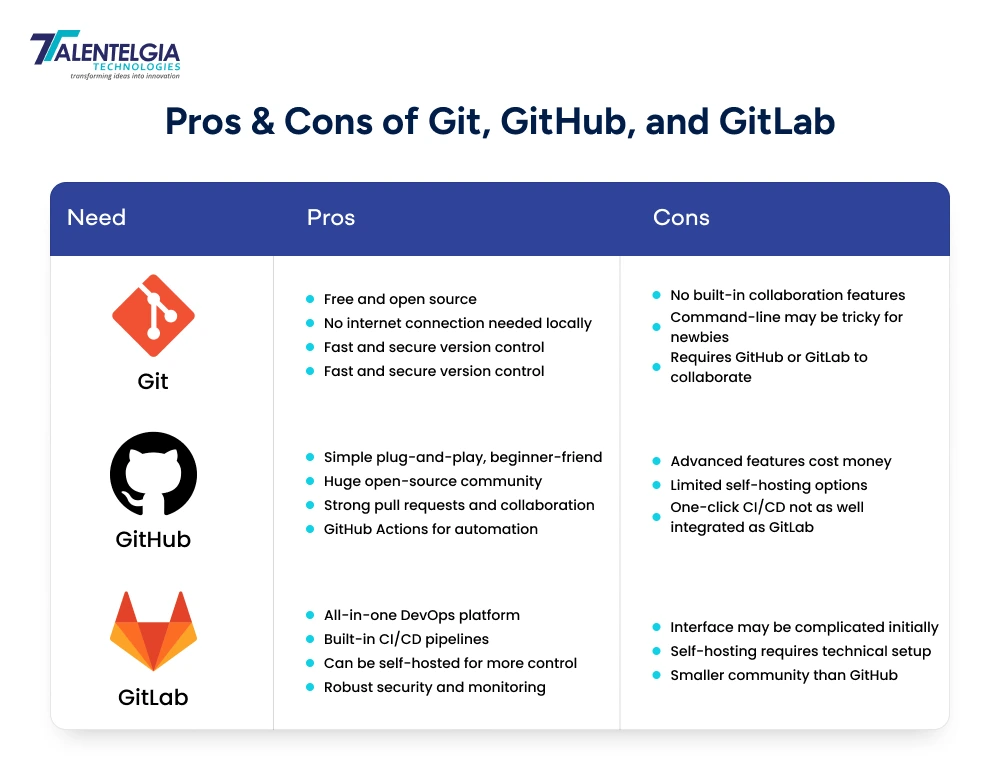
Pros & Cons of Git, GitHub, and GitLab
Before deciding which tool to use, it’s important to look at both the advantages and drawbacks of Git, GitHub, and GitLab. This comparison will make it easier to understand what each tool does best.
Git vs GitHub vs GitLab
Git, GitHub, and GitLab are commonly used together, which can be a little confusing, especially if you are new to coding. They are closely related, but they’re not the same. Git is the underlying software that tracks changes in your code; GitHub and GitLab are platforms on top of Git that make it easier for you to store your code online and work in concert with others.
Basically, Git is running the show, and GitHub/GitLab are extra bells and whistles. With Git, you can manage your code on your own system; GitHub and GitLab are designed to help with collaboration, sharing, automation, and project management. The table below provides a clear overview of the differences between Git vs GitHub, vs GitLab.
| Git | GitHub | GitLab |
| Git is a tool/software installed on your machine. It remembers the history of every change you make to your code. | GitHub is a site that helps people host their code using Git and work together. | GitLab is also a Git-based website but with more emphasis on full development lifecycle management. |
| Works offline and stores code on your machine | Requires internet and stores code on GitHub’s servers | Requires internet and stores code on GitLab’s servers or your server |
| Only version control, no collaboration tools | Provides tools for sharing, reviewing, and managing code | Tools for coding, testing, deploying, and tracking work |
| Cannot be used alone for teamwork | Enables easy teamwork with pull requests and comments | Facilitates collaboration via merge requests and inbuilt workflow |
| No automation or testing features | Some automation via GitHub Actions | Robust built-in automation and testing |
| No project management | Simple issue and task tracking | Detailed project planning and management |
| Mostly used by individuals or as a foundation tool | Widely used for open-source or team projects | Popular among companies and large teams |
| Free and open source | Free with paid plans for extra features | Free with paid enterprise plans |
Conclusion
Knowing the distinction between Git, GitHub, and GitLab helps you to decide which one will fit your requirements. Git is the underlying technology with which programmers keep track of code changes, GitHub makes it easy for developers to collaborate and share code, and GitLab essentially brings all of this together in a single platform.
- If solo or learning Git: Stick with Git
- For open-source projects or teamwork: GitHub is ideal
- For advanced features like CI/CD, project management, or self-hosting, GitLab is the way to go
FAQ
Can I use Git without GitHub or GitLab?
Yes, Git works on your computer without them.
Is GitLab open source?
Yes, GitLab Community Edition is open source.
Does GitLab provide CI/CD?
Yes, GitLab has built-in CI/CD tools.
Can GitHub be self-hosted?
Not fully, only with GitHub Enterprise Server (paid version).














 Sales Enquiries:
  Business queries:
  HR:
HR: 


