



 Healthcare App Development Services
 Real Estate Web Development Services
 E-Commerce App Development Services
 E-Commerce Web Development Services
 Blockchain E-commerce Development Company
 Fintech App Development Services
 Fintech Web Development
 Blockchain Fintech Development Company
 E-Learning App Development Services
 Restaurant App Development Company
 Mobile Game Development Company
 Travel App Development Company
 Automotive Web Design
 AI Traffic Management System
 AI Inventory Management Software
 Machine Learning Development
 ChatGPT integration services
  AI Development Company
  AI Integration Services
  Generative AI Development Services
  Natural Language Processing Company
 Mobile App Development
  IOS App Development
  Android App Development
  Cross-Platform App Development
  Augmented Reality (AR) App Development
  Virtual Reality (VR) App Development
  Web App Development
  SaaS App Development
 Flutter
  React Native
  Swift (IOS)
  Kotlin (Android)
  Mean Stack Development
  AngularJS Development
  MongoDB Development
  Nodejs Development
  Database Development
 Ruby on Rails Development
 Expressjs Development
  Full Stack Development
  Web Development Services
  Laravel Development
  LAMP Development
  Custom PHP Development
  .Net Development
  User Experience Design Services
  User Interface Design Services
  Automated Testing
  Manual Testing
  Digital Marketing Services
 Ride-Sharing And Taxi Services
 Food Delivery Services
 Grocery Delivery Services
 Transportation And Logistics
 Car Wash App
 Home Services App
 ERP Development Services
 CMS Development Services
 LMS Development
 CRM Development
 DevOps Development Services
 AI Business Solutions
 AI Cloud Solutions
 AI Chatbot Development
 API Development
 Blockchain Product Development
 Cryptocurrency Wallet Development
 About Talentelgia
  Our Team
  Our Culture
 Healthcare App Development Services
 Real Estate Web Development Services
 E-Commerce App Development Services
 E-Commerce Web Development Services
 Blockchain E-commerce
Development Company
Blockchain E-commerce
Development Company Fintech App Development Services
 Finance Web Development
 Blockchain Fintech
Development Company
Blockchain Fintech
Development Company E-Learning App Development Services
 Restaurant App Development Company
 Mobile Game Development Company
 Travel App Development Company
 Automotive Web Design
 AI Traffic Management System
 AI Inventory Management Software
 AI Development Company
 ChatGPT integration services
 AI Integration Services
 Machine Learning Development
 Machine learning consulting services
 Blockchain Development
 Blockchain Software Development
 Smart contract development company
 NFT marketplace development services
 Asset tokenization companies
 DeFi Wallet Development Company
 IOS App Development
 Android App Development
 Cross-Platform App Development
 Augmented Reality (AR) App
Development
Augmented Reality (AR) App
Development Virtual Reality (VR) App Development
 Web App Development
 Flutter
 React
Native
React
Native Swift
(IOS)
Swift
(IOS) Kotlin (Android)
 MEAN Stack Development
 AngularJS Development
 MongoDB Development
 Nodejs Development
 Database development services
 Expressjs Development
 Full Stack Development
 Web Development Services
 Laravel Development
 LAMP
Development
LAMP
Development Custom PHP Development
 User Experience Design Services
 User Interface Design Services
 Automated Testing
 Manual
Testing
Manual
Testing About Talentelgia
 Our Team
 Our Culture
![A Guide to Mobile Application Architecture - Everything You Need to Know [2026]](https://www.talentelgia.com/blog/wp-content/uploads/2025/12/mobile-app-architecture-f.webp)
There is no denying that we’re living in an app-driven economy! Mobile applications help businesses expand their customer reach and facilitate quick, hassle-free transactions. Mobile applications act like portals to perform a multitude of tasks, from socializing and communication to shopping and managing business operations. The number of apps being developed every day are staggering! As of December 2025, there are nearly 7.3 billion smartphone users, which is projected to grow to over 7.7 billion by 2028.
These mind-blowing statistics highlight one thing very clearly: we use mobile apps to interact with products and services across all industries. Thus, for businesses, having a custom mobile app is no longer a “nice to have”, but a “must-have”. In today’s fast-growing landscape of mobile app development, the question is: what distinguishes a good mobile app from a great one? The answer lies in its architecture!
An Overview of Mobile App Architecture: Major Types, Components & Benefits
A mobile application architecture design consists of many components, such as UIs, APIs, and databases, all of which must be integrated carefully. These components are organized and integrated over a cohesive set of layers, which we refer to as mobile app architecture. This architecture underpins fully supported and functional utilities of the app. It’s essential to the application processes – establishing the parameters, determining functionalities, integrating systems, and orchestrating user flows through smooth, intuitive interfaces.
What Is Mobile App Architecture?
Mobile application architecture serves as the foundational blueprint guiding the creation of an app. It defines the systematic arrangement, protocols, and interactions between critical components such as the user interface (UI), backend databases, APIs, and other services that collectively enable the app to function effectively.
Imagine this architecture as the app’s internal skeleton—it supports and shapes the app’s outward capabilities. Just like a human skeleton enables movement and coordination, a well-designed architecture empowers your app to receive input from users, process it efficiently, and respond with the appropriate output seamlessly.
While the architecture lays out the structural framework and flow, the technology stack consists of the specific tools, programming languages, and platforms chosen to build each piece. This separation helps developers plan holistically, ensuring that every element works together harmoniously, delivering a smooth, responsive mobile experience.
Why Is It Important To Have a Good Mobile App Architecture?
Mobile app architecture is extremely important for success, and its value cannot be overlooked. The following points explain all the reasons why sound architecture is essential for your mobile app:
- Enhances Modularity:
A well-designed architecture breaks the app into independent components that can be updated or modified separately without affecting the entire system. For example, adding a new payment method in an e-commerce app can be done seamlessly without disrupting other functions.
- Strengthens Security:
Robust architectures incorporate strong security measures like encryption and secure authentication to protect sensitive user data. This is crucial for apps such as banking platforms, helping build trust by preventing unauthorized access.
- Improves Reliability:
Sound architecture reduces bugs and system errors, ensuring that the app runs smoothly and consistently. A messaging app with a solid architecture will avoid frequent crashes, enhancing user satisfaction.
- Optimizes Performance and Scalability:
Efficient architectural design allows the app to handle increased user loads and growing functionality gracefully. Social media apps built with scaling in mind can support millions of concurrent users without slowing down.
- Organizes Through Layered Structure:
Dividing the app into logical layers with distinct responsibilities makes the codebase easier to maintain, test, and extend. This foundation supports building robust and scalable applications that adapt over time.
Core Layers of Mobile Application Architecture
Mobile apps aren’t just pretty screens—they’re precision-engineered systems where every layer has a specialized mission. Like a Formula 1 car, each component works in perfect harmony: sleek aerodynamics (UI), powerful engine (logic), fuel tank (data), and suspension (infrastructure). Here’s the definitive breakdown for apps that win races in 2026.
Presentation Layer
The presentation layer is the front face of your app, responsible for what users see and interact with. This includes screens, layouts, controls, animations, and transitions. Its primary goal is to provide a smooth and intuitive experience that responds promptly to user inputs.
- Key Components: UI frameworks (e.g., SwiftUI for iOS, Jetpack Compose for Android), gesture detectors, accessibility services like VoiceOver.
- Advanced Features: Lifecycle management to handle app state changes; high-refresh-rate support (120Hz) for fluid visuals; theme switches for dark mode; micro-interactions like haptics and real-time feedback.
- Importance: Delivers the app’s branding, usability, and perceived performance. Poor design here can cause user abandonment even if the backend is flawless.
Business Logic Layer
This layer embodies the core functionality and rules of the app. It processes inputs from the presentation layer and decides what actions to take, coordinating data retrieval, validation, and communication with backend services.
- Key Components: Use case implementations, validation logic for inputs, orchestration of API calls, state management solutions like Redux or the MVVM pattern.
- Advanced Features: Clean Architecture & Domain-Driven Design for scalability, Reactive programming enabling real-time UI updates, Offline action queuing and optimistic UI updates
- Importance: Ensures that business objectives translate into consistent, accurate application behaviour. Errors or bottlenecks here affect entire user flows and credibility.
Data Layer
Responsible for reading, writing, caching, and syncing data, the data layer acts as the app’s memory. It manages local storage (SQLite, Realm), remote APIs (REST, GraphQL), and cache layers.
- Key Components: Local databases (SQLite, Realm, Hive), API clients (REST, GraphQL, gRPC), Caching systems (Redis, memory caches, service workers), Synchronization engines supporting conflict resolution (CRDTs)
- Advanced Features: Offline-first capabilities for seamless usage without connectivity, Delta sync to optimize data transfers, Real-time data sync with backend services, Data encryption at rest and in transit
- Importance: Delivers speed and reliability, crucial for user experience and business continuity. Handles the heavy lifting of data integrity and availability across network conditions.
Types of Mobile Application Architecture
Mobile app architecture isn’t one-size-fits-all—it’s strategic chess where each pattern plays to different strengths. From monolithic simplicity to microservices mastery, here’s your 2026 playbook for building apps that scale, perform, and survive.
1. Monolithic Architecture
This architecture bundles all app components—user interface, business logic, data management—into a single unified codebase and deploys it as one package. It’s like a well-built castle: solid and self-contained.
- Ideal for: Minimum Viable Products (MVPs), prototypes, and apps with limited complexity or small teams.
- Pros: Fast initial development, simple debugging, and straightforward deployment since everything lives under one roof.
2. Microservices Architecture
Microservices architecture disintegrates the app into smaller, self-contained services that communicate over APIs. Each service handles a distinct function, like authentication or notifications.
- Ideal for: Large-scale apps, enterprise setups, teams with 20+ developers handling complex, rapidly evolving features.
- Pros: Independent scaling and deployment of services, technology stack flexibility, and fault isolation that limits system-wide failures.
3. Layered Architecture
Layered architectures impose strict separation, with clear boundaries between UI, business logic, data access, and external systems. Data and control flow through these layers sequentially, ensuring separation of concerns.
- Ideal for: Enterprise applications requiring structured, maintainable, and testable codebases.
- Pros: Modular development, easy to test and maintain, allows framework/tool replacement in individual layers.
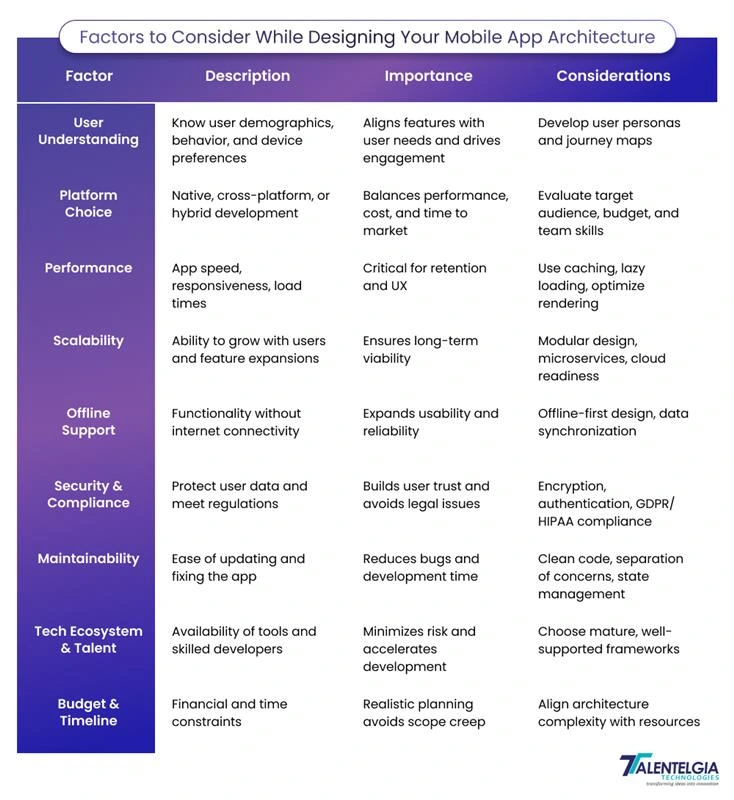
Factors to Consider While Designing Your Mobile App Architecture
Designing effective mobile app architecture requires thoughtful consideration of multiple factors that influence performance, maintainability, scalability, and user satisfaction. As you plan your app’s structural blueprint, it’s also important to understand how these decisions can impact the overall Cost To Design a Mobile App? These are the essential elements to keep in mind as you move forward:
Top Mobile App Architecture Design Patterns: MVC, MVP, MVVM
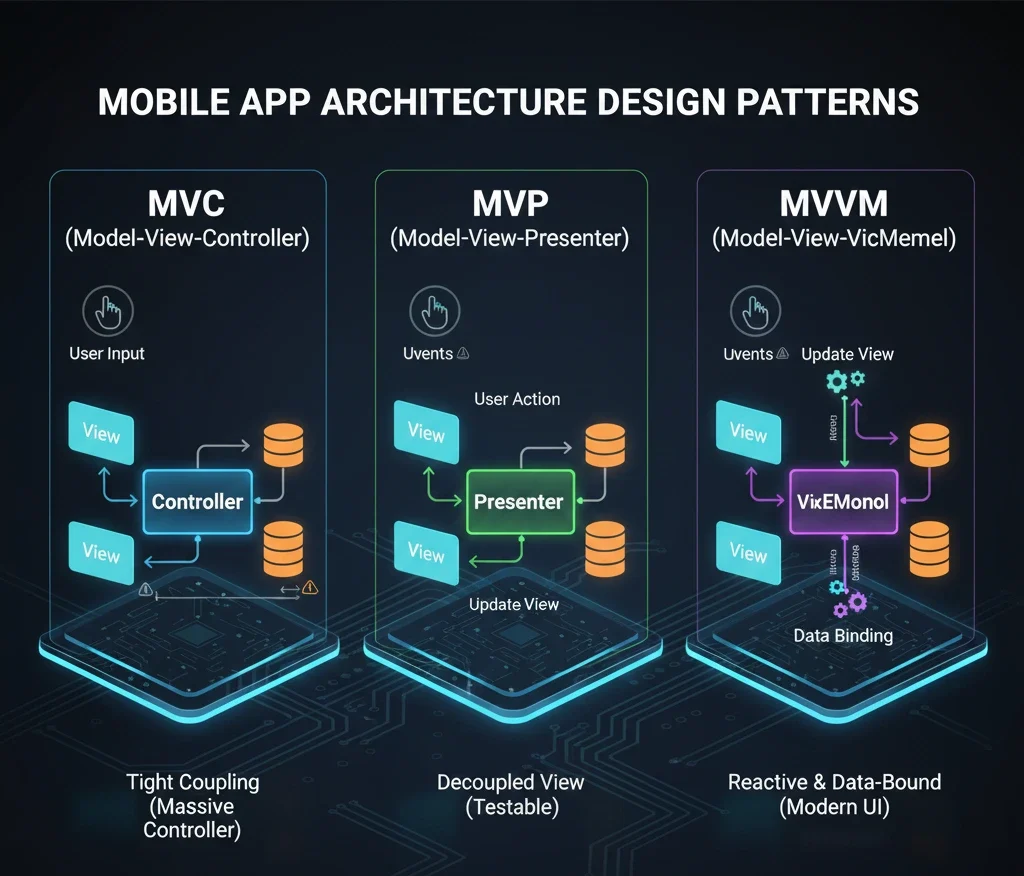
There are several types of architecture; however, the most common ones that are followed in the industry are Model-View-Controller (MVC), Model-View-Presenter (MVP), and Model-View-ViewModel (MVVM) patterns. These design styles are used to alleviate the challenges posed by having complex code and also refine the user interface code to a more structured, organized, and controllable state. The MV(X) designs separate the visualization, processing, and data handling units of a user interface application.
As a result, they enhance the modularity, flexibility, and testability of an application. Now we will analyze the models more in depth and see in which areas they differ.
- Model View Controller (MVC)
MVC establishes the original separation of concerns paradigm, dividing responsibilities across three interconnected components. The Model encapsulates data structures, persistence logic, and business rules, serving as the single source of truth independent of presentation. The View renders UI elements and captures user interactions, remaining stateless and display-focused. The Controller mediates between Model and View, processing input events, invoking Model operations, and directing View updates.
This centralizes coordination but often results in Controllers accumulating excessive responsibilities (“Massive View Controller” anti-pattern), complicating unit testing and maintenance. MVC remains suitable for small-scale applications but scales poorly beyond moderate complexity due to tight coupling.
- Model-View-Presenter (MVP)
MVP refines MVC by replacing the Controller with a Presenter, enforcing stricter decoupling through explicit interfaces. The Model retains its domain-centric role, managing data and operations. The View adopts a passive contract-based interface, exposing methods like showLoading(), showError(), and forwarding events without internal logic. The Presenter implements comprehensive coordination: it subscribes to View callbacks, orchestrates Model interactions, transforms data, and issues imperative View commands.
This architecture excels in testability—Presenters can be mocked and verified in isolation without UI dependencies—but incurs boilerplate overhead from manual View state management. MVP suits legacy Android Fragment-based apps and environments prioritizing explicit control flows.
- Model-View-ViewModel (MVVM)
MVVM leverages declarative data binding and observable state to minimize imperative coordination, positioning the ViewModel as a UI-agnostic data orchestrator. The Model preserves pure domain logic and entities. The View declaratively binds to ViewModel-exposed observables (LiveData, StateFlow, @Published), automatically reflecting state changes without manual intervention.
The ViewModel aggregates Model data, applies transformations, manages loading/error states, and handles user events through reactive streams or coroutines. Dependency injection enhances modularity, while shared ViewModels enable cross-screen state sharing. MVVM dominates 2026 development with Jetpack Compose, SwiftUI, and Flutter due to reduced boilerplate, inherent testability, and seamless integration with reactive UI paradigms.
Key Examples of Modern Mobile App Architectures
There are some existing designs for system architecture for mobile apps, different platforms and operating systems, and these system architectures differ based on the type of users or platforms you wish to target.
For instance, the architecture in Android and iOS apps differs in some ways. An Android application usually comprises of several app components such as activities, fragments, content providers, and services. The app also requires a manifest file in which all these elements are contained.
On the other hand, iOS apps are contained in the IPA container, also known as the Bundle directory, where all the data for the app are compressed and packed. Here are the most popular architectures of mobile apps designed for specific platforms:
| Aspect / Architecture | Android (Jetpack + MVVM) | iOS (SwiftUI + MVVM) | Hybrid / Cross‑Platform (Flutter / React Native) | Enterprise Mobile (Clean + Microservices) |
| Primary tech stack | Jetpack Compose, ViewModel, LiveData/Flow, Room, Retrofit, Hilt | SwiftUI, ViewModel (ObservableObject), SwiftData/Core Data, Combine/async-await | Flutter + Dart or React Native + JS/TS, BLoC/Riverpod/Redux, REST/GraphQL | Native clients (Android/iOS) + MVVM, Clean Architecture, REST/GraphQL/gRPC backend |
| UI layer | Declarative UI with Compose, lifecycle-aware, state-driven rendering | Declarative SwiftUI views bound to observable state | Flutter widgets or RN native components, single shared UI codebase | Multiple native or shared UIs, often with micro-frontends per feature |
| State & business logic | MVVM: ViewModel handles screen logic, uses cases and repositories for domain rules | MVVM: ViewModel exposes @Published/@StateObject, encapsulates business logic | Centralized state (BLoC/Redux) or MVVM-style view models shared across platforms | Clean Architecture: use cases, domain layer, shared business rules across multiple apps |
| Data & networking | Room/SQLite for local, Retrofit/OkHttp for remote APIs, offline caching | SwiftData/Core Data for local, URLSession/Alamofire for APIs, secure persistence | Local DBs (Hive/SQLite/Realm) plus Dio/Axios/fetch clients, sync layer for both OSes | Repository pattern over multiple services (auth, billing, content), API gateway, caching tiers |
| Security & auth | BiometricPrompt, encrypted storage, OAuth2/OIDC, cert pinning appinventiv | Keychain, Face ID/Touch ID, App Attest, secure networking | Uses platform security (Keychain/Keystore) plus shared auth flows, token storage | Zero‑trust: SSO (Okta/Auth0), device attestation, strict API policies and compliance controls |
| Scalability & evolution | Scales via modularization, feature modules, versioned APIs | Scales via modules, Swift Packages, layered project structure | Scales with shared core + platform-specific modules, good for product lines | Designed for large teams, multi-tenant, microservices, feature flags, A/B testing and observability |
| Key benefits | Strong Android UX, great performance, deep Google ecosystem integration | Premium native UX, tight OS integration, energy efficiency | Faster time-to-market, shared code, lower cost, acceptable performance | High reliability, compliance-ready, easy parallel development, long-term maintainability |
1. Android Mobile App Architecture (Jetpack + MVVM)
Android apps increasingly follow a Jetpack + MVVM-based architecture, where Jetpack Compose handles the UI, ViewModels manage screen state, and Room plus Retrofit provide robust data and networking layers. This setup results in reactive, lifecycle-aware interfaces that automatically recompute when state changes, reducing UI bugs and boilerplate. Combined with coroutines and Flow, Android architectures can handle concurrency and background work cleanly, making apps more responsive, testable, and maintainable over time.
Main Components:
- UI Layer: Jetpack Compose (declarative UI)
- ViewModels: StateFlow/LiveData (reactive state)
- Data Layer: Room Database + Retrofit (REST/GraphQL)
- Dependency Injection: Hilt/Dagger
- Networking: OkHttp + WorkManager (background tasks)
- Navigation: Navigation Component
Key Benefits:
- Native Performance: Direct GPU acceleration, 120Hz support
- Reactive UI: Compose recomposes only changed parts
- Lifecycle Safety: Coroutines prevent memory leaks
- Offline-First: Room + WorkManager sync seamlessly
- Google Ecosystem: Firebase integration out-of-box
2. iOS Mobile App Architecture (SwiftUI + Combine)
Modern iOS apps typically adopt SwiftUI with MVVM, backed by SwiftData/Core Data and Combine or async/await for reactive behavior. The UI layer is declarative, meaning developers describe what the interface should look like for a given state, while ViewModels expose observable properties that drive that UI. This architecture minimizes glue code, improves type safety, and integrates deeply with Apple’s ecosystem (widgets, Live Activities, on-device ML), resulting in smooth, energy-efficient, and highly polished applications.
Main Components:
- UI Layer: SwiftUI (declarative, reactive)
- ViewModels: @Observable/@StateObject
- Data Layer: SwiftData/Core Data + URLSession/Alamofire
- Async Handling: async/await + Actors
- Dependency Injection: Swinject/The Composable Architecture (TCA)
- Navigation: NavigationStack
Key Benefits:
- Apple Silicon Optimized: Metal GPU acceleration
- Type Safety: Swift’s compile-time guarantees
- Modern Concurrency: async/await eliminates callback hell
- WidgetKit Integration: Live Activities, Dynamic Island
- Privacy-First: App Intents, on-device ML
3. Hybrid/Cross-Platform Architectures
Hybrid architectures, especially those using Flutter or React Native, center around a shared presentation and business logic layer that targets multiple platforms from a single codebase. In Flutter, the UI is rendered via its own engine and managed with patterns like BLoC or Riverpod, while React Native relies on native components and state managers like Redux or Zustand. These approaches reduce development time and lower the overall cost to develop mobile app solutions by maximizing code reuse, while still allowing platform-specific modules where deep native integration or performance tuning is required.
Flutter Architecture:
- UI: Skia CanvasKit (custom rendering engine)
- State: Riverpod/BLoC (reactive)
- Data: Hive/Drift + Dio (networking)
- Platform Channels: Native extensions
React Architecture:
- UI: Native components (Yoga layout)
- State: Redux Toolkit/Zustand
- Data: Realm + Axios/Fetch
- New Architecture: Fabric + TurboModules
Key Benefits:
- 1 codebase → iOS + Android (60-70% code reuse)
- Hot Reload (1s changes)
- Native Performance (Flutter CanvasKit)
- Massive Ecosystem (plugins, community)
- Lower Cost (2x-3x vs native) [web:502][web:513]
4. Enterprise Mobile App Architecture
Enterprise architectures usually combine Clean Architecture principles on the client with microservices or modular backends, emphasizing clear separation between presentation, domain, and data layers. Mobile clients often use MVVM or similar patterns, talking to backend services through REST, GraphQL, or gRPC, with strong concerns for authentication, observability, and offline robustness. This design enables large teams to work in parallel, supports strict security and compliance requirements, and allows enterprises to roll out features, A/B tests, and tenant-specific customizations without destabilizing the core system.
Main Components:
- Domain Layer: Pure business logic (Kotlin/Swift)
- Data Layer: Repository Pattern + Multiple Sources
- Presentation: MVVM + Micro-frontends
- Backend: GraphQL Federation + gRPC
- Infra: Okta Auth0 + Sentry + Firebase
- CI/CD: Fastlane + GitHub Actions
Key Benefits:
- Team Scale: 20+ devs work independently
- Zero-Downtime: Canary releases, feature flags
- Compliance: SOC2, HIPAA, GDPR ready
- Multi-Tenant: Single codebase, multiple clients
- Observability: Distributed tracing, SLO monitoring
How To Choose The Right Mobile Application Architecture?
Making the right choice while choosing a mobile application architecture is crucial for the user experience, system performance, and overall success of the app. Mobile apps have specific enterprise requirements and involve finding the right architecture and the right mix of client-server communication and offline support, an appropriate method and components, and managing the complexity of switching to microservices.
To better inform and mitigate the risk of the selection process and mobile app enterprise architecture, you should consider an industry architecture expert to help in implementing mobile app enterprise architecture, ensuring the right choice is made.
Conclusion
In conclusion, architecture is the heartbeat of a mobile application, driving the functionality and features of the app. Due to the significance of this field, getting help from a Mobile Application Development Company like Talentelgia and equipping applications with the right architectures is a critical step towards potentially limitless use cases.
Working with certified experts gives companies the ability to access skills, in-depth knowledge, and next-generation digital capabilities, helping companies to grow and stand out in their area of competition.

So, are you prepared to develop the next big thing for your mobile applications? Get in touch with us Today!













 Sales Enquiries:
  Business queries:
  HR:
HR: 


