



 Healthcare Software Development Services
 Healthcare App Development Services
 Real Estate Web Development Services
 Real Estate App Development Company
 E-Commerce App Development Services
 E-Commerce Web Development Services
 Blockchain E-commerce Development Company
 Fintech Software Development
 Fintech App Development Services
 E-Learning App Development Services
 Restaurant App Development Company
 Mobile Game Development Company
 Travel App Development Company
 Automotive Web Design
 AI Traffic Management System
 AI Inventory Management Software
 Logistics App Development Services
 Machine Learning Development
 ChatGPT integration services
  AI Development Company
  AI Integration Services
  Natural Language Processing Company
 Mobile App Development
  IOS App Development
  Android App Development
  Cross-Platform App Development
  Augmented Reality (AR) App Development
  Virtual Reality (VR) App Development
  Web App Development
  SaaS App Development
 Custom Software Development Services
  Flutter
  React Native
  Swift (IOS)
  Kotlin (Android)
  Mean Stack Development
  AngularJS Development
  MongoDB Development
  Nodejs Development
  Database Development
 Ruby on Rails Development
 Expressjs Development
  Full Stack Development
  Web Development Services
  Laravel Development
  LAMP Development
  Custom PHP Development
  .Net Development
  User Experience Design Services
  User Interface Design Services
  Automated Testing
  Manual Testing
  Digital Marketing Services
 Ride-Sharing And Taxi Services
 Food Delivery Services
 Grocery Delivery Services
 Transportation And Logistics
 Car Wash App
 Home Services App
 ERP Development Services
 CMS Development Services
 LMS Development
 CRM Development
 DevOps Development Services
 AI Business Solutions
 AI Cloud Solutions
 AI Chatbot Development
 API Development
 Blockchain Product Development
 Cryptocurrency Wallet Development
 About Talentelgia
  Our Team
  Our Culture
 Healthcare App Development Services
 Real Estate Web Development Services
 E-Commerce App Development Services
 E-Commerce Web Development Services
 Blockchain E-commerce
Development Company
Blockchain E-commerce
Development Company Fintech App Development Services
 Blockchain Fintech
Development Company
Blockchain Fintech
Development Company E-Learning App Development Services
 Restaurant App Development Company
 Mobile Game Development Company
 Travel App Development Company
 AI Traffic Management System
 AI Inventory Management Software
 AI Development Company
 ChatGPT integration services
 AI Integration Services
 Machine Learning Development
 Machine learning consulting services
 Blockchain Development
 Blockchain Software Development
 Smart contract development company
 NFT marketplace development services
 Asset tokenization companies
 DeFi Wallet Development Company
 IOS App Development
 Android App Development
 Cross-Platform App Development
 Augmented Reality (AR) App
Development
Augmented Reality (AR) App
Development Virtual Reality (VR) App Development
 Web App Development
 Flutter
 React
Native
React
Native Swift
(IOS)
Swift
(IOS) Kotlin (Android)
 MEAN Stack Development
 AngularJS Development
 MongoDB Development
 Nodejs Development
 Database development services
 Expressjs Development
 Full Stack Development
 Web Development Services
 Laravel Development
 LAMP
Development
LAMP
Development Custom PHP Development
 User Experience Design Services
 User Interface Design Services
 Automated Testing
 Manual
Testing
Manual
Testing About Talentelgia
 Our Team
 Our Culture
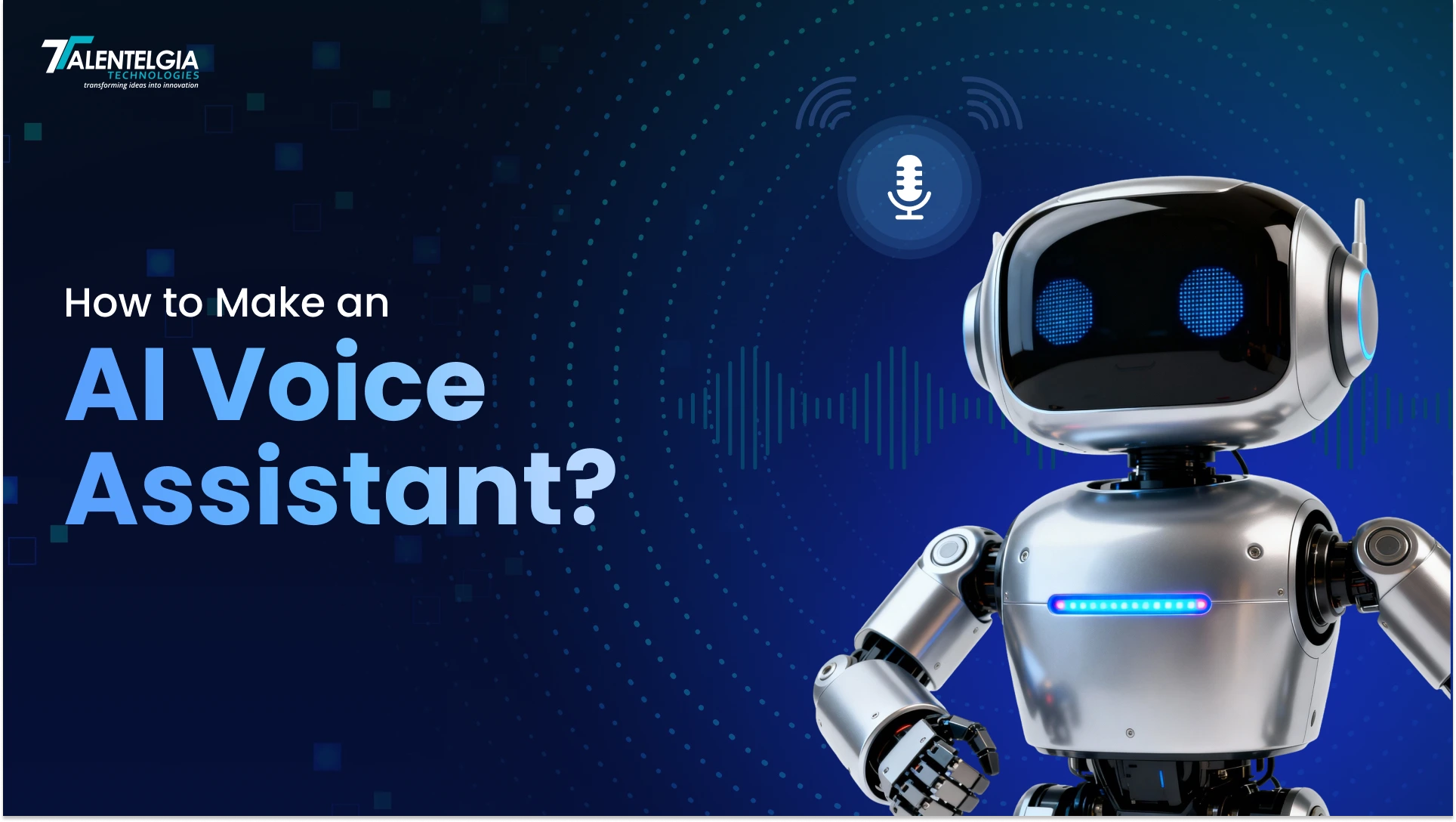
All assistants, or virtual assistants, are programmed to follow your commands and answer your questions to help you with whatever you may need. They have revolutionised the way we use and communicate with technology. They can manage your schedule to help you answer complex questions. Some of the most widely used AI assistants include Siri, Google Assistant, Amazon Alexa, and ChatGPT — powerful outcomes of continuous AI development. Artificial Intelligence voice assistants have become a significant part of the workforce and everyday life.
As per a report from Statista, there are currently over 8.4 billion active AI-powered voice assistants in use globally, which is equivalent to more than 1 voice-controlled AI assistant for every person on the planet. Additionally, Gartner research shows that nearly 75% of the software developers in large organisations are influenced to use a generative AI code assistant for their projects. Getting a custom voice assistant brings several benefits, such as enabling functional specialisation, improving data privacy, and cost-efficiency. Thus, this technology is usually used for better efficiency and convenience, especially for business applications.
In this guide, we will walk you through the process of how to create an AI assistant, providing you with all the resources necessary for both home and workplace applications.
Understanding AI Voice Assistants: Types and Components
AI voice Assistants are sophisticated systems that facilitate the use of voice commands and process voice command inputs with AI-driven text-to-speech technology. They differ from ‘Chatbots’ that only process text as they’re capable of using Natural Language Processing (NLP) that converts voice inputs to text, interprets what the user wants, and gives real-time, natural-sounding responses while executing other tasks.
They continuously learn from user interactions to become more personalized and helpful to the individual. Voice assistants are not only used in smart devices, but they’re also incorporated in business settings as part of AI in Business, integrated with IVR systems that provide customer service automation, smart call routing, and reduced downtime without any human labor. Voice assistants enhance navigation and are capable of performing many tasks simultaneously, and as a result, they improve accessibility, operational efficiency, and user satisfaction across all sectors.
Most Popular Types of AI Voice Assistants
AI-based voice assistants are applications that employ Generative Artificial Intelligence, or “Gen AI”, Machine Learning (ML), and Natural Language Processing (NLP) to understand and respond to requests. Whether it is setting an alarm or ordering food, voice assistants have different applications in daily life and are built to different levels of complexity.
This brings to our attention the most popular examples of AI assistants:
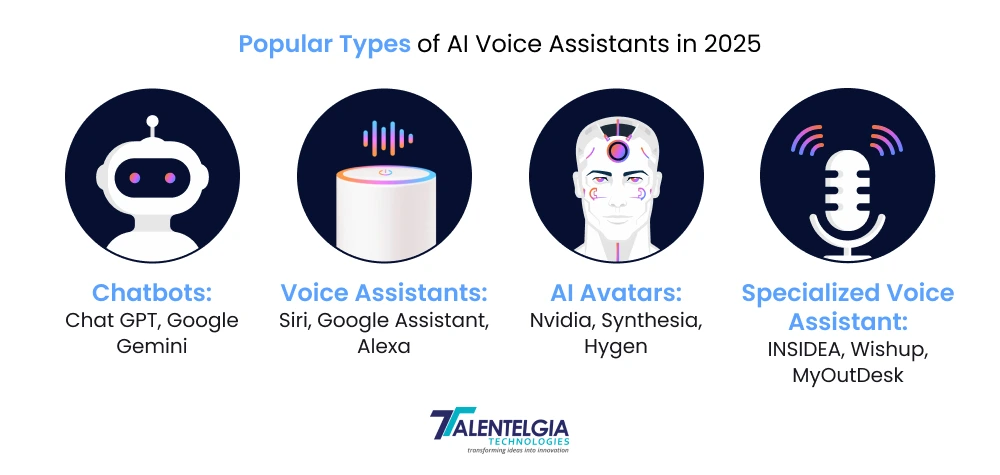
1. Chatbots
Chatbots are text-driven conversational engines that tackle user queries through messaging windows or web chats. These AI tools are the superstars of customer service, automating routine questions, guiding purchases, and delivering nonstop support to enhance user experiences.
- Key Features: 24/7 availability, multi-platform deployment (ChatGPT, Google Gemini, Deepseek)
- Use Cases: FAQ handling, lead capture, process walkthroughs
2. Voice Assistants
Audio-first dynamos like Siri, Google Assistant, and Alexa that spring to life on voice triggers. They juggle tasks from weather checks and music blasts to reminder sets and smart home commands—all hands-free.
- Key Features: Natural speech flow, device syncing, contextual smarts
- Use Cases: Daily scheduling, entertainment control, navigation aid
3. AI Avatars
AI avatars are vivid digital characters blending voice with animated visuals for captivating, lifelike encounters. They pop up in apps, sites, and virtual worlds, making interactions feel personal and immersive. For example, Nvidia, Synthesia, HyGen
- Key Features: Lip-sync precision, emotional gestures, multi-language video
- Use Cases: Gaming companions, support reps, training simulations
4. Specialized Virtual Assistants
Specialized virtual assistants are built to assist in specific fields or duties. For example, in the healthcare industry, virtual assistants help with medical diagnosis, whereas in finance, they help in managing finance portfolios. They are designed to have expertise in a specific domain.
Various types of AI assistants, including AI call assistant solutions, are built to accomplish specific tasks and are customized to suit different users, interactions, and environments. For example: INSIDEA, Wishup, MyOutDesk
- Key Features: Industry jargon fluency, compliance safeguards (HIPAA/GDPR), predictive insights
- Use Cases: Medical triage, financial planning, HR automation
Read More: What Is The Best AI Right Now?
Core Technical Components to Build AI Voice Assistants
Developing an AI voice assistant successfully requires using an advanced set of tools and technologies. These core components in a system work together to capture voice commands, analyse data, and provide seamless voice interactions. Let us look at the invaluable technologies behind voice-enabled AI and how they profoundly enhance the user experience:
- Automatic Speech Recognition (ASR): Converts spoken words into text, handling accents, background noise, and rapid speech patterns with 95%+ accuracy in modern systems.
- Natural Language Understanding (NLU): Deciphers user intent behind words—”Book a flight” becomes “flight_booking” intent with extracted entities like date and destination.
- Dialogue Management: Orchestrates multi-turn conversations, maintaining context across interactions like “What’s the weather?” followed by “And tomorrow?”
- Natural Language Generation (NLG): Crafts human-like responses from structured data, ensuring natural flow and personality.
- Text-to-Speech (TTS) Synthesis: Transforms text responses into lifelike speech with customizable voices, emotions, and regional accents.
How To Create an AI Voice Assistant from Scratch: Step-by-Step Guide
Even though building an AI voice assistant that functions properly may seem easy to do, but in reality, it is pretty complex. Below the straightforward chat interface lie multiple complex processes, and fixing them requires multiple technical skills to solve. Furthermore, you need to consider multiple factors like security, compliance, scalability, adaptability, and more.
The image below shows the steps in our workflow to create a virtual custom voice assistant:
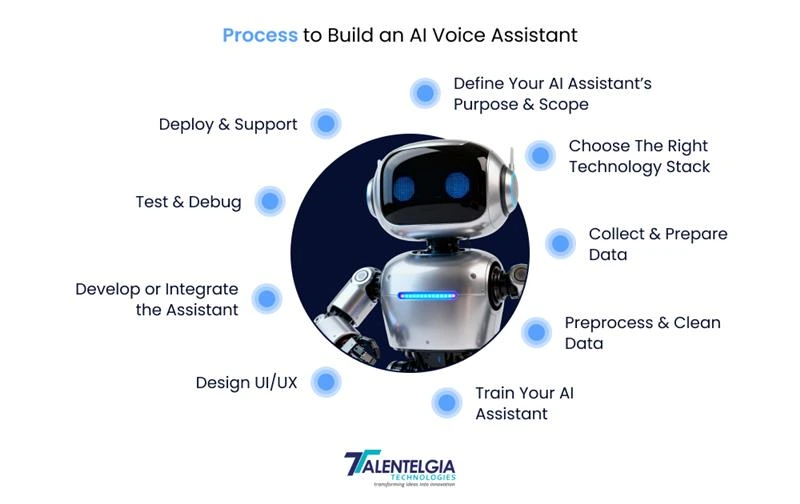
1. Define Your AI Assistant’s Purpose & Scope
Before you dive into coding, solidify what your assistant aims to achieve. Whether managing schedules, answering customer queries, or controlling home devices, specify 3-5 core functionalities to target initially. This focus streamlines development and ensures measurable impact. Develop detailed user scenarios to guide feature design and anticipate challenges early.
- Identify the primary tasks your assistant will handle
- Define target users and their specific needs
- Set measurable success criteria such as response accuracy and latency
- Map user journeys for each core function
2. Choose the Right Technology Stack
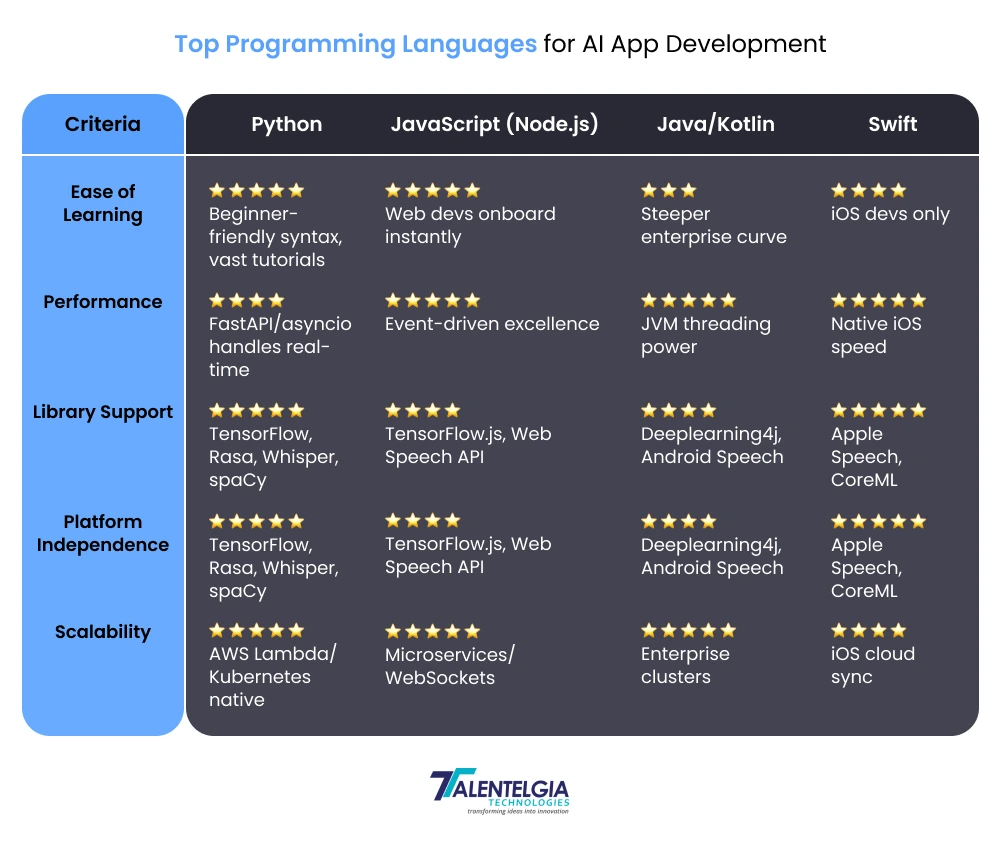
Pick technologies that balance power, flexibility, and ease of integration. While exploring Top AI Frameworks & Libraries, you can look into popular choices like Google Speech-to-Text or Whisper for speech recognition, Rasa or Dialogflow for natural language understanding, and ElevenLabs or Amazon Polly for text-to-speech. Backend frameworks like Flask or Node.js, paired with scalable cloud providers such as AWS or Google Cloud, ensure robustness and future growth capabilities.
- Select ASR engines supporting your programming language needs and privacy constraints
- Choose an NLU framework that matches your customisation and control requirements
- Decide on TTS technologies offering natural, customizable voices
- Plan backend infrastructure with scalability in mind
3. Collect and Prepare Data
High-quality data is the fuel for your AI’s understanding. Gather diverse audio samples representing varied accents, environments, and speaker demographics. Pair these with structured textual transcripts covering expected commands and queries. Label intents and entities meticulously to train models for accurate context recognition.
- Use crowdsourcing platforms or create your own recordings for diversity
- Build a comprehensive library of voice commands and corresponding intents
- Annotate datasets for training with precise entity extraction
- Ensure data privacy compliance and obtain necessary consents
4. Preprocess and Clean Data
Raw data often contains noise, errors, and irrelevant content. Normalize audio levels, trim silent segments, and filter background sounds to enhance speech clarity. Clean text data by correcting typos, removing duplicates, and standardizing formats through tokenization and normalization. Structured, clean datasets significantly improve model training outcomes.
- Normalize audio volume and remove background noise using specialized tools
- Segment audio clips precisely for clear utterance boundaries
- Apply text lemmatization and standardisation
- Split the data into training, validation, and test sets evenly
5. Train Your AI Assistant
Apply machine learning to teach your assistant how to interpret speech and context. Train intent classification and entity extraction models using platforms like TensorFlow or PyTorch. Use neural ASR models, supplemented with domain-specific fine-tuning. Continuously update models with fresh data from real-world interactions to enhance accuracy and responsiveness.
- Train intent recognition with thousands of labelled examples
- Fine-tune speech models on domain-specific vocabulary
- Develop context-aware dialogue management for multi-turn conversations
- Implement continuous learning pipelines for ongoing improvement
6. Design the UI/UX
Create an engaging voice interface that feels natural and intuitive. Use visual cues like pulsing mic icons or sound waves to indicate listening status, and provide clear feedback and error messages. Ensure accessibility through options like dark mode and text alternatives. Combine voice input with touch interaction for flexible user experiences, and consider exploring How to Use AI for UX Research Tools? to better understand user behaviour and continuously improve the overall design.
- Design for multimodal interactions (voice + touch)
- Provide real-time feedback during voice capture
- Make error handling conversational to maintain trust
- Conduct usability testing with diverse user groups
7. Develop or Integrate the Assistant
Assemble the AI pipeline from capture to response:
- Capture voice input and trigger wake words
- Process audio with ASR to text
- Pass text to NLU for intent detection
- Execute actions by invoking APIs or business logic
- Generate responses with TTS to voice. Combine with existing platforms, or build a standalone app using Flutter or React Native for cross-platform reach. Containerize your app with Docker for smooth deployment and scaling.
8. Test and Debug
Test rigorously across multiple dimensions: accuracy of speech recognition, effectiveness of intent detection, response correctness, and overall user flow. Load test to ensure the system performs under stress. Use beta groups for real-world feedback and fix issues such as misinterpretation or latency. Enhance security by verifying data protection compliance and preventing voice spoofing.
- Perform unit, integration, and user acceptance tests
- Simulate various noise environments and accents
- Use performance tools to benchmark latency and throughput
- Iterate based on user feedback and test results
9. Deploy and Support
Roll out your assistant carefully, choosing cloud services optimized for low latency and high availability. Prepare app store listings with compelling descriptions and ratings management strategies. Monitor usage with analytics dashboards for engagement, error rates, and growth. Continuously update your assistant with new features and improvements, adapting to user preferences and emerging trends.
- Deploy backend services to scalable cloud platforms
- Track critical KPIs and real-time logs for proactive alerts
- Implement over-the-air updates for seamless feature releases
- Maintain a responsive support channel for user issues
Conclusion
By developing AI-controlled voice assistants, businesses are able to enhance customer interaction and reduce manual work. The ideal solution is the result of a careful mix of modern technologies, innovate design, and ongoing improvement to provide value and adapt to a changing environment.

Companies that want to integrate ChatGPT or any custom AI assistants with flexibility, scalability, and contextual awareness into their work ecosystem can contact Talentelgia Technologies. We provide a seamless solution to complex use cases through the application of mixed technology and advanced LLMs










 Sales Enquiries:
  Business queries:
  HR:
HR: 


